
 EffectiveMods · 1.18 – 1.21
Fabric client-side mod designed to improve Minecraft's ambience through particles, visual effects and sounds
Kostenlos3,377,346 Downloads

Adding many new subtle details through particles and a few sounds


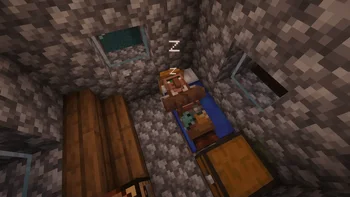
Adding many new subtle details through particles and a few sounds
Subtle Effects (Ressource) stammt von MincraftEinstein. Unterstützt wird Minecraft 1.20 – 26.x. Auf Modrinth gibt es 12,815,215 Downloads. Das letzte Update erschien am 14.10.2026.
Subtle Effects hat seit 03.10.2024 206 Versionen auf Modrinth veröffentlicht. 70 davon erschienen im letzten Jahr. Die neueste ist 1.15.1-hotfix.1, erschienen am 13.10.2026. Sie ist für Minecraft 1.20.1 gemacht. Sie läuft auf Forge. Der Download ist 3.5 MB groß.
| Version | Veröffentlicht | Minecraft | Typ |
|---|---|---|---|
1.15.1-hotfix.1 | 13.10.2026 | 1.20.1 | Release |
1.15.1-hotfix.1 | 13.10.2026 | 1.20.1 | Release |
1.15.1-hotfix.1 | 12.10.2026 | 26.3 | Release |
1.15.1-hotfix.1 | 12.10.2026 | 26.3 | Release |
1.15.1 | 12.10.2026 | 26.3 | Release |
Adding many new subtle details through particles and a few sounds. All of which can be toggled, and some can be further customized. The mod also comes with built-in particle culling and a particle render distance. This mod was designed to be mainly client-sided, but there are a few features that require server access to work, see the FAQ for more details.
✨ Some Key Features
A full list of features can be found on the wiki.
Requires Fzzy Config.
📜 Terms of Use
You may
✅ Use this mod as a reference to understand and or create something of your own, as long as it is not a copy or recreation
✅ Use this mod in modpacks with credit and one or more links to any of the project pages*
✅ Edit for personal use
✅ Use this mod for/in YouTube videos or streams with credit and one or more links to any of the project pages*
✅ Create resource packs, data packs, and addon mods for this mod
You may not
❌ Reupload/publish this mod to any website without explicit permission from me and one or more links
to any of the project pages*
❌ Redistribute edited or unedited assets** from this mod without permission from me and credit
\* Project pages include CurseForge, Modrinth, Planet Minecraft, GitHub
\** Assets include logos, banners, textures, models, etc
[](ko-fi.com/mincrafteinstein)
Q: Can {XYZ} feature be disabled?
A: Yes, all features can be disabled in the config menu. If you find that a feature/change cannot be disabled, please report it as a bug
Q: How to disable Dust Clouds?
A: The configs for dust clouds are located in the Entities/Dust Clouds config section
Q: How to disable dropped item particles?
A: The configs for dropped item particles are located in the Items/Item Rarity config section and can be disabled by changing Particle Display Type to OFF
Q: Will you support Forge?
A: Absolutely not, Forge 1.20.1 is the only version I will support Forge on.
Q: What game environment does the mod run in?
A: The mod was designed to run client side, however, some extra features and details only work if the mod is also installed on the server. If installed on the server, all clients, including those running on LAN servers, will need the mod installed to join. For a list of features that require server access, visit the [wiki]().
Note: Forge 1.20.1 does NOT support the mod running client side only.
Q: Does this mod work with Fancy Block Particles, Particle Core, Visuality, Effective,
Effectual, or Particular?
A: Yes
Q: Do you take suggestions/feature requests?
A: Yes, suggestions and feedback in general are much appreciated. You can provide feedback/suggestions in a GitHub issue, the CurseForge comments, or on my Discord Server. Please keep your suggestions somewhat Minecraft-y, e.g.
Q: The mod isn't working/no particles are appearing.
A: Check your Video Settings to make sure that the Particles setting is not set to minimal
Q: Will you support Forge beyond 1.20.1?
A: Absolutely not
Feel free to translate this mod into any language or update existing translations. To get your translation into the mod, make a pull request on GitHub with the translated language file.
All translators are credited in the list below.
Stomach Growling Sound Effect, licensed under CC0
Want to play with your friends on a server? Get 15% off your first month with code einstein.
Click here or on the banner below to get started!
Geschrieben von MincraftEinstein. Mit Bildern auf Modrinth lesen.
Diese Mod läuft nur in deinem eigenen Spiel. Server brauchen sie nicht, du kannst sie also auf jedem Server nutzen.
Installiere Fabric, Forge und NeoForge für Minecraft 1.20 – 26.x.
Füge die benötigten Mods hinzu: Fzzy Config.
Lade die .jar-Datei von Modrinth herunter und lege sie in den mods-Ordner deines .minecraft-Verzeichnisses.
Starte Minecraft mit dem Fabric-Profil.
Mit dem CraftRank Launcher sparst du dir diese Schritte: Öffne Mods, suche nach Subtle Effects und klicke auf Installieren.
| Ressource | Downloads | Versionen | Letztes Update | Preis |
|---|---|---|---|---|
| Subtle Effectsdie du angesehen hast | 12.8M | 1.20 – 26.x | vor 27 Tagen | Kostenlos |
| EffectiveLadysnake | 3.4M | 1.18 – 1.21 | 23. Feb. 2025 | Kostenlos |
 Ocean's DelightScouter567 | 9.3M | 1.18 – 1.21 | 17. Apr. 2026 | Kostenlos |
 Cool RainJaiz | 8.3M | 1.16 – 26.x | 17. Sept. 2026 | Kostenlos |
Ja. Subtle Effects unterstützt Minecraft 26.x. Alle unterstützten Versionen: 26.x, 1.21, 1.20.
Ja. Subtle Effects kannst du kostenlos bei Modrinth herunterladen.
Clientseitig. Subtle Effects kommt in deinen eigenen mods-Ordner und funktioniert auf jedem Server, auch auf Servern ohne Mods.
Ja: Fzzy Config. Installiere es vor Subtle Effects.
Ja. Das letzte Update kam innerhalb des letzten Tages.
Am ähnlichsten sind Effective, Ocean's Delight und Cool Rain. Alle Alternativen vergleichen
EffectiveMods · 1.18 – 1.21Fabric client-side mod designed to improve Minecraft's ambience through particles, visual effects and sounds
Ocean's DelightMods · 1.18 – 1.21Ocean's Delight is an addon mod for Farmer's Delight based around adding culinary content to the ocean!
Cool RainMods · 1.16 – 26.xCreates ambient sounds for certain blocks during rain
 MeadowMods · 1.19 – 1.21
A Mod offering a slight overhaul for the meadow biome by adding two new sub biomes and introducing the process of crafting cheese.
 Particle EffectsMods · 1.20 – 26.x
Visual Mod which adds unique textured particles for every effect in vanilla Minecraft!
 Make Bubbles PopMods · 1.17 – 26.x
Client-side mod that makes bubble particles pop and lets them rise realistically to the water surface.
Logg dich ein, um eine Bewertung zu schreiben.