
 Thunder's Motion BlurShader · 1.8 – 26.x
Lightweight and performant shader for motion blur. Looks good even at 4 samples. Great for PVP.
Kostenlos47,387 Downloads

MotionBlur+ (1.8 PvP) – Adds motion blur for smoother PvP and Bedwars gameplay.
Opens Modrinth · 24,243 downloads there
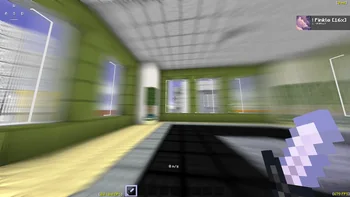
MotionBlur+ (1.8 PvP) – Adds motion blur for smoother PvP and Bedwars gameplay.
MotionBlur+ (Shaderpack) stammt von GlacierDevelopment. Unterstützt wird Minecraft 1.8 – 26.x. Auf Modrinth gibt es 24,243 Downloads. Das letzte Update erschien am 05.06.2026.
MotionBlur+ hat seit 07.09.2025 2 Versionen auf Modrinth veröffentlicht. Eine davon erschien im letzten Jahr. Die neueste ist 1.1, erschienen am 05.06.2026. Sie ist für Minecraft 1.20 – 26.1.2 gemacht. Sie läuft auf Iris und Optifine. Der Download ist 7 KB groß.
| Version | Veröffentlicht | Minecraft | Typ |
|---|---|---|---|
1.1 | 05.06.2026 | 1.20 – 26.1.2 | Release |
1.0.0 | 07.09.2025 | 1.8.9 | Release |
MotionBlur+ is a lightweight, high-performance shader for Minecraft 1.8, designed specifically for PvP, Bedwars, and other fast-paced gameplay. Unlike heavy shader packs, it focuses solely on motion blur, making movements smoother and easier to track without adding unnecessary visual effects that can reduce FPS.
Key Features:
MotionBlur+ is ideal for players who want better visual feedback during fights, content creators recording gameplay, or anyone who wants a subtle motion blur effect without sacrificing performance.
Geschrieben von GlacierDevelopment. Mit Bildern auf Modrinth lesen.
Installiere Iris (mit Sodium) oder OptiFine für deine Minecraft-Version: Shader brauchen eins davon.
Lade die .zip-Datei von Modrinth herunter. Entpacke sie nicht.
Öffne in Minecraft Optionen, dann Grafikeinstellungen, dann Shaderpacks und klicke auf Shaderpack-Ordner öffnen.
Lege die .zip-Datei in diesen Ordner, wähle MotionBlur+ in der Liste und klicke auf Fertig.
Shader belasten die Grafikkarte. Wird das Spiel langsam, wähle in den Shader-Einstellungen ein niedrigeres Profil.
| Ressource | Downloads | Versionen | Letztes Update | Preis |
|---|---|---|---|---|
| MotionBlur+die du angesehen hast | 24K | 1.8 – 26.x | 5. Juni 2026 | Kostenlos |
| Thunder's Motion BlurThunderFound | 47K | 1.8 – 26.x | 30. Mai 2026 | Kostenlos |
 Drift POVparthpov | 3,296 | 1.12 – 26.x | 9. Juni 2026 | Kostenlos |
 Motion Blur FXmarctgamer | 154K | 1.12 – 1.21 | 14. Aug. 2026 | Kostenlos |
Ja. MotionBlur+ unterstützt Minecraft 26.x. Alle unterstützten Versionen: 26.x, 1.21, 1.20, 1.8.
Ja. MotionBlur+ kannst du kostenlos bei Modrinth herunterladen.
Ja. Das letzte Update kam innerhalb des letzten Tages.
Am ähnlichsten sind Thunder's Motion Blur, Drift POV und Motion Blur FX. Alle Alternativen vergleichen
Thunder's Motion BlurShader · 1.8 – 26.xLightweight and performant shader for motion blur. Looks good even at 4 samples. Great for PVP.
Drift POVShader · 1.12 – 26.x"A custom motion blur shader by Parth POV designed for clean visuals and ultra-smooth gameplay. Ideal for both high-end and low-end PCs."
Motion Blur FXShader · 1.12 – 1.21Add Motion Blur in Minecraft
 CH MotionShader · 1.8 – 26.x
A simple but very good low performance motion blur pack, which enhances the vanilla experience!
 Ancient DreamShader · 1.12 – 1.21
A lightweight horror-themed shader that adds visual effects without compromising gameplay and performance.
 Extremely Simple Camera EffectsShader · 1.16 – 1.21
An extremely simple shader that adds extremely simple camera effects, while still playable in normal gameplay.
Logg dich ein, um eine Bewertung zu schreiben.