
 Night VisionRessourcenpakete · 1.19 – 26.x
Tiny night vision resource pack for Polytone or OptiFine
Kostenlos3,003,722 Downloads

Makes everything bright just like night vision
Direkter Download von Modrinth · 473,504 Downloads
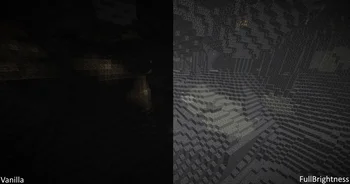
FullBrightness (Ressourcenpaket) stammt von BlockLegend001. Makes everything bright just like night vision.
Unterstützt wird Minecraft 1.13 – 26.x. Auf Modrinth gibt es 473,504 Downloads. Das letzte Update erschien am 26.03.2025.
FullBrightness hat seit 05.06.2024 4 Versionen auf Modrinth veröffentlicht. Keine davon erschien im letzten Jahr. Die neueste ist 0.1, erschienen am 26.03.2025. Sie ist für Minecraft 1.21.5 – 26.3 gemacht. Sie läuft auf Minecraft. Der Download ist 8 KB groß.
| Version | Veröffentlicht | Minecraft | Typ |
|---|---|---|---|
0.1 | 26.03.2025 | 1.21.5 – 26.3 | Release |
0.2 | 12.12.2024 | 1.21.2, 1.21.3, 1.21.4 | Release |
0.1 | 11.12.2024 | 1.21.2, 1.21.3, 1.21.4 | Release |
0.1 | 05.06.2024 | 1.13 – 1.20.6 | Release |
Make sure to install it before adding the texture pack.
Geschrieben von BlockLegend001. Mit Bildern auf Modrinth lesen.
Lade die .zip-Datei von Modrinth herunter. Entpacke sie nicht.
Öffne in Minecraft Optionen, dann Ressourcenpakete, dann Paketordner öffnen.
Lege die .zip-Datei in diesen Ordner und gehe zurück ins Spiel.
Schiebe FullBrightness in die rechte Liste und klicke auf Fertig.
Es ist für Minecraft 1.13 – 26.x gemacht. Auf anderen Versionen markiert Minecraft es als inkompatibel, oft funktioniert es aber trotzdem.
Ja. FullBrightness unterstützt Minecraft 26.x. Alle unterstützten Versionen: 26.x, 1.21, 1.20, 1.19, 1.18, 1.17, 1.16, 1.13.
Ja. FullBrightness kannst du kostenlos bei Modrinth herunterladen.
Ja. Das letzte Update kam innerhalb des letzten Tages.
Night VisionRessourcenpakete · 1.19 – 26.xTiny night vision resource pack for Polytone or OptiFine
Logg dich ein, um eine Bewertung zu schreiben.