
 Created Simple Storage NetworkRessourcenpakete · 1.18 – 1.21
Created Storage Network is an Resource Pack that updates the textures of this incredible mod made by Lothrazar with the textures of another incredible mod by…
Kostenlos1,708,994 Downloads

Updates the Particle Effects mod textures to ones I like better
Direkter Download von Modrinth · 257,396 Downloads

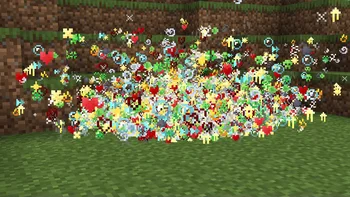

Particles Updated (Ressourcenpaket) stammt von zdkrr. Updates the Particle Effects mod textures to ones I like better.
Unterstützt wird Minecraft 1.20 – 26.x. Auf Modrinth gibt es 257,396 Downloads. Das letzte Update erschien am 04.08.2026.
Particles Updated hat seit 11.12.2024 8 Versionen auf Modrinth veröffentlicht. 2 davon erschienen im letzten Jahr. Die neueste ist 0.7, erschienen am 03.08.2026. Sie ist für Minecraft 1.20.1 – 26.3 gemacht. Sie läuft auf Minecraft. Der Download ist 54 KB groß.
| Version | Veröffentlicht | Minecraft | Typ |
|---|---|---|---|
0.7 | 03.08.2026 | 1.20.1 – 26.3 | Release |
0.6 | 25.12.2025 | 1.20.1 – 26.2 | Release |
0.5.1 | 22.06.2025 | 1.20.1 – 1.21.11 | Release |
0.5 | 20.06.2025 | 1.20.1 – 1.21.6 | Beta |
0.4 | 27.04.2025 | 1.20.1 – 1.21.6 | Release |
[](modrinth.com/mod/particle-effects)
[](modrinth.com/user/zed1ker)
[](discord.gg/4GCkRTVTX9)[](https://t.me/zCoreMD)
I didn't like the particle textures in the Particle Effects mod, so I fixed them. Most of the particles have been redrawn, if you don't like a certain particle, then suggest me another option in the discord (zed1ker).
This table contains all the particles, even those that have not been changed.
Description on russian / Описание на русском
Мне не понравились текстуры частиц в моде Particle Effects и я их исправил. Большинство частиц было перерисовано, если вам не нравится определенная частица, то предложите мне другой вариант в дискорде (zed1ker).
В этой таблице находятся все частицы, даже те которые не были изменены.
Geschrieben von zdkrr. Mit Bildern auf Modrinth lesen.
Lade die .zip-Datei von Modrinth herunter. Entpacke sie nicht.
Öffne in Minecraft Optionen, dann Ressourcenpakete, dann Paketordner öffnen.
Lege die .zip-Datei in diesen Ordner und gehe zurück ins Spiel.
Schiebe Particles Updated in die rechte Liste und klicke auf Fertig.
Es ist für Minecraft 1.20 – 26.x gemacht. Auf anderen Versionen markiert Minecraft es als inkompatibel, oft funktioniert es aber trotzdem.
| Ressource | Downloads | Versionen | Letztes Update | Preis |
|---|---|---|---|---|
| Particles Updateddie du angesehen hast | 257K | 1.20 – 26.x | 4. Aug. 2026 | Kostenlos |
| Created Simple Storage NetworkMakzzin | 1.7M | 1.18 – 1.21 | 8. Juli 2023 | Kostenlos |
 Angel's WeatherLiminal_Angel | 276K | 1.16 – 26.x | vor 9 Tagen | Kostenlos |
 Better Zombiesnvi | 259K | 1.20 | 10. Feb. 2024 | Kostenlos |
Ja. Particles Updated unterstützt Minecraft 26.x. Alle unterstützten Versionen: 26.x, 1.21, 1.20.
Ja. Particles Updated kannst du kostenlos bei Modrinth herunterladen.
Ja: Particle Effects. Installiere es vor Particles Updated.
Ja. Das letzte Update kam innerhalb des letzten Tages.
Am ähnlichsten sind Created Simple Storage Network, Angel's Weather und Better Zombies. Alle Alternativen vergleichen
Created Simple Storage NetworkRessourcenpakete · 1.18 – 1.21Created Storage Network is an Resource Pack that updates the textures of this incredible mod made by Lothrazar with the textures of another incredible mod by…
Angel's WeatherRessourcenpakete · 1.16 – 26.xThe Weather Miracle • A full weather rework featuring high-fidelity audio, new snow, cloud, and fog variants, dynamic particle effects, and revamped biome…
Better ZombiesRessourcenpakete · 1.20Zombies now look and feel like zombies.
 Better BetterXRessourcenpakete · 1.19 – 1.21
This pack replaces a few BetterX textures with ones that feel more in line with other mods/vanilla. This pack is still useable in 1.20.1
 Golden Days BaseRessourcenpakete · 1.16 – 26.x
Golden Days is a Minecraft resource pack meant to bring back old textures, lighting, names, and sounds from older versions of Minecraft, like Beta. Requires…
 YouTube ThemedRessourcenpakete · 1.21 – 26.x
This Texture Pack Introduces new textures for items and equipment to enhance gameplay themed like YouTube
Logg dich ein, um eine Bewertung zu schreiben.