
 Default Dark ModeTexturenpakete · 1.8 – 26.x
🌙 The Dark Mode Resource Pack for Minecraft: Java Edition
Kostenlos8,325,974 Downloads
Cute & Floral GUI overhaul resource pack
Direkter Download von Modrinth · 217,556 Downloads
Overgrown Flowery GUI (Texturenpaket) stammt von coolbot100s. Cute & Floral GUI overhaul resource pack.
Unterstützt wird Minecraft 1.8 – 26.x. Auf Modrinth gibt es 217,556 Downloads. Das letzte Update erschien am 26.03.2026.
Overgrown Flowery GUI hat seit 18.10.2022 31 Versionen auf Modrinth veröffentlicht. Eine davon erschien im letzten Jahr. Die neueste ist 1.5.1, erschienen am 26.03.2026. Sie ist für Minecraft 1.21.4 – 26.1.2 gemacht. Sie läuft auf Minecraft. Der Download ist 868 KB groß.
| Version | Veröffentlicht | Minecraft | Typ |
|---|---|---|---|
1.5.1 | 26.03.2026 | 1.21.4 – 26.1.2 | Release |
1.5 | 19.01.2025 | 1.10 – 1.20.3 | Release |
1.4.10 | 12.01.2025 | 1.10 – 1.20.3 | Release |
1.4.9 | 29.12.2024 | 1.10 – 1.20.3 | Release |
1.4.8.1 | 21.12.2024 | 1.10 – 1.20.3 | Release |
_Become a bit closer to living out your cottagecore dreams using this GUI overhaul!_
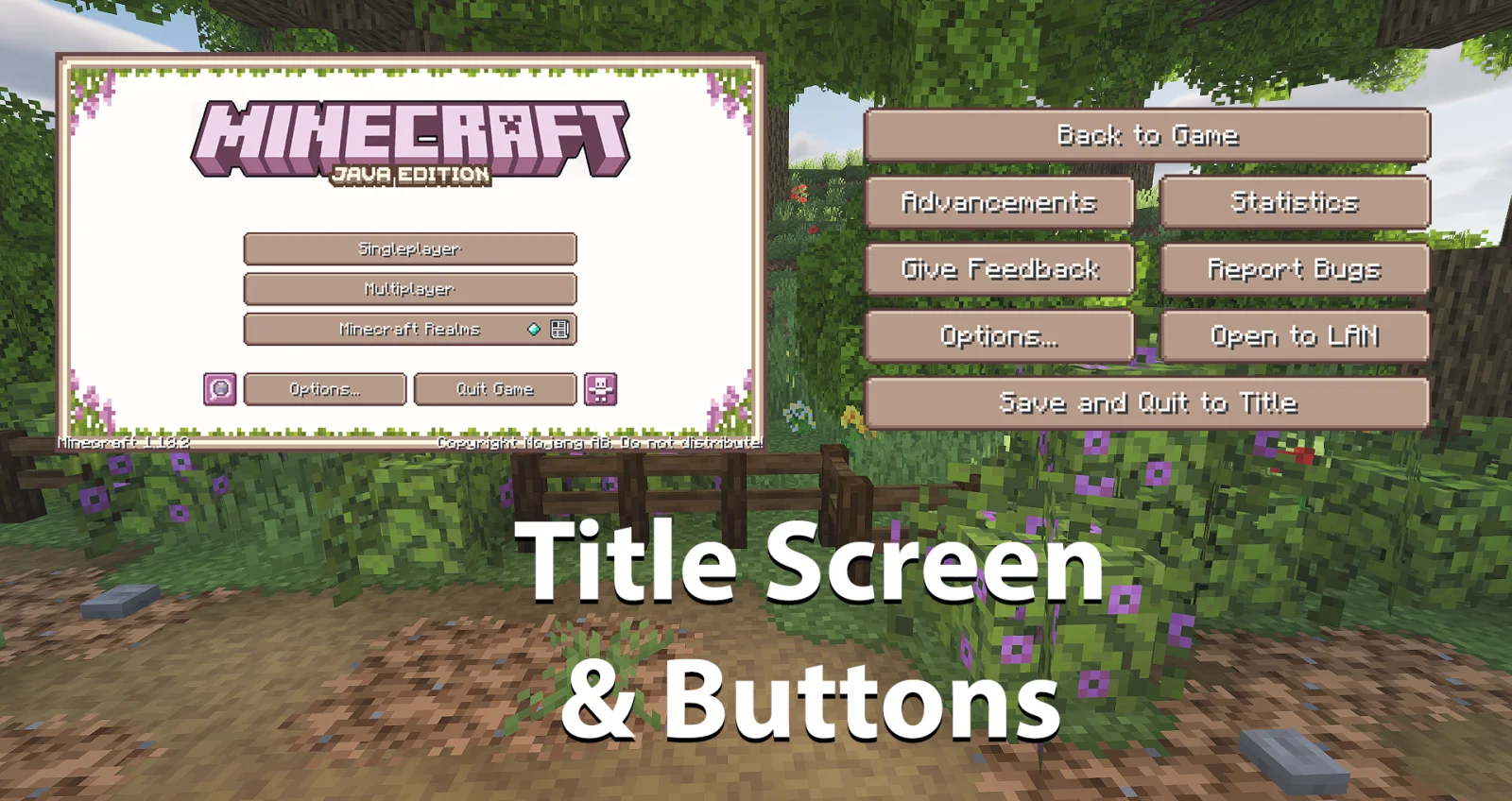
This resource pack changes your crafting inventories, armor, health, food bar, menus and more to be filled with vines and flowers. Watch flowers grow from the ground as you get exp and collect flowerpots as you gain armor!
As a fan of the Overgrown Flowery Interface mod for Stardew Valley I wanted to capture that feeling with a Minecraft Resource Pack, thus Overgrown Flowery GUI was born!
As of version 1.2+ we support integration with an ever-growing list of client side and content mods!
Supported Mods
Additional Support from Sunshine Hunger
Install the Sunshine Hunger addon for support with even more mods!
Note that some of the Mods above like Malilib and LibGui are libraries used by multiple developers, any mods that rely on these libraries should also be supported but not specifically listed.
Keep in mind that any dependent mods may lose support if a breaking change is made in an update.
Want more of Overgrown Flowery GUI? Make sure to check out our modernized addon: Extra Flowery GUI!
If you're only here for the hotbar, try Overgrown Flowery Hotbar.
Geschrieben von coolbot100s. Mit Bildern auf Modrinth lesen.
Lade die .zip-Datei von Modrinth herunter. Entpacke sie nicht.
Öffne in Minecraft Optionen, dann Ressourcenpakete, dann Paketordner öffnen.
Lege die .zip-Datei in diesen Ordner und gehe zurück ins Spiel.
Schiebe Overgrown Flowery GUI in die rechte Liste und klicke auf Fertig.
Es ist für Minecraft 1.8 – 26.x gemacht. Auf anderen Versionen markiert Minecraft es als inkompatibel, oft funktioniert es aber trotzdem.
| Ressource | Downloads | Versionen | Letztes Update | Preis |
|---|---|---|---|---|
| Overgrown Flowery GUIdie du angesehen hast | 218K | 1.8 – 26.x | 26. März 2026 | Kostenlos |
| Default Dark Modenebulr | 8.3M | 1.8 – 26.x | 19. Sept. 2026 | Kostenlos |
 Coquetjekaloic | 175K | 1.19 – 1.20 | 14. Jan. 2024 | Kostenlos |
 Snowy GUIPayPW | 26 | 1.16 – 26.x | vor 25 Tagen | Kostenlos |
Ja. Overgrown Flowery GUI unterstützt Minecraft 26.x. Alle unterstützten Versionen: 26.x, 1.21, 1.20, 1.19, 1.18, 1.17, 1.16, 1.13, 1.12, 1.8.
Ja. Overgrown Flowery GUI kannst du kostenlos bei Modrinth herunterladen.
Ja: Curios API, Inventory Sorting, Stardew Fishing Fabric, Colorful Hearts, Crafting Tweaks. Installiere es vor Overgrown Flowery GUI.
Ja. Das letzte Update kam innerhalb des letzten Tages.
Am ähnlichsten sind Default Dark Mode, Coquet und Snowy GUI. Alle Alternativen vergleichen
Default Dark ModeTexturenpakete · 1.8 – 26.x🌙 The Dark Mode Resource Pack for Minecraft: Java Edition
CoquetTexturenpakete · 1.19 – 1.20Just a typical resource pack that tries to be faithful to the original style of the game at times
Snowy GUITexturenpakete · 1.16 – 26.xResource pack that adds snow to the GUI
 Beautiful Enchanted BooksTexturenpakete · 1.16 – 26.x
This resource pack aims to improve the appearance of enchanted books, now each one will be different!
 AlacrityTexturenpakete · 1.16 – 26.x
32x resource pack with crazy attention to details
 FurSky RebornTexturenpakete · 1.8 – 26.x
Hypixel Skyblock's most popular resource pack. Now available for 1.21.11 & 26.x!
Logg dich ein, um eine Bewertung zu schreiben.