
 UShaderShader · 1.16 – 1.21
This shaderpack is basically just a loose recreation of an old SEUS Mod of mine, but without using any of its code.
Kostenlos692,025 Downloads
make your Minecraft realistic without using too much FPS
Direkter Download von Modrinth · 4 Downloads
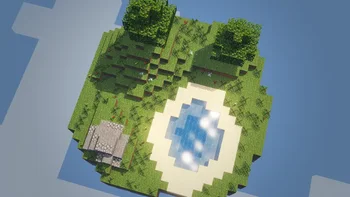
fps max (Shaderpack) stammt von bellavortexyt. make your Minecraft realistic without using too much FPS.
Unterstützt wird Minecraft 26.x. Auf Modrinth gibt es 4 Downloads. Das letzte Update erschien am 26.10.2026.
Die neueste ist 26.2, erschienen am 26.10.2026. Sie ist für Minecraft 26.2, 26.3 gemacht. Sie läuft auf Iris und Optifine. Der Download ist 40 KB groß.
| Version | Veröffentlicht | Minecraft | Typ |
|---|---|---|---|
26.2 | 26.10.2026 | 26.2, 26.3 | Release |
Create a high-quality, realistic shader for Minecraft Java Edition. The main goal is to transform the appearance of water, lighting, reflections, shadows, and the sky while preserving the original Minecraft atmosphere. The shader should make the world look beautiful, immersive, natural, and visually detailed.
Completely improve the appearance of water with realistic transparency, natural blue and turquoise colors, animated waves, and detailed surface movement. Water should reflect the sky, clouds, sunlight, and surrounding terrain. Add realistic ripples when the player enters the water, swims, or moves near the surface. Underwater areas should have realistic depth, soft blue colors, and visible light rays passing through the water. Shallow water should appear clear, while deeper water should gradually become darker. Add subtle foam near coastlines, rocks, and moving water where supported by the shader engine.
Create natural lighting that changes throughout the day. Sunlight should produce soft illumination, beautiful highlights, and realistic color variations. Sunrise and sunset should have warm orange, pink, and golden tones. Nighttime should have cooler colors and gentle moonlight. Lighting should make landscapes feel alive without making the image excessively bright or dark.
Implement soft, realistic shadows from trees, buildings, mountains, and other objects, where supported by the shader platform. Shadows should change direction and length according to the position of the sun. Avoid excessively dark shadows, flickering, and visible graphical artifacts.
Improve reflections on water and other suitable surfaces. Water reflections should change according to the viewing angle, the sky, and the surrounding environment. Add subtle highlights from sunlight and realistic visual depth. Keep reflections smooth and natural rather than exaggerated.
Create a beautiful sky with detailed clouds, realistic atmospheric colors, and natural transitions between daytime, sunset, and nighttime. Clouds should blend naturally with the lighting. The sky should be reflected in the water to create a consistent and immersive environment.
Improve the appearance of rain, storms, and fog where supported. Rain should create small ripples on water surfaces. Fog should blend naturally into distant landscapes and create a sense of depth without hiding nearby objects. Cloudy weather should produce softer lighting than clear weather.
Make underwater exploration more immersive with blue-green color filtering, soft light rays, and natural visibility changes based on depth. Avoid excessive blur or darkness. The player should still be able to see underwater terrain and nearby objects clearly.
Optimize the shader for smooth gameplay. Provide adjustable settings for water quality, reflections, shadows, lighting, clouds, and visual effects. Include lower-quality settings for computers with limited graphics performance. Avoid unnecessary calculations and graphical glitches.
Target Minecraft Java Edition version 26.2. Use the appropriate shader format and rendering features supported by the chosen shader loader. Make sure the shader files are correctly structured and ready to install. Do not claim compatibility with unsupported rendering features. Include clear installation instructions and explain any required dependencies.
Keep Minecraft recognizable while significantly improving its visual quality. Use natural colors, realistic water, soft lighting, detailed reflections, and balanced contrast. Avoid excessive saturation, artificial-looking effects, and distracting visual distortions.
Deliver a complete, functional Minecraft shader project focused on beautiful realistic water, natural lighting, soft shadows, detailed reflections, atmospheric skies, and smooth performance. The final result should be visually impressive, practical to use, easy to configure, and compatible with the specified Minecraft version.
Geschrieben von bellavortexyt. Mit Bildern auf Modrinth lesen.
Installiere Iris (mit Sodium) oder OptiFine für deine Minecraft-Version: Shader brauchen eins davon.
Lade die .zip-Datei von Modrinth herunter. Entpacke sie nicht.
Öffne in Minecraft Optionen, dann Grafikeinstellungen, dann Shaderpacks und klicke auf Shaderpack-Ordner öffnen.
Lege die .zip-Datei in diesen Ordner, wähle fps max in der Liste und klicke auf Fertig.
Shader belasten die Grafikkarte. Wird das Spiel langsam, wähle in den Shader-Einstellungen ein niedrigeres Profil.
| Ressource | Downloads | Versionen | Letztes Update | Preis |
|---|---|---|---|---|
| fps maxdie du angesehen hast | 4 | 26.x | vor 15 Tagen | Kostenlos |
| UShaderRRe36 | 692K | 1.16 – 1.21 | 28. Feb. 2025 | Kostenlos |
 Spirity Motion BlurItsAnshuXD | 10K | 1.21 – 26.x | 28. Apr. 2026 | Kostenlos |
 HyperShadertopsyy_yy | 9,255 | 1.12 – 26.x | 3. Okt. 2026 | Kostenlos |
Ja. fps max unterstützt Minecraft 26.x. Alle unterstützten Versionen: 26.x.
Ja. fps max kannst du kostenlos bei Modrinth herunterladen.
Ja. Das letzte Update kam innerhalb des letzten Tages.
Am ähnlichsten sind UShader, Spirity Motion Blur und HyperShader. Alle Alternativen vergleichen
UShaderShader · 1.16 – 1.21This shaderpack is basically just a loose recreation of an old SEUS Mod of mine, but without using any of its code.
Spirity Motion BlurShader · 1.21 – 26.xUltra lightweight motion blur shader with zero FPS drop. Smooth visuals without performance loss.
HyperShaderShader · 1.12 – 26.xHyper-realistic visuals with smooth FPS — built for low-end PCs. Tune every detail in-game: water, lava, sun, moon, stars and more.
 Super FPS ShaderShader · 1.18 – 26.x
An ultra-light shader built for max FPS on low-end devices. Adds soft lighting and gentle water waves while keeping vanilla water untouched. Works with Iris…
 BalancedShadersShader · 1.16 – 26.x
An ultra-lightweight shader pack optimized specifically for weak PCs and laptops without a dedicated graphics card. It delivers a smooth 60+ FPS while…
 Samarium ShadersShader · 1.21 – 26.x
Samarium Shaders is a custom, high-performance realistic shader pack built specifically for Minecraft Java Edition (supporting 1.21.11 and 26.2 using Fabric…
Logg dich ein, um eine Bewertung zu schreiben.