
 Yet Another Loot Beams ModMods · 26.x
Fork of a fork of the original lootbeams mod. This client side mod highlights dropped items and loot with cool customizable beams! No more losing items or…
Kostenlos64 Downloads

Client-side mod that helps you find the most cost-effective way to combine enchantments on your items
Direkter Download von Modrinth · 87 Downloads
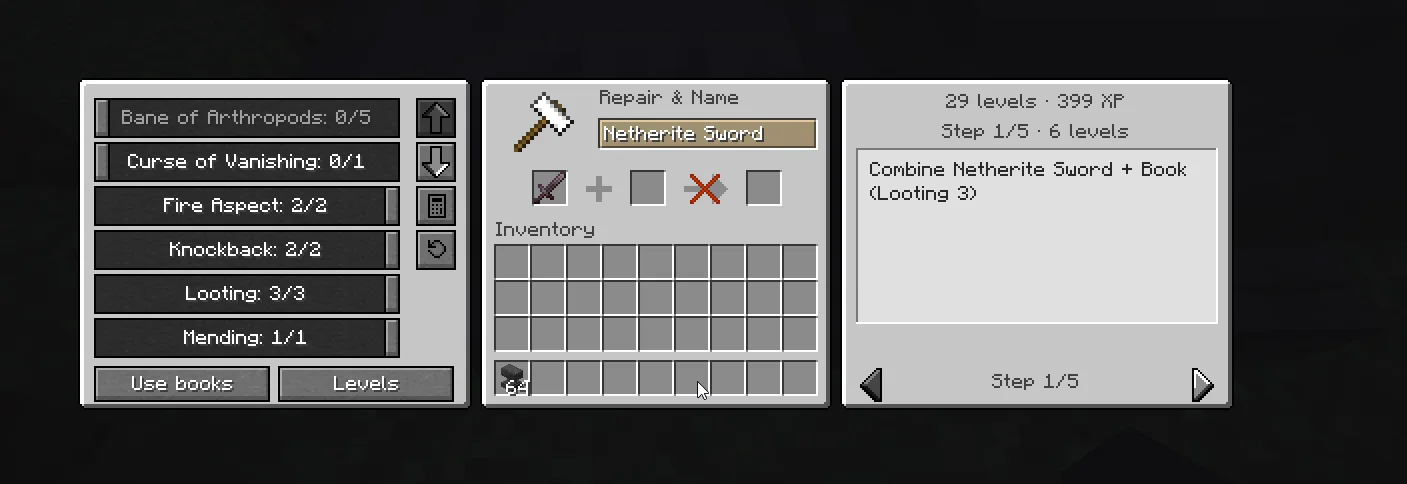
Enchantment Calculator (Mod) stammt von FanyaOff. Client-side mod that helps you find the most cost-effective way to combine enchantments on your items.
Unterstützt wird Minecraft 1.21 – 26.x. Auf Modrinth gibt es 87 Downloads. Das letzte Update erschien am 11.11.2026.
Enchantment Calculator hat seit 15.10.2026 7 Versionen auf Modrinth veröffentlicht. 7 davon erschienen im letzten Jahr. Die neueste ist 2.0.0+26.3-fair-play, erschienen am 15.10.2026. Sie ist für Minecraft 26.3 gemacht. Sie läuft auf Fabric. Der Download ist 109 KB groß.
| Version | Veröffentlicht | Minecraft | Typ |
|---|---|---|---|
2.0.0+26.3-fair-play | 15.10.2026 | 26.3 | Release |
2.0.0+26.2-fair-play | 15.10.2026 | 26.2 | Release |
2.0.0+26.1-fair-play | 15.10.2026 | 26.1, 26.1.1, 26.1.2 | Release |
2.0.0+1.21.11-fair-play | 15.10.2026 | 1.21.11 | Release |
2.0.0+1.21.10-fair-play | 15.10.2026 | 1.21.10 | Release |
Enchantment Calculator ist Open Source. Die neueste Version auf GitHub ist Enchantment Calculator 1.0, veröffentlicht am 14.07.2025.
No content.
Enchantment Calculator is a client-side mod that helps you find the most cost-effective way to combine enchantments on your items.
This mod is based on the functionality provided by this website
This mod supports customization via a custom resource pack. GUI elements are located at:
assets/enchantmentcalculator/textures/gui
You can view the original textures in the source code on GitHub
If you have an idea to improve the interface by redrawing the elements or by changing the code, I would appreciate it.
This edition helps you plan enchantments, but leaves the anvil work to you. Pick the enchantments you want, choose whether to save levels or XP, and follow the steps on screen. Use Books reads the enchanted books in your inventory and adds their enchantments to the calculator; it does not move or use the books.
There are no presets or auto-enchant controls in this edition. The mod does not click inventory slots, put items in the anvil, or take the result for you. The auto-enchantment notes below describe the regular edition.
IMPORTANT!!!!! Before using the auto-enchantment feature, please get approval from your server admins. Otherwise, use the Fair Play Edition
Found a bug, errors in calculations, have a suggestion? Please report it my our GitHub Issues page.
The Enchantment Calculator uses a sophisticated tree-based optimization algorithm to find the most cost-effective enchanting sequence.
For n enchantments, generate all possible binary combination trees
The mod calculates costs using Minecraft's exact anvil mechanics:
Total Cost = Enchantment Cost + Prior Work Penalty
Where:
Instead of testing all possible trees, the algorithm:
For each tree structure:
Supports two optimization targets:
penalty = MULTIPLIERS[left_item_uses] + MULTIPLIERS[right_item_uses]
if (levels ≤ 16): xp = levels² + 6×levels
if (levels ≤ 31): xp = 2.5×levels² - 40.5×levels + 360
if (levels > 31): xp = 4.5×levels² - 162.5×levels + 2220
For each tree position i:
contribution[i] = depth_from_root
weighted_sum = Σ(i × contribution[i])
Geschrieben von FanyaOff. Mit Bildern auf Modrinth lesen.
Diese Mod läuft nur in deinem eigenen Spiel. Server brauchen sie nicht, du kannst sie also auf jedem Server nutzen.
Installiere Fabric für Minecraft 1.21 – 26.x.
Lade die .jar-Datei von Modrinth herunter und lege sie in den mods-Ordner deines .minecraft-Verzeichnisses.
Starte Minecraft mit dem Fabric-Profil.
Einfacher: Suche in Prism Launcher oder der Modrinth App in den Mods deiner Instanz nach Enchantment Calculator und klicke auf Install. Loader und benötigte Mods werden für dich hinzugefügt.
| Ressource | Downloads | Versionen | Letztes Update | Preis |
|---|---|---|---|---|
| Enchantment Calculatordie du angesehen hast | 87 | 1.21 – 26.x | vor 3 Tagen | Kostenlos |
| Yet Another Loot Beams ModderexXD | 64 | 26.x | 11. Okt. 2026 | Kostenlos |
 Enchantment Glow Itemsj4nn1k | 55 | 26.x | vor 7 Tagen | Kostenlos |
 Trade Findernomad_dev | 70 | 1.21 – 26.x | vor 12 Tagen | Kostenlos |
Ja. Enchantment Calculator unterstützt Minecraft 26.x. Alle unterstützten Versionen: 26.x, 1.21.
Ja. Enchantment Calculator kannst du kostenlos bei Modrinth herunterladen.
Clientseitig. Enchantment Calculator kommt in deinen eigenen mods-Ordner und funktioniert auf jedem Server, auch auf Servern ohne Mods.
Ja. Das letzte Update kam innerhalb des letzten Tages.
Am ähnlichsten sind Yet Another Loot Beams Mod, Enchantment Glow Items und Trade Finder. Alle Alternativen vergleichen
Yet Another Loot Beams ModMods · 26.xFork of a fork of the original lootbeams mod. This client side mod highlights dropped items and loot with cool customizable beams! No more losing items or…
Enchantment Glow ItemsMods · 26.xEnchantment Glow is an addon for the NoRisk Client that makes your items glow in your chosen color.
Trade FinderMods · 1.21 – 26.xFind the exact trades and enchantments you need from all villager types!
 Enchantment DescriptionsMods · 1.12 – 26.x
Provides a way to get enchantment descriptions from enchanted books.
 Easy MagicMods · 1.19 – 26.x
Enchanting tables as they always should have been! Items stay after closing, and easy re-rolls.
 Enchanting InfuserMods · 1.19 – 26.x
An all-new enchanting table for choosing your enchantments at fair prices without the randomness.
Logg dich ein, um eine Bewertung zu schreiben.