
 Iron FurnacesMods · 1.20 – 26.x
Inspired by cpw's Iron Chests mod, adds a few different tiers of furnace.
Kostenlos10,170,260 Downloads

Adds nuclear stuff to Minecraft!
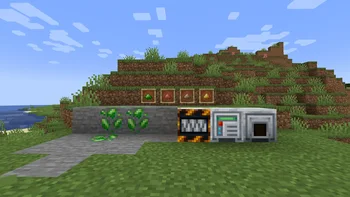
Adds nuclear stuff to Minecraft!
Atomcraft (Ressource) stammt von FuzjaJadrowa. Unterstützt wird Minecraft 1.21. Auf Modrinth gibt es 2 Downloads. Das letzte Update erschien am 27.10.2026.
Die neueste ist 0.1.0-alpha+1.21.1-neoforge, erschienen am 26.10.2026. Sie ist für Minecraft 1.21, 1.21.1 gemacht. Sie läuft auf NeoForge. Der Download ist 102 KB groß.
| Version | Veröffentlicht | Minecraft | Typ |
|---|---|---|---|
0.1.0-alpha+1.21.1-neoforge | 26.10.2026 | 1.21, 1.21.1 | Alpha |
AtomCraft is a technical Minecraft mod which brings nuclear engineering to the game. Inspired by NuclearCraft mod
Start with electrical machines and uranium processing, and create working fission or fusion reactor!
[](github.com/FuzjaJadrowa/Atomcraft/actions/workf…)
Mod is currently in alpha state. Full features described here will be available in the full release!
WORK IN PROGRESS
This project is distributed under the **PIF-1.0** license.
Geschrieben von FuzjaJadrowa. Mit Bildern auf Modrinth lesen.
Diese Mod wird auf dem Server und bei jedem Spieler gebraucht.
Installiere NeoForge für Minecraft 1.21.
Lade die .jar-Datei von Modrinth herunter und lege sie in den mods-Ordner deines .minecraft-Verzeichnisses.
Starte Minecraft mit dem NeoForge-Profil.
Mit dem CraftRank Launcher sparst du dir diese Schritte: Öffne Mods, suche nach Atomcraft und klicke auf Installieren.
| Ressource | Downloads | Versionen | Letztes Update | Preis |
|---|---|---|---|---|
| Atomcraftdie du angesehen hast | 2 | 1.21 | vor 14 Tagen | Kostenlos |
| Iron FurnacesQelifern | 10.2M | 1.20 – 26.x | 26. Juni 2026 | Kostenlos |
 GD656KilliconMinecraft_GD656 | 8M | 1.18 – 1.21 | 12. Aug. 2026 | Kostenlos |
 Create: Diesel GeneratorsGeorgeVI | 6.3M | 1.18 – 1.21 | 30. Juli 2026 | Kostenlos |
Noch nicht. Die neueste unterstützte Version ist Minecraft 1.21.
Ja. Atomcraft kannst du kostenlos bei Modrinth herunterladen.
Beides. Der Server und jeder Spieler brauchen Atomcraft.
Ja. Das letzte Update kam innerhalb des letzten Tages.
Am ähnlichsten sind Iron Furnaces, GD656Killicon und Create: Diesel Generators. Alle Alternativen vergleichen
Iron FurnacesMods · 1.20 – 26.xInspired by cpw's Iron Chests mod, adds a few different tiers of furnace.
GD656KilliconMods · 1.18 – 1.21This Minecraft mod adds FPS-style killfeed notifications with exceptionally smooth animations. It offers unique features and highly customizable settings for…
Create: Diesel GeneratorsMods · 1.18 – 1.21A Create addon that adds compact diesel generators (engines), simple industrial features and crude oil refinery
 SecurityCraftMods · 1.8 – 26.x
Adds plenty of blocks and items to defend and secure your base with.
 Create: New AgeMods · 1.19 – 1.21
Create: New Age is an addon for the Create mod that adds integration with electricity.
 ImmersiveThunderMods · 1.19 – 1.21
A fabric mod that adds realistic and dynamic thunder sounds to Minecraft based on the player’s distance from the lightning strike.
Logg dich ein, um eine Bewertung zu schreiben.