
 WoodCutterPlusPlugins · 1.21 – 26.x
An enchantment for axes that cuts the whole tree - with levels, a falling animation and a woodcutting skill.
Kostenlos21 Downloads
An enchantment for axes that cuts the whole tree at once - with levels, a falling animation, a woodcutting skill and Folia support.
Direkter Download von Modrinth · 4 Downloads
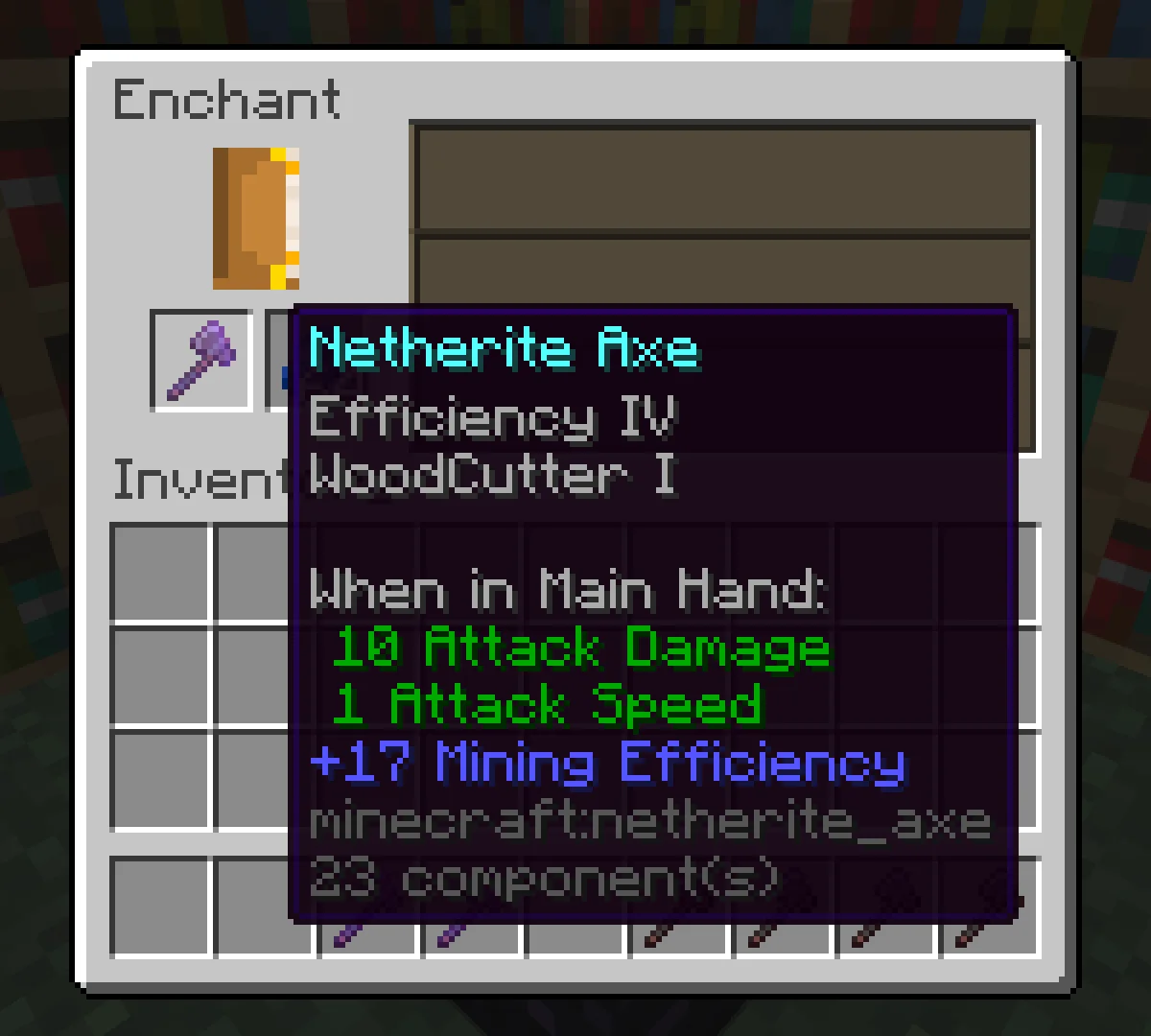
WoodCutter (Plugin) ist für Server mit Paper / Spigot gedacht und stammt von Christian34. An enchantment for axes that cuts the whole tree at once - with levels, a falling animation, a woodcutting skill and Folia support.
Unterstützt wird Minecraft 1.21 – 26.x. Auf Modrinth gibt es 4 Downloads. Damit liegt es auf Platz 90 der 108 hier gelisteten RPG- und Magie-Plugins. Das letzte Update erschien am 27.10.2026.
WoodCutter hat seit 13.10.2026 3 Versionen auf Modrinth veröffentlicht. 3 davon erschienen im letzten Jahr. Die neueste ist 3.1.2, erschienen am 27.10.2026. Sie ist für Minecraft 1.21 – 26.3 gemacht. Sie läuft auf Folia, Paper und Purpur. Der Download ist 135 KB groß.
| Version | Veröffentlicht | Minecraft | Typ |
|---|---|---|---|
3.1.2 | 27.10.2026 | 1.21 – 26.3 | Release |
3.1.1 | 23.10.2026 | 1.21 – 26.3 | Release |
3.1.0 | 13.10.2026 | 1.21 – 26.3 | Release |
Die Befehle, die auf der Modrinth-Seite von WoodCutter stehen:
/woodcutter/wcutter/woodc/rgDort genannte Berechtigungen, zu vergeben mit einem Plugin wie LuckPerms:
woodcutter.usewoodcutter.adminwoodcutter.goodiewoodcutter.bypass.delaywoodcutter.delaywoodcutter.maxblocksWoodCutter adds an enchantment for axes that cuts the whole tree when you break one log – with levels, a falling
animation, a woodcutting skill and a lot of settings. No commands are needed to play: sneak, break a log, done.
Requirements: Paper or Folia 1.21 or newer, Java 21. Spigot is not supported.
are cut as well.
and experience drops.
Players gain experience for every log of a tree they cut and reach levels (50 by default). The perks grow with every
level: faster cutting, a shorter delay, bigger trees, bonus drops, less damage for the axe, lower costs and
forester's luck (leaves drop sticks, saplings or apples). Free replanting and drops into the inventory are unlocked
at levels 10 and 20. All values can be changed, and the skill can be switched off.
Command · Description · Permission
/woodcutter menu · Menu: switch WoodCutter on and off, level, perks and the best players – admins change settings there · –
/woodcutter toggle · Switch WoodCutter on or off for yourself · woodcutter.use
/woodcutter level [player] · Woodcutting level and perks · –
/woodcutter top · The best woodcutters · –
/woodcutter give [book\ · axe] [level] · Give an enchanted book or axe (also from the console) · woodcutter.admin
/woodcutter enchant [level] · Enchant the axe in the main hand · woodcutter.admin
/woodcutter reload · Reload the files · woodcutter.admin
Aliases: /wcutter, /woodc
Permission · Description · Default
woodcutter.use · Get the enchantment at the enchanting table and cut trees with it · everyone
woodcutter.goodie · Cut trees with every axe (with goodie: permission) · –
woodcutter.bypass.delay · No delay between two trees · –
woodcutter.delay. · A shorter delay, e.g. for ranks · –
woodcutter.maxblocks. · A higher limit of logs, e.g. for ranks · –
woodcutter.admin · Reload, enchant, give and the settings in the menu · operators
in a region.
%woodcutter_delay%, %woodcutter_skill_level%, %woodcutter_skill_xp%, %woodcutter_skill_xp_needed% and
%woodcutter_top__name%, ..._level%, ..._xp% for the ranking.
in plugins/bStats/config.yml.
Source code and issues: itsthechris07/WoodCutter
Geschrieben von Christian34. Mit Bildern auf Modrinth lesen.
Stelle sicher, dass dein Server Paper und Spigot auf Minecraft 1.21 – 26.x nutzt.
Lade die .jar-Datei von Modrinth herunter und lege sie in den plugins-Ordner deines Servers.
Starte den Server neu. Vermeide /reload, viele Plugins kommen damit nicht gut klar.
Gib /plugins in der Konsole ein: WoodCutter sollte grün aufgelistet sein. Die Konfigurationsdateien werden beim ersten Start im plugins-Ordner angelegt.
Ausführliche Anleitung: So installierst du Plugins auf einem Minecraft-Server
| Ressource | Downloads | Versionen | Letztes Update | Preis |
|---|---|---|---|---|
| WoodCutterdie du angesehen hast | 4 | 1.21 – 26.x | vor 16 Tagen | Kostenlos |
| WoodCutterPlusChristian34 | 21 | 1.21 – 26.x | vor 16 Tagen | Kostenlos |
 VeinMiner EnchantmentMiraculixx | 18.2M | 1.21 – 26.x | vor 23 Tagen | Kostenlos |
 AnvilEnhancedBitByLogic | 24K | 1.16 – 26.x | vor 15 Tagen | Kostenlos |
Ja. WoodCutter unterstützt Minecraft 26.x. Alle unterstützten Versionen: 26.x, 1.21.
Ja. WoodCutter kannst du kostenlos bei Modrinth herunterladen.
WoodCutter läuft auf Servern mit Paper und Spigot.
Ja. Das letzte Update kam innerhalb des letzten Tages.
Am ähnlichsten sind WoodCutterPlus, VeinMiner Enchantment und AnvilEnhanced. Alle Alternativen vergleichen
WoodCutterPlusPlugins · 1.21 – 26.xAn enchantment for axes that cuts the whole tree - with levels, a falling animation and a woodcutting skill.
VeinMiner EnchantmentPlugins · 1.21 – 26.xVeinminer Addon - Adds vineminer enchantment to enchanting tables. Only tools with the enchantment can veinmine
AnvilEnhancedPlugins · 1.16 – 26.xWith AnvilEnhanced you can enchant your items with enchantments higher than the vanilla limit and put color in item name. No hex color support.
 AutoTreeChopPlugins · 1.17 – 26.x
A lightweight, customizable automatic tree chopping plugin for Paper/Folia servers.
 TreeMinerPlugins · 1.20 – 26.x
A plugin which mines the whole tree for you with geyserMC support
 EnderChestPlugins · 1.16 – 26.x
⭐Trusted on 900+ Server⭐Opens your Ender Chest with /ec /enderchest⭐ Configurable storage type ⭐Anti Dupe⭐ Custom Enderchest Size⭐ Custom Sounds ⭐Folia…
Logg dich ein, um eine Bewertung zu schreiben.