
 CustomCraftingPlugins · 1.16 – 26.x
Easily create custom recipes via an in-game GUI, including Crafting, Cooking, Smithing, etc. Use advanced config features to merge/copy NBT from ingredients…
Kostenlos242,009 Downloads

Advanced Minecraft punishment plugin
Direkter Download von Modrinth · 4 Downloads
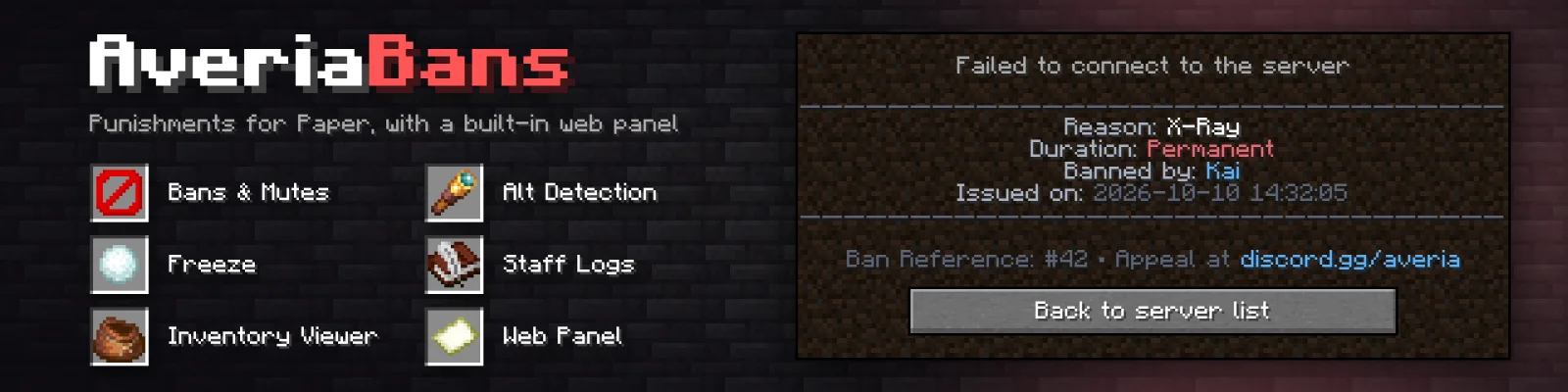
AveriaBans (Plugin) ist für Server mit Paper / Spigot gedacht und stammt von Kai295. Advanced Minecraft punishment plugin.
Unterstützt wird Minecraft 1.20 – 26.x. Auf Modrinth gibt es 4 Downloads. Damit liegt es auf Platz 423 der 468 hier gelisteten Hilfs-Plugins. Das letzte Update erschien am 10.10.2026.
Die neueste ist 1.0.0, erschienen am 10.10.2026. Sie ist für Minecraft 1.20 – 26.3 gemacht. Sie läuft auf Bukkit, Paper und Spigot. Der Download ist 13.2 MB groß.
| Version | Veröffentlicht | Minecraft | Typ |
|---|---|---|---|
1.0.0 | 10.10.2026 | 1.20 – 26.3 | Release |
Die Befehle, die auf der Modrinth-Seite von AveriaBans stehen:
/ban/kick/punish/ab/tempban/unban/pardon/banlist/bans/ipban/ban-ip/banip/tempipban/tempbanip/unipban/pardon-ipDort genannte Berechtigungen, zu vergeben mit einem Plugin wie LuckPerms:
averiabans.command.banaveriabans.command.tempbanaveriabans.command.unbanaveriabans.command.banlistaveriabans.command.ipbanaveriabans.command.tempipbanaveriabans.command.unipbanaveriabans.command.muteaveriabans.command.tempmuteaveriabans.command.unmuteaveriabans.command.ipmuteaveriabans.command.tempipmuteaveriabans.command.unipmuteaveriabans.command.warnaveriabans.command.kickaveriabans.command.freezeA clean, modern punishment system for Paper, with a built-in web panel.
Bans, mutes, IP punishments, warnings, kicks, freezes, alt detection, and a password-protected website where your staff team can manage everything from a browser, including viewing any player's inventory exactly like in-game.
` · [optional] · Durations look like 30m, 2h, 7d, 1mo, 1y or combined like 1d12h`.
Bans
Command · Aliases · Description · Permission
/ban [reason] · Permanently bans a player. Works for offline players. · averiabans.command.ban
/tempban [reason] · Bans a player for a set time. · averiabans.command.tempban
/unban · /pardon · Lifts a player's active ban. · averiabans.command.unban
/banlist [players\ · ips] [page] · /bans · Lists all active bans, 8 per page. Hover an entry for details, click it to unban. · averiabans.command.banlist
Banned players see a kick screen with the reason, who banned them, the expiry and your appeal link.
IP bans
Command · Aliases · Description · Permission
/ipban [reason] · /ban-ip, /banip · Permanently bans an IP address (a player's last known IP, or a raw IP). Kicks everyone online from that IP. · averiabans.command.ipban
/tempipban [reason] · /tempbanip · Temporarily bans an IP address. · averiabans.command.tempipban
/unipban · /pardon-ip, /pardonip, /unbanip · Lifts an active IP ban. · averiabans.command.unipban
Mutes
Command · Description · Permission
/mute [reason] · Permanently mutes a player. · averiabans.command.mute
/tempmute [reason] · Mutes a player for a set time. · averiabans.command.tempmute
/unmute · Lifts a player's active mute. · averiabans.command.unmute
/ipmute [reason] · Permanently mutes everyone on an IP address. · averiabans.command.ipmute
/tempipmute [reason] · Temporarily mutes everyone on an IP address. · averiabans.command.tempipmute
/unipmute · Lifts an active IP mute. · averiabans.command.unipmute
Muted players can't chat. With block-pm-when-muted: true they also can't use /msg, /tell, /w, /whisper, /r, /reply, /me or /say.
Warnings & kicks
Command · Description · Permission
/warn [reason] · Gives a player a formal warning, saved to their history. · averiabans.command.warn
/kick [reason] · Kicks an online player, saved to their history. · averiabans.command.kick
Freeze (screenshares)
Command · Aliases · Description · Permission
/freeze · /ss · Freezes a player, or unfreezes them if already frozen. · averiabans.command.freeze
/unfreeze · Unfreezes a player. · averiabans.command.unfreeze
Frozen players see a title and regular chat reminders. They can't move, break or place blocks, attack, interact, drop or pick up items, or use their inventory. Only the commands in freeze.allowed-commands work (by default /msg, /r, /tell, /w and /helpop). If they log out while frozen, staff are alerted and, with auto-ban-on-disconnect, they are banned automatically (1 day by default).
Punishment presets
Command · Description · Permission
/punish · Applies a preset from premade-punishments in config.yml. · averiabans.command.punish
premade-punishments:
hacking:
type: TEMP_BAN
duration: "7d"
reason: "Cheating / Unfair Advantage"
spam:
type: TEMP_MUTE
duration: "30m"
reason: "Chat Spam / Flooding"
advertising:
type: IP_MUTE
reason: "Malicious Advertising"
Types: BAN, IP_BAN, MUTE, IP_MUTE, KICK, WARN (TEMP_BAN, TEMP_MUTE etc. also work). Add a duration for a temporary punishment, or leave it out for a permanent one.
Alt accounts
Command · Aliases · Description · Permission
/alts · /alt, /dupeip · Lists every account that has shared an IP with this player, colored by status: online, offline, banned or IP-banned. · averiabans.command.alts
/recentalts · Shows alt-account joins within a timeframe, e.g. /recentalts 24h. Useful for catching evasion that happened while staff were offline. · averiabans.command.recentalts
When a player joins sharing an IP with other accounts, staff with averiabans.alerts.alts get an alert. If one of those accounts is banned, it's flagged as possible ban evasion and sent to Discord.
Admin (/averiabans, /ab)
Command · Description · Permission
/ab help · Shows the command list. · averiabans.command.help
/ab check · Shows a player's active ban and mute. · averiabans.command.check
/ab history · Shows a player's last 10 punishments. · averiabans.command.history
/ab panel · Shows the clickable web panel address. · averiabans.command.panel
/ab reload · Reloads config.yml and messages.yml and restarts the web panel. · averiabans.command.reload
ab panel reset · Console only. Clears a web panel account's password so its owner sets a new one at their next sign-in. Use this if the main admin forgets their password. · Console
Everything defaults to OP except averiabans.command.help (everyone) and the bypass permissions (nobody). Give staff averiabans.admin for everything, or pick individual permissions below.
Group permission
Permission · Description
averiabans.admin · Every command, alert and broadcast permission below (not the bypass permissions).
Command permissions
Permission · Allows
averiabans.command.ban · /ban
averiabans.command.tempban · /tempban
averiabans.command.unban · /unban
averiabans.command.banlist · /banlist
averiabans.command.ipban · /ipban
averiabans.command.tempipban · /tempipban
averiabans.command.unipban · /unipban
averiabans.command.mute · /mute
averiabans.command.tempmute · /tempmute
averiabans.command.unmute · /unmute
averiabans.command.ipmute · /ipmute
averiabans.command.tempipmute · /tempipmute
averiabans.command.unipmute · /unipmute
averiabans.command.warn · /warn
averiabans.command.kick · /kick
averiabans.command.freeze · /freeze
averiabans.command.unfreeze · /unfreeze
averiabans.command.punish · /punish
averiabans.command.alts · /alts
averiabans.command.recentalts · /recentalts
averiabans.command.check · /ab check
averiabans.command.history · /ab history
averiabans.command.panel · /ab panel
averiabans.command.reload · /ab reload
averiabans.command.help · /ab help (default: everyone)
Alerts & broadcasts
Permission · Description
averiabans.broadcast.view · See punishment broadcasts when broadcasts.permission-only is on.
averiabans.alerts.alts · Get alerts when a player joins with alt accounts or evades a ban.
averiabans.alerts.freeze · Get alerts when a frozen player logs out.
Bypass (immunity)
These default to nobody, not even OPs. Console can always punish anyone.
Permission · Immune to
averiabans.bypass.ban · Bans
averiabans.bypass.mute · Mutes
averiabans.bypass.kick · Kicks
averiabans.bypass.freeze · Freezing
averiabans.bypass.warn · Warnings
averiabans.bypass.* · All of the above
What's in the panel
Punishments from the panel work exactly like the in-game commands: players are kicked, broadcasts and Discord webhooks fire, and the staff member's panel username is recorded as who issued it.
Inventory viewer
The player lookup page shows the player's inventory and ender chest drawn like the real Minecraft screens: armor slots, offhand, player model, hotbar, stack counts, durability bars and the enchantment glint. Hover (or tap on mobile) any item to see its exact in-game tooltip, including custom names, enchantments, lore, attributes and potion effects.
Item icons, player heads and the pixel font load from the Minecraft Wiki, mcasset.cloud, mc-heads.net and Google Fonts in the viewer's browser.
Staff accounts & roles
Account · Can do
Main admin (set by web-panel.admin-username) · Everything, including managing staff accounts.
Staff (created by the main admin in the panel) · Everything except managing accounts.
Security
Geschrieben von Kai295. Mit Bildern auf Modrinth lesen.
Stelle sicher, dass dein Server Paper und Spigot auf Minecraft 1.20 – 26.x nutzt.
Lade die .jar-Datei von Modrinth herunter und lege sie in den plugins-Ordner deines Servers.
Starte den Server neu. Vermeide /reload, viele Plugins kommen damit nicht gut klar.
Gib /plugins in der Konsole ein: AveriaBans sollte grün aufgelistet sein. Die Konfigurationsdateien werden beim ersten Start im plugins-Ordner angelegt.
Ausführliche Anleitung: So installierst du Plugins auf einem Minecraft-Server
| Ressource | Downloads | Versionen | Letztes Update | Preis |
|---|---|---|---|---|
| AveriaBansdie du angesehen hast | 4 | 1.20 – 26.x | 10. Okt. 2026 | Kostenlos |
| CustomCraftingWolfyScript | 242K | 1.16 – 26.x | vor 6 Tagen | Kostenlos |
 DupeItemFixerCraftury | 18 | 1.21 – 26.x | 10. Aug. 2026 | Kostenlos |
 Grim AnticheatAoElite | 807K | 1.8 – 26.x | vor 5 Tagen | Kostenlos |
Ja. AveriaBans unterstützt Minecraft 26.x. Alle unterstützten Versionen: 26.x, 1.21, 1.20.
Ja. AveriaBans kannst du kostenlos bei Modrinth herunterladen.
AveriaBans läuft auf Servern mit Paper und Spigot.
Ja. Das letzte Update kam innerhalb des letzten Tages.
Am ähnlichsten sind CustomCrafting, DupeItemFixer und Grim Anticheat. Alle Alternativen vergleichen
CustomCraftingPlugins · 1.16 – 26.xEasily create custom recipes via an in-game GUI, including Crafting, Cooking, Smithing, etc. Use advanced config features to merge/copy NBT from ingredients…
DupeItemFixerPlugins · 1.21 – 26.xAdvanced item duplication detection and prevention for Paper & Folia with intelligent transaction analysis, quarantine, rollback and farm-safe protection.
Grim AnticheatPlugins · 1.8 – 26.xFully async, multithreaded, predictive, open source, 3.01 reach, 1.005 timer, 0.01% speed, 99.99% antikb, "bypassable" 1.8-1.21 anticheat
 Chunky BorderPlugins · 1.16 – 26.x
An add-on for Chunky which lets you create and manage world borders
 Advanced BackupsPlugins · 1.12 – 1.21
The backup mod to solve all your problems - actively maintained for almost any minecraft version!
 SmartSpawnerPlugins · 1.20 – 26.x
Add custom GUI spawners that generate items and XP instead of spawning mobs.
Logg dich ein, um eine Bewertung zu schreiben.