
 LumyREIMods · 1.21
Integrates Cobblemon recipes (Campfire Pot & Brewing Stand) directly into REI
Kostenlos3,730,807 Downloads

Brew potions in tiered cauldrons over a campfire, stir them with a ladle and forge better tools on the anvil.
Direkter Download von Modrinth · 3 Downloads
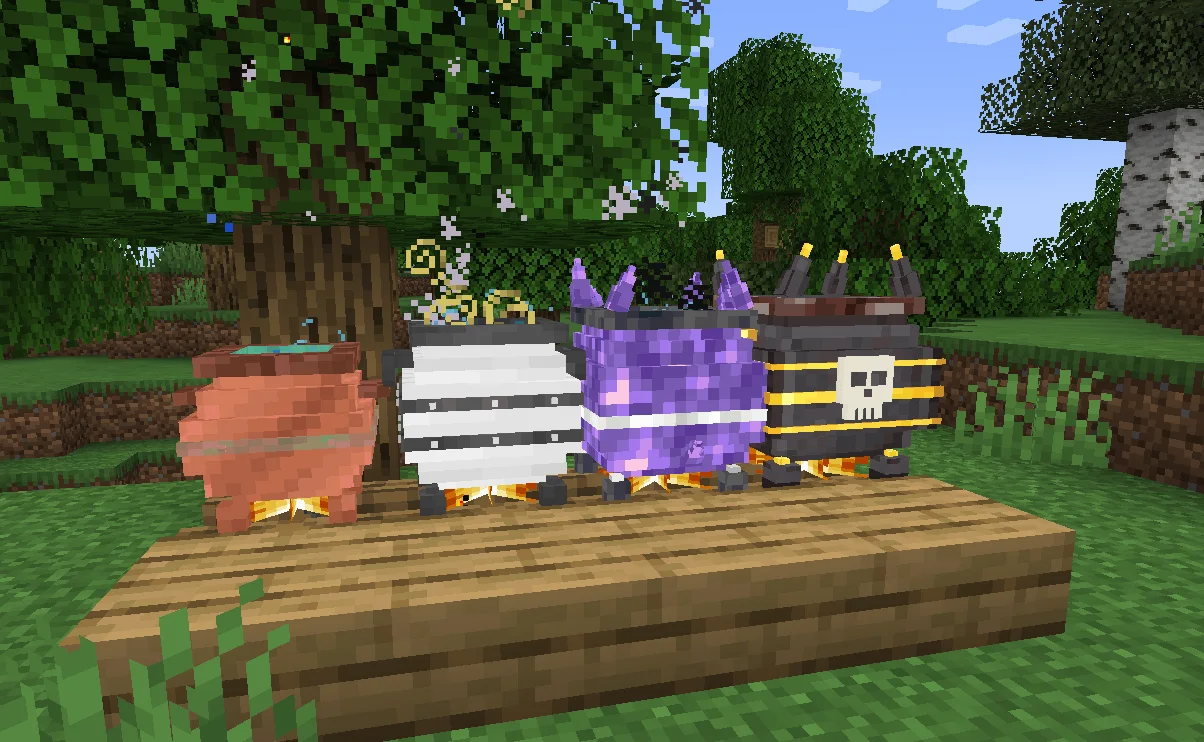
PAO Alchemy (Mod) stammt von dracoblanz. Brew potions in tiered cauldrons over a campfire, stir them with a ladle and forge better tools on the anvil.
Unterstützt wird Minecraft 1.21. Auf Modrinth gibt es 3 Downloads. Das letzte Update erschien am 20.10.2026.
Die neueste ist 0.8.0, erschienen am 20.10.2026. Sie ist für Minecraft 1.21.1 gemacht. Sie läuft auf NeoForge. Der Download ist 283 KB groß.
| Version | Veröffentlicht | Minecraft | Typ |
|---|---|---|---|
0.8.0 | 20.10.2026 | 1.21.1 | Release |
PAO Alchemy replaces potion making with cauldrons that sit on a campfire. You fill one with water, throw in ingredients, wait for it to boil and then stir the brew yourself before you can bottle it.
Cauldrons
There are four cauldrons: copper, iron, amethyst and netherite. A bigger cauldron needs more buckets of water, takes more ingredients and can mix more effects into one potion (one effect in copper, up to four in netherite). It only boils on a lit campfire and only when it is full. If a mix is too unstable the cauldron shakes, smokes and can blow up when it finishes.
Ingredients
More than 70 items work as ingredients. Each one adds effects, length, strength or instability. Some are there just to adjust the mix: redstone makes effects last longer, glowstone makes them stronger and amethyst calms an unstable brew. The mod also adds 16 effects of its own, like Stoneskin, Lifesteal, Magnetism, Echolocation or Blink. Ingredients are defined in a datapack, so modpacks can add their own.
Stirring
When a brew is done you have 30 seconds to start stirring with a ladle, or it is ruined. Stirring is a short minigame and the cauldron picks it:
Three mistakes ruin the potion. The camera moves above the cauldron while you stir; you can turn that off in the client config.
Bottles
Potions can only be taken out with vials, flasks or jugs. A vial is one sip at half duration, a flask is two sips, a jug is four sips at full duration and takes longer to drink.
Anvil and hammer
The Smith's Hammer works on any anvil. Hold the piece in your offhand, the hammer in your main hand and right click the anvil. With it you can:
Forging is done in heats. You strike the hot metal while the target moves around, then cool the piece in water by keeping a marker inside a moving band. Forging and tempering recipes are also datapack files.
Books
The Alchemy Guide explains the mechanics and shows every crafting and anvil recipe with item icons. The Alchemy Recipe Book saves each formula you record from a finished cauldron.
Multiplayer
Install the mod on both the server and the client. Minigames run on the client and the server checks the results, so they respond right away even.
Requirements: Minecraft 1.21.1, NeoForge 21.1.
Geschrieben von dracoblanz. Mit Bildern auf Modrinth lesen.
Diese Mod wird auf dem Server und bei jedem Spieler gebraucht.
Installiere NeoForge für Minecraft 1.21.
Lade die .jar-Datei von Modrinth herunter und lege sie in den mods-Ordner deines .minecraft-Verzeichnisses.
Starte Minecraft mit dem NeoForge-Profil.
Einfacher: Suche in Prism Launcher oder der Modrinth App in den Mods deiner Instanz nach PAO Alchemy und klicke auf Install. Loader und benötigte Mods werden für dich hinzugefügt.
| Ressource | Downloads | Versionen | Letztes Update | Preis |
|---|---|---|---|---|
| PAO Alchemydie du angesehen hast | 3 | 1.21 | vor 27 Tagen | Kostenlos |
| LumyREILUMYVERSE | 3.7M | 1.21 | 2. Apr. 2026 | Kostenlos |
 Brewing ExtensionNichtElias | 43 | 1.21 – 26.x | vor 4 Tagen | Kostenlos |
 HerbalBrewssatisfyu | 9.1M | 1.20 – 1.21 | 19. Sept. 2026 | Kostenlos |
Noch nicht. Die neueste unterstützte Version ist Minecraft 1.21.
Ja. PAO Alchemy kannst du kostenlos bei Modrinth herunterladen.
Beides. Der Server und jeder Spieler brauchen PAO Alchemy.
Ja. Das letzte Update kam innerhalb des letzten Tages.
Am ähnlichsten sind LumyREI, Brewing Extension und HerbalBrews. Alle Alternativen vergleichen
LumyREIMods · 1.21Integrates Cobblemon recipes (Campfire Pot & Brewing Stand) directly into REI
Brewing ExtensionMods · 1.21 – 26.xAn extension of the vanilla brewing system, adding potions for existing effects and minor QoL tweaks for potions.
HerbalBrewsMods · 1.20 – 1.21It's Tea Time! Brew Tea, Coffee and Flasks.
 Easy AnvilsMods · 1.18 – 26.x
Overhauled anvils with stored items, fairer costs, and no more frustrating repair penalties.
 Mia's XPerience XPandedMods · 26.x
A Vanilla+ mod that expands Minecraft's experience system with new XP sources, improved anvils and grindstones, smarter Mending, Wisdom potions, and reusable…
 Brewin' And Chewin'Mods · 1.18 – 1.21
Fermenting addon for Farmer's Delight.
Logg dich ein, um eine Bewertung zu schreiben.