
 Mekanism Community Edition: DefenseTechMods
The defensetech module has been se actualizó a work against newer builds of mekanism community edition. También contains bug fixes y other improvements aswell…
Gratis15 descargas
A Fabric port of Create Sifting se actualizó a work with Create 6 for Minecraft 1.20.1.Also named differently elsewhere.
Descarga directa desde Modrinth · 42 descargas
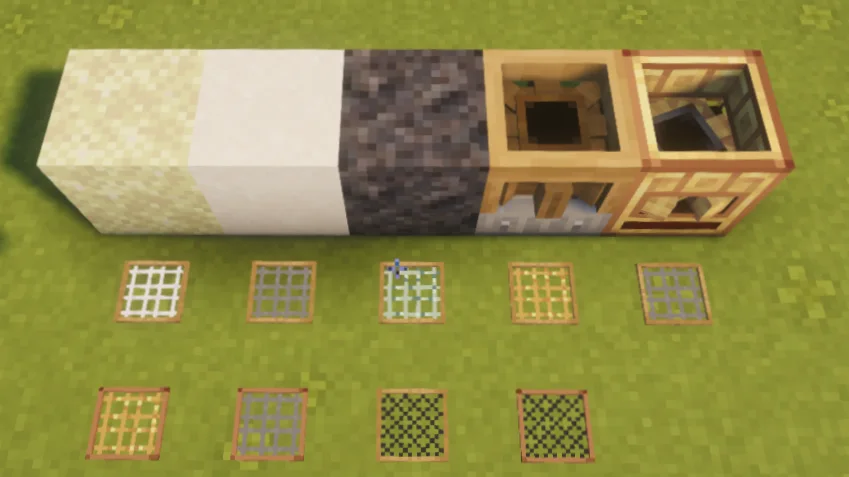
Create Sifting Fabric (mod) es obra de jiesoon771. A Fabric port of Create Sifting updated to work with Create 6 for Minecraft 1.20.1.Also named differently elsewhere.
Es compatible con Minecraft 1.20. Se ha descargado 42 veces en Modrinth. La última actualización salió el 06/09/2026.
Create Sifting Fabric ha publicado 11 versiones en Modrinth desde el 20/08/2026. 11 salieron en el último año. La más reciente es V1.1.0, publicada el 06/09/2026. Está hecha para Minecraft 1.20.1. Funciona en Fabric. La descarga ocupa 263 KB.
| Versión | Publicado | Minecraft | Tipo |
|---|---|---|---|
V1.1.0 | 06/09/2026 | 1.20.1 | Estable |
V1.0.3 | 26/08/2026 | 1.20.1 | Estable |
V1.0.2 | 25/08/2026 | 1.20.1 | Estable |
V1.0.1 | 25/08/2026 | 1.20.1 | Estable |
V1.0.0 | 22/08/2026 | 1.20.1 | Estable |
Create Sifting Fabric es de código abierto. Su última versión en GitHub es Create Sifter v1.1.0, publicada el 06/09/2026.
Create 机械动力:筛子(Fabric) — 适配 Create 6.0.8.1 / Minecraft 1.20.1
Antes: Create Sifter v1.0.3 (26/08/2026), Create Sifter v1.0.2 (25/08/2026).
A Fabric port update for Create: Sifting! This is not just a port — it also adds a graphical config screen, a full netherite sifting chain, and many other practical features. It is currently the most feature-complete Create: Sifting adaptation for Fabric 1.20.1!
This mod has long been discussed for its balance issues, so this port includes a full visual config overhaul. No manual config file editing required — even beginners can pick it up easily.
The following features require Mod Menu.
Open the config screen via Pause Menu → Mods → Create:Sifting, and you get:
Enough talk — let's look at some screenshots:
Notes:
All configs are server-authoritative. Dedicated servers automatically sync settings to all clients, so whether you're playing singleplayer, on a multiplayer server, or making a modpack, you can quickly tune the balance experience you need. Editing recipes and selecting the "Ultra" difficulty require cheat/OP permissions (after all, it's not much different from enabling creative mode).
This adaptation brings the netherite sifting gameplay that only exists in newer official versions fully to 1.20.1! No other 1.20.1 version of Create: Sifting has this (and honestly, I wanted to play with it, haha).
Gameplay and Mod Content
The Brass Powered Sifter is the upgraded version of the Powered Sifter:
Some recipes require the sifter to be "waterlogged" to trigger. Placing the sifter in water, or hand-sifting while in a liquid, counts as waterlogged.
This adaptation includes 13 built-in sifting recipes. All recipes default to 500 ticks (25 seconds) processing time and can be adjusted or added to via the config UI. Here is the full list of built-in recipes:
This is a new recipe added by this adaptation compared with the official 1.20.1 version:
The Crushed Basalt recipes and Sturdy Mesh were ported by this adaptation from the newer official version (1.21) to 1.20.1; the official 1.20.1 version does not have this content. Full recipes can also be viewed in-game via JEI.
Meshes are required for sifting recipes; different meshes yield different outputs.
Servers and clients must use the same mod file. Clients must also install this mod, Create, and Fabric API, with versions matching the server exactly.
Compatibility
The following data is based on Minecraft 1.20.1 · Create 6.0.8.1+ · Fabric.
Create ecosystem addons (1.20.1 Fabric, latest versions meeting the Create 6.0.8.1 minimum): Steam 'n' Rails 1.7.2+, Copycats+ 3.0.8+, Create Deco 2.1.1, Slice & Dice 3.6.0, Enchantment Industry 2.5.2, Jetpack 4.4.2, Extended Cogwheels 2.1.1+, New Age, Ore Excavation, Power Loader (Fabric) 2.0.3, Diesel Generators [Fabric] 2.1.4, Interactive 1.2.1, Crystal Clear, Numismatics, Utilities, Contraption Terminals, Goggles 6.1.1, Trading Floor, Central Kitchen, Bells & Whistles, Interiors, Design n' Decor, Dreams & Desires, Copper & Zinc, Ultimine, Oxidized, Pattern Schematics, etc.
Common optimization/utility/library mods: Embeddium, Starlight, Cull Less Leaves, GPUMemLeakFix, Xaero map, JourneyMap, inventory/damage display/voice/localization mods, Architectury, Kotlin for Fabric, YUNG's API, GeckoLib, Terralith, YUNG's series, Farmer's Delight family, Supplementaries (tested), etc.
Recipe viewers: EMI / REI can coexist without conflict, but this mod only implements a JEI plugin; sifter recipes do not display in EMI / REI (JEI 15.20+ recommended).
Item · Type · Behavior
Create 0.5.1 and earlier · Dependency rejection · Loader refuses to start (not a crash)
Create 6.0.0 ~ 6.0.8 · Dependency rejection · Requires ≥ 6.0.8.1
OptiFine / OptiFabric · Officially incompatible with Create · Incompatible across all versions
| Old addons deprecated by Create (railways 1` does it impose an additional speed threshold. Built-in recipes do not set this field, so they impose no extra threshold.
Recipe type createsifter:sifting, placed in datapack data//recipes/sifting/*.json (or any path, vanilla rules). Fields:
Field · Type · Default · Description
type · String · Required · createsifter:sifting
ingredients · Array · Required · Recipe ingredients. Order-independent: automatically categorized by item type — the first "mesh-type item" is the mesh, the first "non-mesh item" is the siftable; remaining entries are ignored during matching
results · Array · Required · Results. Each entry: { "item": id, "chance": 0~1, "count": amount (default 1) }
processingTime · Integer · 0 · Base processing time (ticks), multiplied by difficulty time multiplier at runtime
waterlogged · Boolean · false · Whether waterlogged is required (see 6.2)
minimumSpeed · Float · 1 · Recipe-level minimum speed requirement (see 5.3)
Example (full structure of built-in sand_brass_mesh):
{
"type": "createsifter:sifting",
"ingredients": [
{ "item": "minecraft:sand" },
{ "item": "createsifter:brass_mesh" }
],
"processingTime": 500,
"results": [
{ "chance": 0.25, "count": 2, "item": "minecraft:redstone" },
{ "chance": 0.1, "item": "minecraft:glowstone_dust" },
{ "chance": 0.4, "item": "minecraft:bone_meal" },
{ "chance": 0.05, "item": "minecraft:blaze_powder" },
{ "chance": 0.2, "item": "create:experience_nugget" }
]
}
Escrita por jiesoon771. Léela con imágenes en Modrinth.
Este mod funciona solo en tu propio juego. Los servidores no lo necesitan, así que puedes usarlo en cualquier servidor.
Instala Fabric para Minecraft 1.20.
Añade los mods que necesita: Create Fabric y API de Fabric.
Descarga el archivo .jar desde Modrinth y ponlo en la carpeta mods de tu directorio .minecraft.
Inicia Minecraft con el perfil de Fabric.
Más fácil: en Prism Launcher o la Modrinth App, busca Create Sifting Fabric en los mods de tu instancia y haz clic en Install. Añade el loader y los mods que necesita por ti.
| Recurso | Descargas | Versiones | Última actualización | Precio |
|---|---|---|---|---|
| Create Sifting Fabricel que estabas viendo | 42 | 1.20 | 6 sept 2026 | Gratis |
| Mekanism Community Edition: DefenseTechmaggi373 | 15 | – | 19 sept 2026 | Gratis |
 Create Fabrictropheusj | 10.9M | 1.18 – 1.20 | 2 dic 2025 | Gratis |
 Create Contraption Terminalstom5454 | 2.7M | 1.20 – 1.21 | 12 ago 2026 | Gratis |
Todavía no. La versión más reciente que admite es Minecraft 1.20.
Sí. Create Sifting Fabric se puede descargar gratis desde Modrinth.
Del lado del cliente. Create Sifting Fabric va en tu propia carpeta mods y funciona en cualquier servidor, incluso en servidores sin mods.
Sí: Create Fabric, Fabric API, Mod Menu. Instálalo antes de Create Sifting Fabric.
Sí. La última actualización salió en el último día.
Los más parecidos son Mekanism Community Edition: DefenseTech, Create Fabric y Create Contraption Terminals. Comparar todas las alternativas
Mekanism Community Edition: DefenseTechModsThe defensetech module has been se actualizó a work against newer builds of mekanism community edition. También contains bug fixes y other improvements aswell…
Create FabricMods · 1.18 – 1.20Building Tools and Aesthetic Technology
Create Contraption TerminalsMods · 1.20 – 1.21Allows Tom's Simple Storage Terminals to work on Create contraptions.
 PipsterMods · 1.21 – 26.x
Readable item, fluid, gas and energy pipes for Minecraft, with filters right at the port and channel-based tesseracts. For Fabric and NeoForge.
 CreateMods · 1.18 – 1.21
Aesthetic Technology that empowers the Player
 Create: Steam 'n' RailsMods · 1.18 – 1.20
Adding depth to Create's rail network & steam system
Inicia sesión para dejar una reseña.