
 Mod MenuMods · 1.16 – 26.x
Adds a mod menu to view the list of mods you have installed.
Gratis160,238,731 descargas
This modification adds a convenient feature that makes your tools never break again. With the help of an easy-to-use menu, you can edit all the settings of…
Descarga directa desde Modrinth · 27 descargas
Item Saver (mod) es obra de PyBal. This modification adds a convenient feature that makes your tools never break again. With the help of an easy-to-use menu, you can edit all the settings of…
Es compatible con Minecraft 26.x. Se ha descargado 27 veces en Modrinth. La última actualización salió el 23/08/2026.
La más reciente es 1.0-SNAPSHOT, publicada el 23/08/2026. Está hecha para Minecraft 26.1 – 26.2. Funciona en Fabric. La descarga ocupa 87 KB.
| Versión | Publicado | Minecraft | Tipo |
|---|---|---|---|
1.0-SNAPSHOT | 23/08/2026 | 26.1 – 26.2 | Estable |
(English):
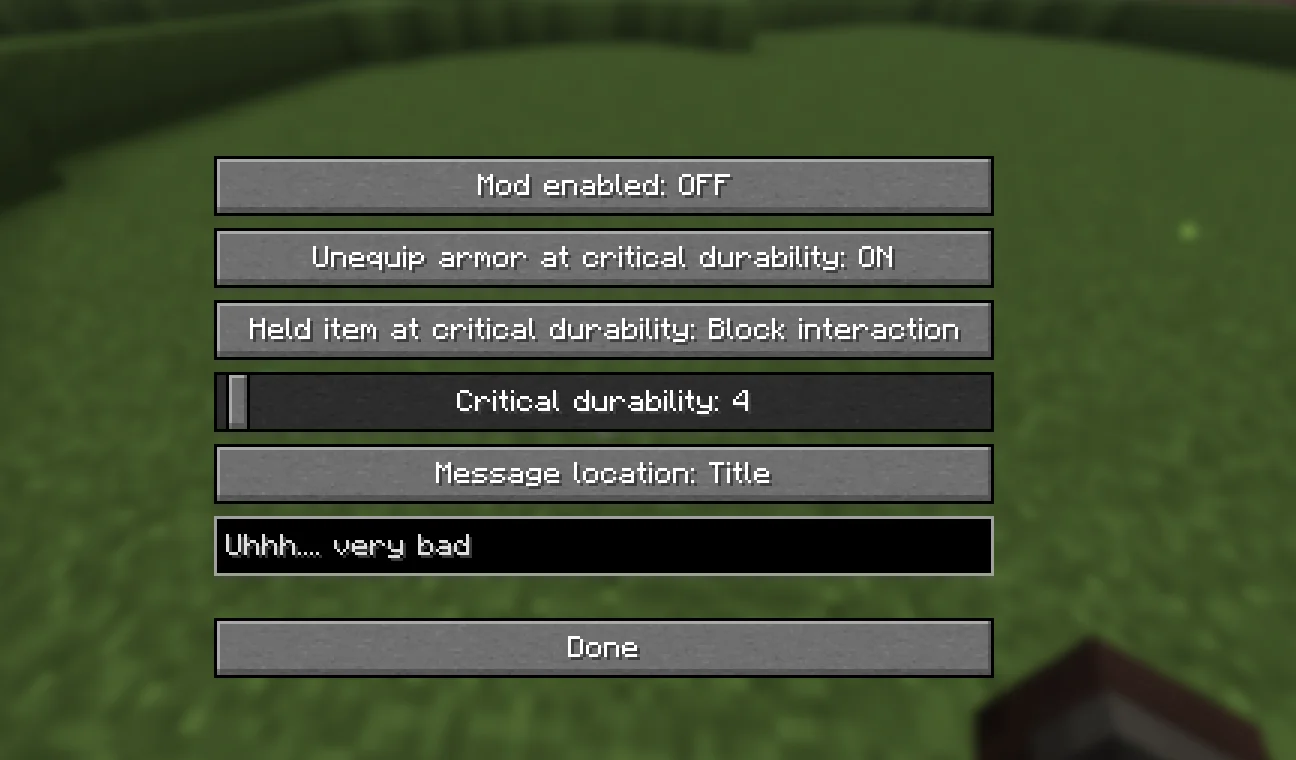
This mod adds a convenient feature that makes your tools and armor never break again. Using an easy-to-use in-game menu, you can edit all settings of the mod without leaving the game.
You can choose:
The durability threshold at which the mod starts warning you.
Whether armor is automatically unequipped when its durability becomes too low.
A custom message that appears when an item reaches a selected durability level.
How tools and armor should behave when they reach the configured durability limit.
All other mod options directly through the menu.
This gives you full control over your gear, helping you avoid losing items while still receiving clear warnings when durability gets low.
Escrita por PyBal. Léela con imágenes en Modrinth.
Este mod funciona solo en tu propio juego. Los servidores no lo necesitan, así que puedes usarlo en cualquier servidor.
Instala Fabric para Minecraft 26.x.
Añade los mods que necesita: API de Fabric.
Descarga el archivo .jar desde Modrinth y ponlo en la carpeta mods de tu directorio .minecraft.
Inicia Minecraft con el perfil de Fabric.
Más fácil: en Prism Launcher o la Modrinth App, busca Item Saver en los mods de tu instancia y haz clic en Install. Añade el loader y los mods que necesita por ti.
| Recurso | Descargas | Versiones | Última actualización | Precio |
|---|---|---|---|---|
| Item Saverel que estabas viendo | 27 | 26.x | 23 ago 2026 | Gratis |
| Mod MenuProspector | 160.2M | 1.16 – 26.x | hace 1 día | Gratis |
 LambDynamicLightsLambdAurora | 63.6M | 1.16 – 26.x | 15 sept 2026 | Gratis |
 Controllingjaredlll08 | 42.4M | 1.8 – 26.x | 9 oct 2026 | Gratis |
Sí. Item Saver es compatible con Minecraft 26.x. Todas las versiones compatibles: 26.x.
Sí. Item Saver se puede descargar gratis desde Modrinth.
Del lado del cliente. Item Saver va en tu propia carpeta mods y funciona en cualquier servidor, incluso en servidores sin mods.
Sí: Fabric API. Instálalo antes de Item Saver.
Sí. La última actualización salió en el último día.
Los más parecidos son Mod Menu, LambDynamicLights y Controlling. Comparar todas las alternativas
Mod MenuMods · 1.16 – 26.xAdds a mod menu to view the list of mods you have installed.
LambDynamicLightsMods · 1.16 – 26.xAdds dynamic lights to Minecraft as the most feature-complete and optimized dynamic lighting mod.
ControllingMods · 1.8 – 26.xAdds a search bar to the Key-Bindings menu
 Item HighlighterMods · 1.12 – 26.x
Highlights newly picked-up items. Simple and convenient.
 GD656KilliconMods · 1.18 – 1.21
This Minecraft mod adds FPS-style killfeed notifications with exceptionally smooth animations. It offers unique features and highly customizable settings for…
 Drip SoundsMods · 1.16 – 26.x
Adds sounds for drip particles landing & settings for block particles
Inicia sesión para dejar una reseña.