
 MyFurniturePlugins · 1.21 – 26.x
Add new custom furniture in the game very easily ! Collisions are based on the 3D model !
Gratis39,813 descargas

VoxelFurniture brings custom, interactive furniture to Minecraft servers, powered by VoxelCore. Create detailed furniture with custom models, placement…
Descarga directa desde Modrinth · 29 descargas
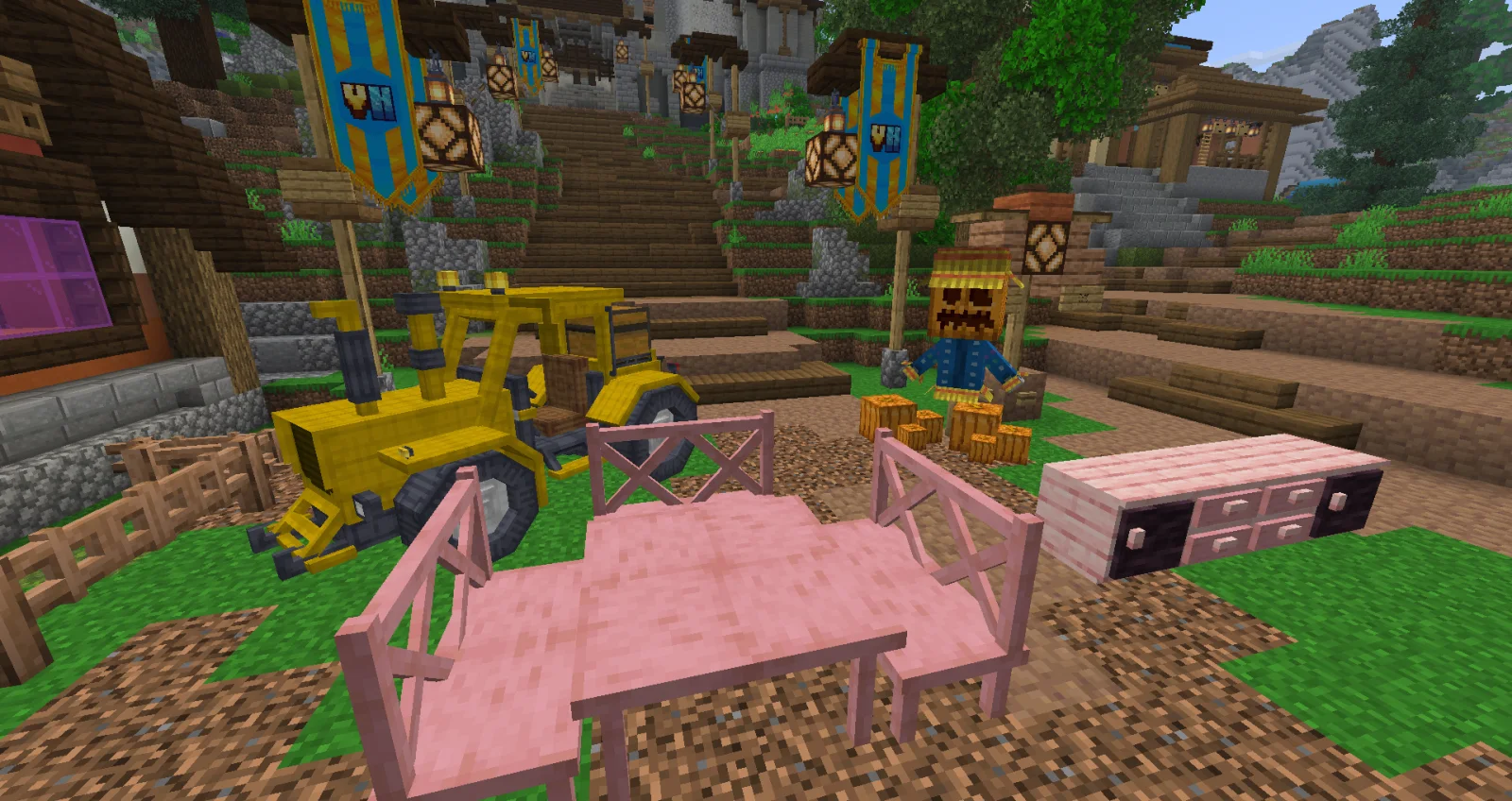
FlopsiNZ creó VoxelFurniture (plugin) para servidores Paper / Spigot. VoxelFurniture brings custom, interactive furniture to Minecraft servers, powered by VoxelCore. Create detailed furniture with custom models, placement…
Es compatible con Minecraft 1.12 – 26.x. Se ha descargado 29 veces en Modrinth. Eso lo sitúa en el puesto 100 de los 152 plugins cosméticos y de visualización de esta lista. La última actualización salió el 03/11/2026.
La más reciente es 1.0.0, publicada el 03/11/2026. Está hecha para Minecraft 1.12 – 1.21.10. Funciona en Bukkit, Paper y Spigot. La descarga ocupa 143 KB.
| Versión | Publicado | Minecraft | Tipo |
|---|---|---|---|
1.0.0 | 03/11/2026 | 1.12 – 1.21.10 | Estable |
VoxelFurniture es de código abierto. Su última versión en GitHub es v1.0.1, publicada el 06/11/2026.
Full Changelog: v1.0.0...v1.0.1
Antes: VoxelFurniture v1.0.0 (03/11/2026).
Bring your Minecraft world to life with fully interactive custom furniture — on Java and Bedrock Edition!
VoxelFurniture is a powerful furniture creation and management plugin for Minecraft servers, built on the VoxelCore content system. Create, place and interact with custom furniture featuring detailed 3D models, animations, storage, seating and much more.
From simple decorative objects to interactive cupboards, benches, drawers and animated furniture, VoxelFurniture gives server owners the tools to create immersive environments using their own custom content.
VoxelFurniture doesn't restrict you to a predefined furniture collection.
Using VoxelCore's content system, you can create custom furniture from your own models and textures, define their behaviour, and configure how players interact with them.
Furniture definitions support configurable placement rules, rotations, model variations, inventory sizes, seating positions, animations and interactions.
Whether you're building a survival server, roleplay environment or custom adventure world, VoxelFurniture provides the foundation for bringing your creations into Minecraft.
VoxelFurniture supports both legacy and modern Minecraft server versions through its adaptive rendering system.
Some functionality varies by Minecraft version and client edition. Full Java/Bedrock visual and interaction parity is not guaranteed.
For Bedrock support, follow VoxelCore's Geyser configuration guide.
Supported server versions: Minecraft 1.12–26.3
Required dependency: VoxelCore v1.0.0
Folia: Not supported.
Everything you need to create, configure and manage furniture is available through our GitHub Wiki.
Documentation: github.com/VoxelHorizons/VoxelFurniture/wiki
Source Code: github.com/VoxelHorizons/VoxelFurniture
Issues & Support: github.com/VoxelHorizons/VoxelFurniture/issues
Latest Release: github.com/VoxelHorizons/VoxelFurniture/release…
VoxelFurniture is part of the Voxel Horizons plugin ecosystem, powered by VoxelCore.
Create custom content with VoxelCore, bring your environments to life with VoxelFurniture, and build experiences that work across supported Minecraft Java and Bedrock clients.
Free to use • Source-available • Official distribution only
VoxelFurniture is available free of charge for personal and commercial Minecraft servers. Unauthorised redistribution, resale and repackaging are prohibited under the Voxel Horizons licence.
Create. Customise. Interact. Bring your world to life with VoxelFurniture.
Escrita por FlopsiNZ. Léela con imágenes en Modrinth.
Asegúrate de que tu servidor use Paper y Spigot en Minecraft 1.12 – 26.x.
Descarga el archivo .jar desde Modrinth y ponlo en la carpeta plugins de tu servidor.
Reinicia el servidor. Evita /reload, muchos plugins no lo llevan bien.
Escribe /plugins en la consola: VoxelFurniture debería aparecer en verde. Sus archivos de configuración se crean en la carpeta plugins al primer arranque.
Guía completa: Cómo instalar plugins en un servidor de Minecraft
| Recurso | Descargas | Versiones | Última actualización | Precio |
|---|---|---|---|---|
| VoxelFurnitureel que estabas viendo | 29 | 1.12 – 26.x | hace 11 días | Gratis |
| MyFurnitureSsomar | 40K | 1.21 – 26.x | hace 1 día | Gratis |
 Free Minecraft ModelsMagmaGuy | 33K | 1.18 – 26.x | hace 6 días | Gratis |
 YugiSignyugiyx | 7 | 1.21 | hace 13 días | Gratis |
Sí. VoxelFurniture es compatible con Minecraft 26.x. Todas las versiones compatibles: 26.x, 1.21, 1.20, 1.19, 1.18, 1.17, 1.16, 1.13, 1.12.
Sí. VoxelFurniture se puede descargar gratis desde Modrinth.
VoxelFurniture funciona en servidores Paper y Spigot.
Sí. La última actualización salió en el último día.
Los más parecidos son MyFurniture, Free Minecraft Models y YugiSign. Comparar todas las alternativas
MyFurniturePlugins · 1.21 – 26.xAdd new custom furniture in the game very easily ! Collisions are based on the 3D model !
Free Minecraft ModelsPlugins · 1.18 – 26.xPut custom models in your Minecraft server without client mods, for free!
YugiSignPlugins · 1.21A lightweight Minecraft plugin that allows players to sign items in their main hand with custom messages.
 NeuroNPCPlugins · 1.21
AI-powered interactive NPCs for Paper servers with customizable personalities, persistent storage, async LLM conversations, skins, localization, permissions…
 Armor Stand ArmsPlugins · 1.16 – 26.x
Armor stands get arms automatically when placed
 FancyHologramsPlugins · 1.19 – 26.x
Create fancy looking text, item or block holograms with display entities.
Inicia sesión para dejar una reseña.