
 ClearLaggEnhancedPlugins · 1.20 – 26.x
The definitive ClearLagg successor for 1.20+. Boost TPS and fix lag on Paper, Spigot, and Folia with smart entity clearing and a real-time Admin GUI.
Gratis23,999 descargas

CheckLags is a server side Paper/Purpur/Folia plugin that shows where lag occurs and why at that location.
Descarga directa desde Modrinth · 3 descargas
Mr_Nova_76 creó Checklags (plugin) para servidores Paper / Spigot. CheckLags is a server side Paper/Purpur/Folia plugin that shows where lag occurs and why at that location.
Es compatible con Minecraft 26.x. Se ha descargado 3 veces en Modrinth. Eso lo sitúa en el puesto 110 de los 128 plugins de rendimiento de esta lista. La última actualización salió el 11/11/2026.
La más reciente es 26.1.2, publicada el 10/11/2026. Está hecha para Minecraft 26.2, 26.3. Funciona en Folia, Paper y Purpur. La descarga ocupa 1.9 MB.
| Versión | Publicado | Minecraft | Tipo |
|---|---|---|---|
26.1.2 | 10/11/2026 | 26.2, 26.3 | Estable |
Los comandos que aparecen en la página de Checklags en Modrinth:
/lagcheck/lagsFind out where your server is lagging and what's causing it!
spark can tell you which plugin or task is eating your tick time. But sometimes that's only half the story. You might know that entities or chunk loading are causing problems, but not where it's happening.
That's what CheckLags is for. It scans loaded chunks, ranks them by estimated lag impact, and gives you an idea of what's causing trouble in each area. This includes mob stacks, item farms, hopper and block-entity clusters, and chunk loading activity.
CheckLags is a server-side tool that helps you find where lag is coming from.
It monitors tick times in the background and starts scanning loaded chunks when TPS drops or unusually slow ticks occur. The results are sorted by heat, making it easier to find areas that might be causing problems.
Here's how it works:
The scores show relative lag impact, not exact milliseconds per chunk. Minecraft doesn't provide a way to measure tick time for individual chunks. CheckLags is meant to help you find suspicious areas that you can investigate further with spark.
All commands are under /lagcheck. Aliases: /lags and /clag.
Command · Description
/lagcheck top [world] [rows] · Show the chunks with the highest heat scores. Click a row to teleport there.
/lagcheck watch [seconds] · Show the top 3 hotspots repeatedly while testing for lag. Defaults to 120 seconds. Run again to stop.
/lagcheck inspect [world] [cx] [cz] · Scan a 3×3 chunk area and show items, mobs, block entities, chunk loads and the most common block-entity types. Without arguments, scans your current location.
/lagcheck region · Folia only: Show the TPS of your current region compared to global TPS.
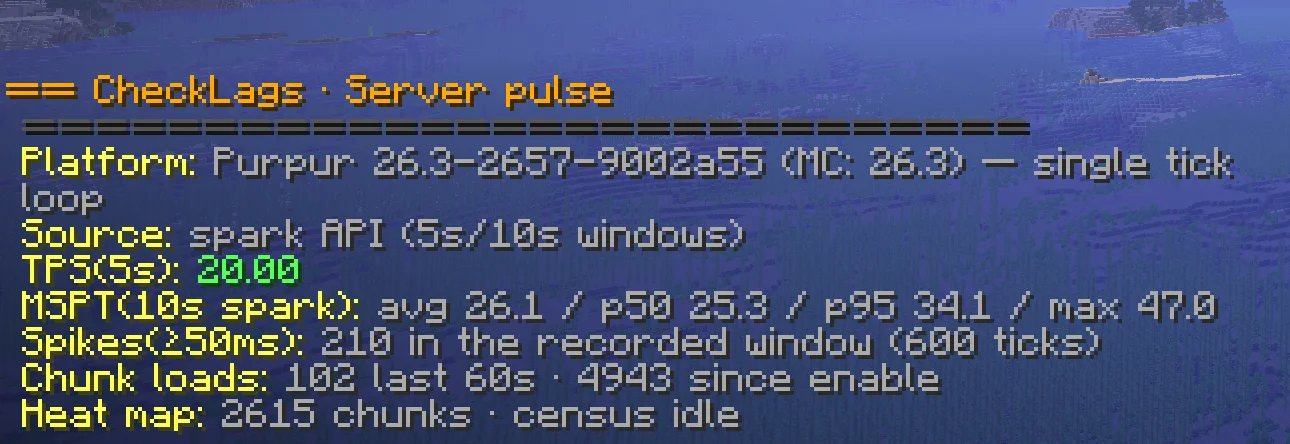
/lagcheck stats · Show platform information, spark status, TPS/MSPT data, spike count and chunk-load rate.
/lagcheck reset · Clear the heat map, tick history and chunk-load counters.
/lagcheck reload · Reload config.yml without restarting the server.
Examples:
Permission · Description
checklags.use · Access to all CheckLags commands. Default: OP.
The configuration file is located here:
plugins/CheckLags/
└── config.yml
Important settings:
spike-threshold-ms: 60 # Tick duration that counts as a spike
tps-alert-threshold: 18.0 # Start scanning when TPS drops below this value
census-interval-ticks: 40 # How often chunks are rescanned while lagging
heat-decay: 0.9 # How quickly old hotspots lose heat
weights: # Adjust these to suit your server
block-entity: 2.0 # Increase for redstone-heavy servers
hostile-mob: 1.0
item: 0.5 # Increase if dropped items are a common problem
chunk-load: 8.0 # Give chunk-loading activity a higher priority
Found a bug or have an idea for a feature? Feel free to DM me on Discord:
Mr_Nova_76
Escrita por Mr_Nova_76. Léela con imágenes en Modrinth.
Asegúrate de que tu servidor use Paper y Spigot en Minecraft 26.x.
Descarga el archivo .jar desde Modrinth y ponlo en la carpeta plugins de tu servidor.
Reinicia el servidor. Evita /reload, muchos plugins no lo llevan bien.
Escribe /plugins en la consola: Checklags debería aparecer en verde. Sus archivos de configuración se crean en la carpeta plugins al primer arranque.
Guía completa: Cómo instalar plugins en un servidor de Minecraft
| Recurso | Descargas | Versiones | Última actualización | Precio |
|---|---|---|---|---|
| Checklagsel que estabas viendo | 3 | 26.x | hace 3 días | Gratis |
| ClearLaggEnhanceddjtmk1 | 24K | 1.20 – 26.x | hace 13 días | Gratis |
 Spartan AntiCheat & AntiExploitVagdedes | 23K | 1.8 – 26.x | hace 28 días | Gratis |
 Omni AnticheatOneGamingv2 | 2,392 | 1.8 – 26.x | hace 6 días | Gratis |
Sí. Checklags es compatible con Minecraft 26.x. Todas las versiones compatibles: 26.x.
Sí. Checklags se puede descargar gratis desde Modrinth.
Checklags funciona en servidores Paper y Spigot.
Sí: spark, LuckPerms. Instálalo antes de Checklags.
Sí. La última actualización salió en el último día.
Los más parecidos son ClearLaggEnhanced, Spartan AntiCheat & AntiExploit y Omni Anticheat. Comparar todas las alternativas
ClearLaggEnhancedPlugins · 1.20 – 26.xThe definitive ClearLagg successor for 1.20+. Boost TPS and fix lag on Paper, Spigot, and Folia with smart entity clearing and a real-time Admin GUI.
Spartan AntiCheat & AntiExploitPlugins · 1.8 – 26.xOptimized | Customizable | Cross-Version | Adaptive | Folia Support | Geyser Detections
Omni AnticheatPlugins · 1.8 – 26.xAnti-cheat for Minecraft 1.8–26.x on Spigot, Paper and Purpur. Java and Bedrock, 63 checks, staff tools. One jar, commented config, a normal plugin nothing…
 NoChatReportsPlugins · 1.19 – 26.x
Block and disable chat reporting on Minecraft Servers - Bukkit, Spigot, Paper, Purpur & Folia - 1.19-26.1
 Overclock ClearLagPlugins · 1.19 – 26.x
✨Ultimate Server Optimization & Lag Control System, Advanced Performance plugin for High-Load Minecraft Servers✨
 Chorus Clear LagPlugins · 26.x
Smart, fully customizable lag cleaner for Paper: protected items and mobs, item recovery, TPS trigger, chunk limiter, hex colors and every message editable.
Inicia sesión para dejar una reseña.