
 Aurelia ShaderShaders · 1.20 – 26.x
A cinematic Iris shader for Minecraft with volumetric clouds, realistic animated water with reflections, god rays, bloom, circular sun and moon, and a green…
Gratis311 descargas
Cinematic shaders for Iris 1.21.1: alpenglow on the peaks, volumetric clouds, god rays, living weather, detailed water and a night sky with rare events. 4…
Descarga directa desde Modrinth · 2 descargas
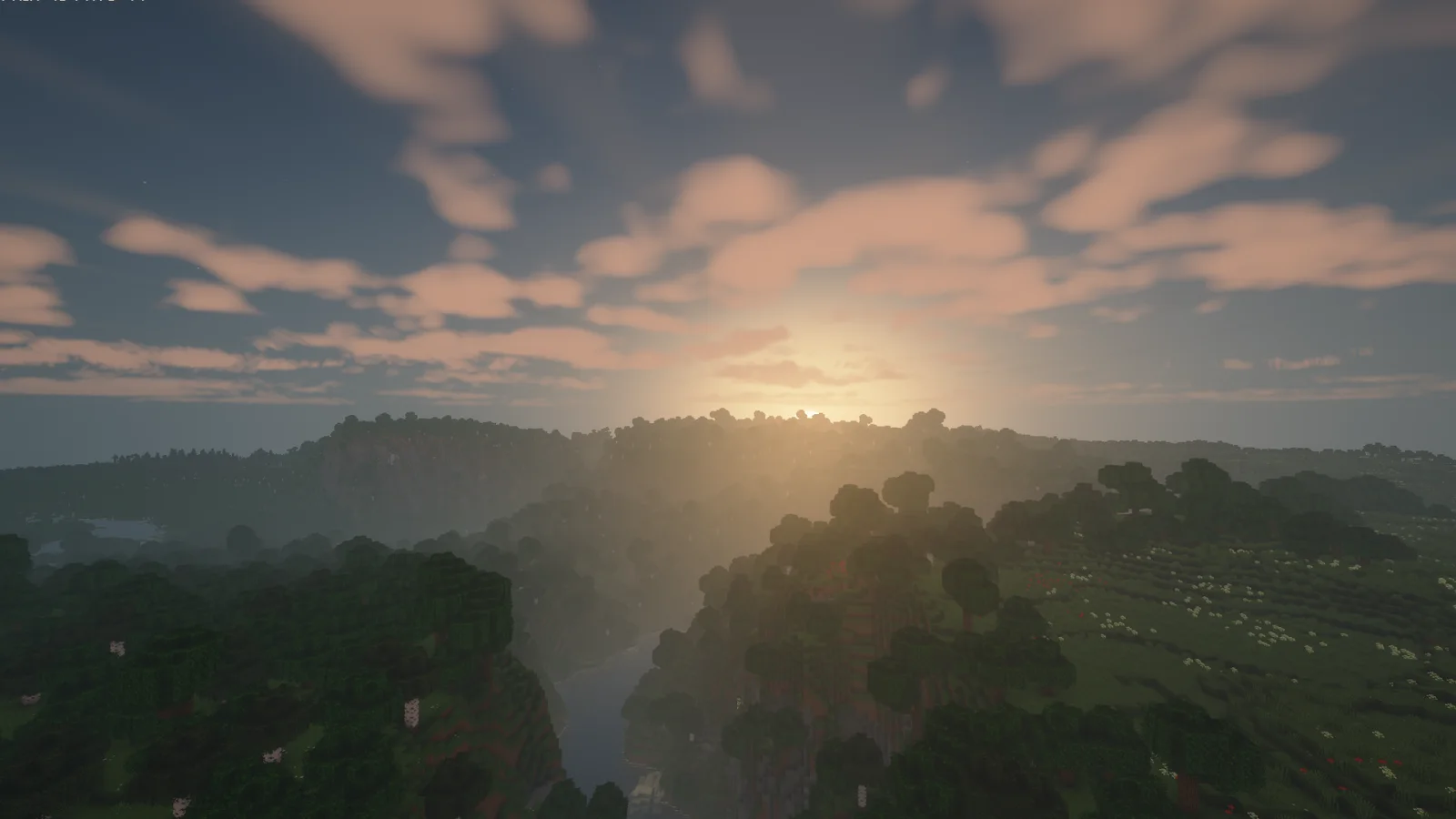
Alpenglow Shaders (pack de shaders) es obra de xeasycrash. Cinematic shaders for Iris 1.21.1: alpenglow on the peaks, volumetric clouds, god rays, living weather, detailed water and a night sky with rare events. 4…
Es compatible con Minecraft 1.17 – 1.21. Se ha descargado 2 veces en Modrinth. La última actualización salió el 15/11/2026.
La más reciente es 1.14.2, publicada el 15/11/2026. Está hecha para Minecraft 1.17 – 1.21.11. Funciona en Iris. La descarga ocupa 387 KB.
| Versión | Publicado | Minecraft | Tipo |
|---|---|---|---|
1.14.2 | 15/11/2026 | 1.17 – 1.21.11 | Estable |
Alpenglow Shaders
A cinematic shader pack for Minecraft Java 1.21.1 with Iris – made by EasyCrashX.
Alpenglow is the moment after sunset when the highest peaks still burn red while the valleys are already in shadow. This pack is built around moments like that: light that changes through the day, weather you can see coming, and a sky that is worth looking up at.
Everything in it was written from scratch. There is no code and no texture from any other shader pack.
Beta. Alpenglow is young and developed on a single machine (NVIDIA RTX 4060 laptop GPU). AMD and Intel graphics are untested. Some effects are new and may still look wrong in places – bug reports with a screenshot are very welcome.
Highlights
Alpenglow and afterglow – high peaks glow pink and orange before sunrise and after sunset, and the clouds light up from below.
Volumetric clouds and god rays – clouds you can fly through, cirrus above them, light shafts through trees, cliffs and gaps in the clouds.
Weather with character – rain clouds turn grey and close in before it rains, distant rain curtains, puddles and wet surfaces, sheet lightning, sandstorms and snowstorms.
Water – waves, reflections, refraction, caustics, shore foam, surf, white water on rapids and falls.
A night sky with events – Milky Way, aurora, constellations and planets, shooting stars, and rare events that follow the world's day counter: eclipse, blood moon, supermoon, a comet.
Four quality profiles and 163 options – from "Performance" to "Cinematic", with every effect adjustable on its own.
Features
Light and shadow
Soft shadows with variable penumbra, coloured shadows through stained glass, cloud shadows
Ambient occlusion and indirect light that bounces off lit surfaces
Warm block light with optional flicker, hand-held light in the colour of the item
Light through leaves and plants, rim light on creatures
Sky
Physically inspired sky colours, sun and moon drawn by the shader, moon phases
Stars, Milky Way, aurora, constellations, two wandering planets
Rainbow after rain, halo around sun and moon, sun dogs and a light pillar in cold biomes
Special sky events: solar eclipse, blood moon, supermoon, meteor nights, comet, fireballs
Clouds, fog and weather
Volumetric or flat clouds, cirrus, glowing cloud edges, a sea of clouds in the valleys on some mornings
Height fog, ground mist, cave atmosphere, light halos in damp air
Rain: wet surfaces, puddles, drops on the lens, distant rain curtains
Snow: snow cover, soft snow surface, sparkling snow, snowstorms
Lightning flashes, sheet lightning, sandstorms, varying weather from day to day
Water
Moving surface, reflections of sky and world, refraction, caustics, adjustable murkiness
Shore foam, surf, storm waves, sea sparkle at night
White water and mist on waterfalls, bubbles and specks under water
Living world
Waving grass, plants and leaves with gusts of wind
Seasons that follow the day counter
Fireflies, dust in sunlight, morning dew
Glowing ores, sculk and glow berries, glowing creatures, moving lava
Image and camera
Three tone mappers, six looks (including "Epic"), white balance, saturation, contrast, auto exposure
Anti-aliasing with TAA or FXAA, sharpening
Bloom, anamorphic streaks, lens flare, lens dirt, vignette
Photo mode, depth of field, motion blur, film grain, chromatic aberration, letterbox bars
Styles for fun: comic, retro pixels, CRT screen, miniature
Dimensions
Nether: heat haze and drifting embers
End: streams of matter in the sky
Fancy portals
Accessibility
Colour vision filters for protanopia, deuteranopia and tritanopia
"Reduce Flashing" tones down lightning and other sudden flashes
Settings menu
The menu is sorted into pages by topic, with a quick-start page, a page for everything that is new in the current version and an alphabetical list of all options. It is available in German and English; the detailed tooltips exist in German only for now.
Requirements
Minecraft Java Edition 1.21.1 (the version the pack is developed and tested on)
Iris (with Sodium). OptiFine is not supported.
A dedicated graphics card is recommended. Start with the "Balanced" profile and switch to "Performance" if the frame rate is too low.
Compatibility
Other Minecraft versions: the pack has no version-specific code, so the same file is meant to work on other versions that have a current Iris release. Only 1.21.1 is confirmed so far.
labPBR 1.3 resource packs: normal maps, specular maps and parallax mapping are read.
Distant Horizons and Voxy: support is included, but still experimental.
Installation
Install Iris for Minecraft 1.21.1.
Open Options → Video Settings → Shader Packs and click Open Shader Pack Folder.
Put the downloaded zip file into that folder. Do not unpack it.
Select Alpenglow in the list and click Apply.
Experimental options
These are off by default and may not work everywhere: coloured block light, tracks in the snow, rings on water, relief from textures.
Licence
Copyright © 2026 EasyCrashX. All rights reserved.
You are welcome to play with the pack and to publish screenshots and videos made with it – please credit "Alpenglow Shaders by EasyCrashX". Re-uploading the pack or modified versions of it, selling it, or presenting it as your own work is not allowed without permission.
Escrita por xeasycrash. Léela con imágenes en Modrinth.
Instala Iris (con Sodium) u OptiFine para tu versión de Minecraft: los shaders necesitan uno de ellos.
Descarga el archivo .zip desde Modrinth. No lo descomprimas.
En Minecraft, abre Opciones, luego Gráficos, luego Shader Packs y pulsa Abrir carpeta de shaders.
Suelta el archivo .zip en esa carpeta, elige Alpenglow Shaders en la lista y pulsa Listo.
Los shaders exigen mucho a la tarjeta gráfica. Si el juego va lento, elige un perfil más bajo en sus ajustes.
| Recurso | Descargas | Versiones | Última actualización | Precio |
|---|---|---|---|---|
| Alpenglow Shadersel que estabas viendo | 2 | 1.17 – 1.21 | hace 16 horas | Gratis |
| Aurelia ShaderVirtualAdi | 311 | 1.20 – 26.x | hace 19 días | Gratis |
 Cristal ShadersEidenMax | 105 | 1.20 | hace 11 días | Gratis |
 Lumina ShaderBenjiaa | 201K | 1.8 – 26.x | 20 sept 2026 | Gratis |
Todavía no. La versión más reciente que admite es Minecraft 1.21.
Sí. Alpenglow Shaders se puede descargar gratis desde Modrinth.
Sí. La última actualización salió en el último día.
Los más parecidos son Aurelia Shader, Cristal Shaders y Lumina Shader. Comparar todas las alternativas
Aurelia ShaderShaders · 1.20 – 26.xA cinematic Iris shader for Minecraft with volumetric clouds, realistic animated water with reflections, god rays, bloom, circular sun and moon, and a green…
Cristal ShadersShaders · 1.20Crystal-clear water, warm natural light, soft volumetric clouds and living skies for Iris and Oculus on 1.20.1.
Lumina ShaderShaders · 1.8 – 26.xCinematic shaders for Minecraft Java featuring a black hole and white hole in the End, atmospheric lighting, volumetric clouds, water reflections and…
 Knight ShadersShaders · 1.20 – 26.x
A lightweight Minecraft shader with volumetric lighting, dynamic skies, bloom, god rays, and customizable cinematic visuals.
 FS shadersShaders · 26.x
Cinematic shaders for Iris & OptiFine (1.21): physically-based scattering skies, soft sun/moon shadows, volumetric light, reflective water, waving foliage…
 Altheon ShadersShaders · 1.20 – 26.x
Realistic shaders for Iris: colored block lighting that mixes and fills caves, volumetric clouds, a physically based sky with deep sunsets, soft shadows and…
Inicia sesión para dejar una reseña.