
 Simple WebMods · 26.x
This mod adds client-side screens to Minecraft. No setup is needed; it works on any world or server. Features: Have unlimited web displays around your world…
Gratis129 descargas

Place interactive web browser screens directly in the Minecraft world.
Descarga directa desde Modrinth · 7 descargas
DigitalScreen (mod) es obra de nurislam2000fartuk. Place interactive web browser screens directly in the Minecraft world.
Es compatible con Minecraft 26.x. Se ha descargado 7 veces en Modrinth. La última actualización salió el 20/09/2026.
La más reciente es 0.1.0, publicada el 20/09/2026. Está hecha para Minecraft 26.2. Funciona en Fabric. La descarga ocupa 75 KB.
| Versión | Publicado | Minecraft | Tipo |
|---|---|---|---|
0.1.0 | 20/09/2026 | 26.2 | Beta |
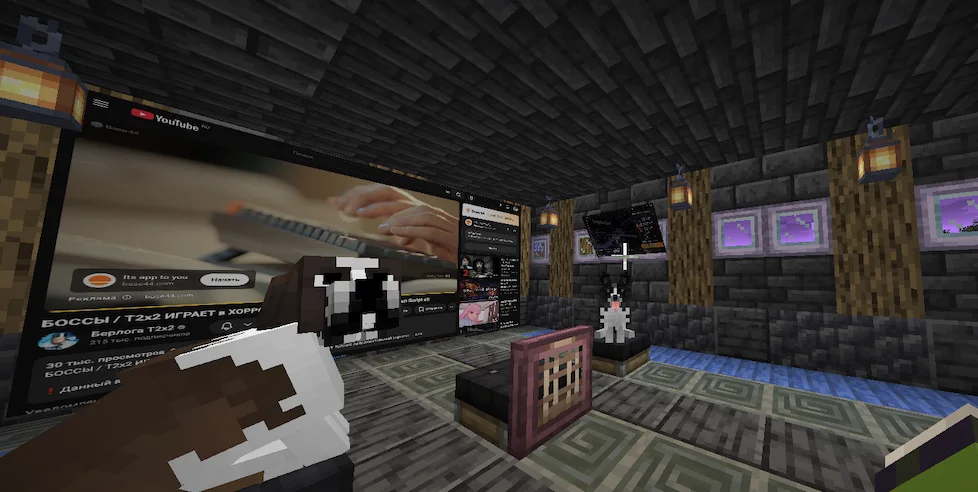
DigitalScreen is a Fabric mod that lets you create interactive web browser screens directly inside the Minecraft world.
Instead of opening a browser as a normal Minecraft menu, DigitalScreen renders Chromium-powered web pages onto freely positioned world-space screens. Screens exist as objects in the 3D world: you can walk around them, resize them, rotate them, and interact with their browser content.
DigitalScreen screens are not regular Minecraft GUI windows.
Each screen has its own position, rotation, and dimensions in the Minecraft world. This means you can create anything from a small virtual monitor to a large cinema-style display and physically move around it.
The browser is rendered directly onto the surface of the screen.
DigitalScreen uses MCEF (Minecraft Chromium Embedded Framework) to provide a Chromium-based browser inside Minecraft.
This allows compatible websites and web applications to run directly on your screens.
YouTube playback is supported. Some websites may behave differently inside an embedded Chromium browser, and availability of individual websites cannot be guaranteed.
Browser audio is supported.
The volume of a screen changes depending on the player's distance from it, allowing browser screens to behave more naturally as objects inside the Minecraft world.
More advanced spatial/stereo audio is planned for a future update.
The current version is client-side.
Screens you create are currently local to your Minecraft client and are not visible to other players.
Shared multiplayer screens are planned for a future version.
DigitalScreen is still under active development.
The current release already provides the core world-space browser experience, but additional features and improvements are planned.
DigitalScreen is currently intended for the client.
Web content is loaded from third-party websites. DigitalScreen does not control the availability, content, authentication requirements, or behavior of those websites.
Browser account/session data is stored locally by the embedded browser and is not included with the DigitalScreen mod file.
What eventually became this mod came about through someone's actions, in which artificial intelligence turned out to be involved in a twofold manner — both as something influencing the course of things, and as that very environment in which this something gradually took shape.
Escrita por nurislam2000fartuk. Léela con imágenes en Modrinth.
Este mod funciona solo en tu propio juego. Los servidores no lo necesitan, así que puedes usarlo en cualquier servidor.
Instala Fabric para Minecraft 26.x.
Añade los mods que necesita: API de Fabric y MCEF Modern.
Descarga el archivo .jar desde Modrinth y ponlo en la carpeta mods de tu directorio .minecraft.
Inicia Minecraft con el perfil de Fabric.
Más fácil: en Prism Launcher o la Modrinth App, busca DigitalScreen en los mods de tu instancia y haz clic en Install. Añade el loader y los mods que necesita por ti.
| Recurso | Descargas | Versiones | Última actualización | Precio |
|---|---|---|---|---|
| DigitalScreenel que estabas viendo | 7 | 26.x | 20 sept 2026 | Gratis |
| Simple WebLuca2D | 129 | 26.x | hace 7 días | Gratis |
 Easy Shulker BoxesFuzs | 5.8M | 1.19 – 26.x | hace 8 días | Gratis |
 Xaero's World Mapthexaero | 106.3M | 1.8 – 26.x | hace 23 días | Gratis |
Sí. DigitalScreen es compatible con Minecraft 26.x. Todas las versiones compatibles: 26.x.
Sí. DigitalScreen se puede descargar gratis desde Modrinth.
Del lado del cliente. DigitalScreen va en tu propia carpeta mods y funciona en cualquier servidor, incluso en servidores sin mods.
Sí: Fabric API, MCEF Modern. Instálalo antes de DigitalScreen.
Sí. La última actualización salió en el último día.
Los más parecidos son Simple Web, Easy Shulker Boxes y Xaero's World Map. Comparar todas las alternativas
Simple WebMods · 26.xThis mod adds client-side screens to Minecraft. No setup is needed; it works on any world or server. Features: Have unlimited web displays around your world…
Easy Shulker BoxesMods · 1.19 – 26.xSupercharge shulker boxes with browsing, inserting and extracting contents directly from your inventory.
Xaero's World MapMods · 1.8 – 26.xAdds a full screen world map which shows you what you have explored in the world. Works great together with Xaero's Minimap.
 Smooth ScrollingMods · 1.20 – 26.x
Customize the scrolling smoothness or speed in various places like chat, hotbar, creative screen...
 FastQuitMods · 1.17 – 26.x
Lets you return to the Title Screen early while your world is still saving in the background!
 Xaero's MinimapMods · 1.8 – 26.x
Displays a map of the nearby world terrain, players, mobs, entities in the corner of your screen. Lets you create waypoints which help you find the locations…
Inicia sesión para dejar una reseña.