
 Vanilla AdvancedShaders · 1.20
A high-performance shader meant to both look good and run on low-end computers! Might have some bugs on older GPUs. Feedback is appreciated!
Gratuit57,886 téléchargements
a shader made by me and little ai help(ai helped with some ui and performance stuff and bloom since im dumb) STRONGLY RECOMMEND TURNING OFF DIRT LENS ILL…
Téléchargement direct depuis Modrinth · 48 téléchargements
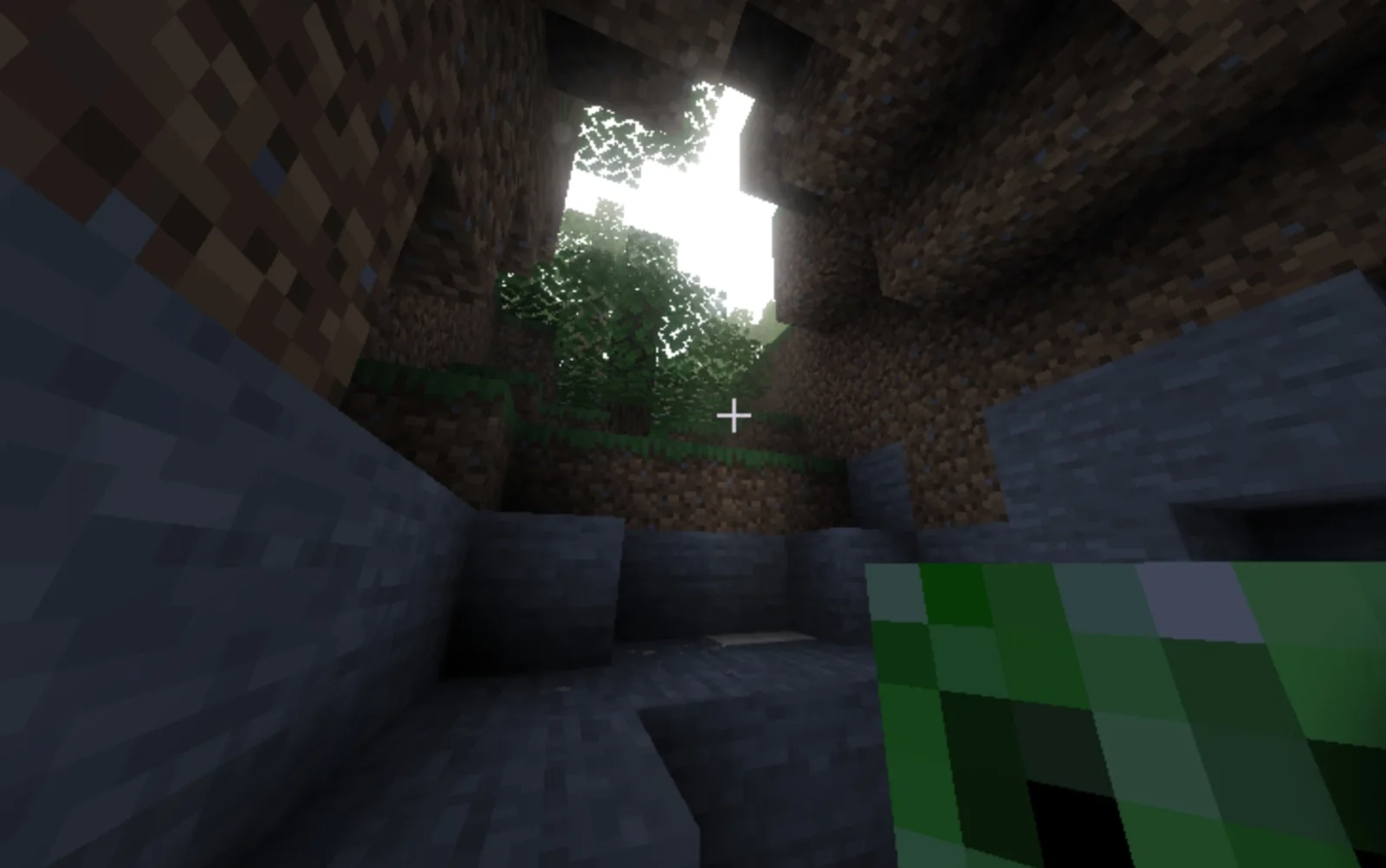
quantum's shader (pack de shaders) est une création de ajayghaie929292. a shader made by me and little ai help(ai helped with some ui and performance stuff and bloom since im dumb) STRONGLY RECOMMEND TURNING OFF DIRT LENS ILL…
Versions prises en charge : Minecraft 1.20 – 26.x. On compte 48 téléchargements sur Modrinth. La dernière mise à jour date du 05/10/2026.
La plus récente est 1.20.1, sortie le 05/10/2026. Elle est faite pour Minecraft 1.20 – 26.3. Elle fonctionne sur Iris et Optifine. Le téléchargement fait 21 KB.
| Version | Publié | Minecraft | Type |
|---|---|---|---|
1.20.1 | 05/10/2026 | 1.20 – 26.3 | Stable |
A mobile-friendly, atmosphere-focused shaderpack for Minecraft Java 1.20.1.
quantums shader brings cinematic light shafts, real volumetric clouds, planar reflections, lens effects and soft dynamic lighting to devices that usually can’t run shaders. It was built and tested on Forge 47.4.x with Embeddium and Oculus 1.8.0, running through MobileGlues (Zalith Launcher) on an Adreno GPU with OpenGL ES 3.2. It uses only plain GLSL 120 programs and avoids compute shaders and unsupported image formats, so it stays compatible with GL-translation layers.
Highlights
Volumetric light rays
The rays are world-space, not screen-space. They are raymarched through the shadow map, so shafts stay visible when you look away from the sun and don’t vanish at the screen edge.
Light scattering uses a dual-lobe Henyey-Greenstein phase function with Beer-Lambert absorption, for a soft, physically-inspired look.
Rays have no hard shaft edges, and a depth-aware blur removes noise without smearing them across geometry.
Ray transparency is configurable from 1% to 100%, so you can go from a subtle haze to dramatic god rays.
You can also adjust intensity, density, sample count, distance, rain boost and blur radius.
Volumetric and blocky clouds
Blocky clouds are inspired by Complementary Reimagined. They are traced on a grid, with configurable height, thickness, cell size, speed, threshold and step count.
Volumetric clouds are slab-raymarched with their own coverage, density, thickness, erosion, scale, brightness, opacity, step count and view distance. A denoise pass keeps them smooth at low sample counts.
You can switch cloud mode to suit your device.
Sky, sun, moon and stars
The pack draws its own sun, moon and stars, with adjustable sun size and shape.
Sky tone is linked to cloud tone (SKY_TONE_MATCH), so the sky and clouds always share a coherent palette. You can also set hue, saturation and brightness by hand.
Shadows
Sun shadows are soft, with adjustable sample count and softness.
Mobs and entities darken properly in shadow and at night.
Dynamic light shadows
Light-emitting blocks (torches, lanterns, lamps, glowstone and similar) can light and shade their surroundings in screen space, with contact shadows.
An emitter search over the scene’s mip chain finds the nearest light source, and block-light darkening keeps the effect natural.
The effect is fully optional. You can toggle it and tune strength, shadow amount, radius, blur, distance, lod count and steps. When it is off, its passes are skipped entirely and cost nothing.
Debug views are included to help you tune it.
Planar reflections
Reflections use a planar-style reflection pass instead of SSR, which is more stable on mobile.
Water reflects, and so do solid blocks, including grass.
A minimum Fresnel keeps reflections visible from more than just a few viewing angles.
Reflection strength, block reflection strength, minimum reflectivity and iteration count are all adjustable.
Ambient occlusion (SSAO)
A hemisphere SSAO with edge-safe normals gives contact depth without halos.
It has many controls: strength, radius, samples, bias, power, maximum darkness, distance, blur radius and tint. It can skip emissive surfaces and has a debug view.
Rain ripples
Rain ripples on water and puddles are taken from the Eclipse shader’s ripples.glsl.
The effect is biome-aware and eases in and out smoothly when rain starts and stops.
Water, puddles, intensity, strength and the biome check can all be toggled or tuned.
Bloom and lens dirt
Bloom uses the Derivative Shaders bloom pipeline: a tiled dual-blur downsample atlas, separable Gaussian blur and a bicubic multi-tile upsample.
Every light-emitting block contributes to bloom, and there are controls for strength, threshold, veiling glare, emissive bloom strength and blur quality.
A procedural lens dirt effect adds smudges, oily fingerprints, scratches, dust and water droplets with bright rims and a subtle rainbow fringe. The dirt only shows where glare hits it, as on a real dirty lens. Its strength and detail level (0–2) are adjustable.
Color grading
Saturation, contrast, brightness and vibrance sliders let you set the final look yourself.
Écrite par ajayghaie929292. À lire avec les images sur Modrinth.
Installe Iris (avec Sodium) ou OptiFine pour ta version de Minecraft : les shaders ont besoin de l'un des deux.
Télécharge le fichier .zip depuis Modrinth. Ne le décompresse pas.
Dans Minecraft, ouvre Options, puis Paramètres vidéo, puis Shaders, et clique sur Ouvrir le dossier des shaders.
Dépose le fichier .zip dans ce dossier, choisis quantum's shader dans la liste et clique sur Terminé.
Les shaders sollicitent beaucoup la carte graphique. Si le jeu ralentit, choisis un profil plus bas dans leurs réglages.
| Ressource | Téléchargements | Versions | Mise à jour | Prix |
|---|---|---|---|---|
| quantum's shadercelle que tu regardais | 48 | 1.20 – 26.x | 5 oct. 2026 | Gratuit |
| Vanilla AdvancedThePlaneGuy45 | 58K | 1.20 | 19 oct. 2023 | Gratuit |
 RAY TRACING POTATOoct2one | 4,831 | 1.16 – 26.x | il y a 27 jours | Gratuit |
 MakeUpKDXavier | 14.2M | 1.12 – 26.x | il y a 23 jours | Gratuit |
Oui. quantum's shader prend en charge Minecraft 26.x. Toutes les versions prises en charge : 26.x, 1.21, 1.20.
Oui. quantum's shader se télécharge gratuitement sur Modrinth.
Oui. La dernière mise à jour date des dernières 24 heures.
Les plus proches sont Vanilla Advanced, RAY TRACING POTATO et MakeUp. Comparer toutes les alternatives
Vanilla AdvancedShaders · 1.20A high-performance shader meant to both look good and run on low-end computers! Might have some bugs on older GPUs. Feedback is appreciated!
RAY TRACING POTATOShaders · 1.16 – 26.xA performance-focused Minecraft shader with improved lighting, atmospheric fog, bloom, water visuals and shadows, designed with lower-end hardware in mind.
MakeUpShaders · 1.12 – 26.xMakeUp aims to provide the best quality / performance ratio, building a shader that can be adapted to anyone's resources.
 Insanity ShaderShaders · 1.8 – 1.21
A stylized, horror themed Iris shaderpack with high customizability and performance.
 ArcShaders · 1.16 – 1.19
An attempt at a mostly realistic shader that maintains decent performance; for Minecraft Java.
 Pegasus ShadersShaders · 1.19 – 26.x
A shader that blends high performance range with new features, and lots of stylistic range!
Connecte-toi pour laisser un avis.