
 Tom's Simple Storage ModMods · 1.16 – 26.x
Simple vanilla style storage mod
Gratuit21,121,052 téléchargements

A mod that lets you store your experience in multiple ways!
Téléchargement direct depuis Modrinth · 2,928,641 téléchargements
XP Storage (mod) est une création de Pardys. A mod that lets you store your experience in multiple ways!
Versions prises en charge : Minecraft 1.19 – 26.x. On compte 2,928,641 téléchargements sur Modrinth. La dernière mise à jour date du 01/11/2026.
XP Storage a publié 20 versions sur Modrinth depuis le 02/06/2023. 8 sont sorties au cours de l'année passée. La plus récente est 1.6.2+26.3, sortie le 01/11/2026. Elle est faite pour Minecraft 26.3. Elle fonctionne sur Fabric. Le téléchargement fait 1.1 MB.
| Version | Publié | Minecraft | Type |
|---|---|---|---|
1.6.2+26.3 | 01/11/2026 | 26.3 | Stable |
1.6.1+26.2 | 01/11/2026 | 26.2 | Stable |
1.6.1+26.1.2 | 01/11/2026 | 26.1, 26.1.1, 26.1.2 | Stable |
1.6.1+1.21.11 | 01/11/2026 | 1.21.11 | Stable |
1.6.1+1.21.10 | 01/11/2026 | 1.21.10 | Stable |
NO PORT TO FORGE PLANNED! (but feel free to port it by yourself and link it)
The mod is fully configurable to enable only changes that you like
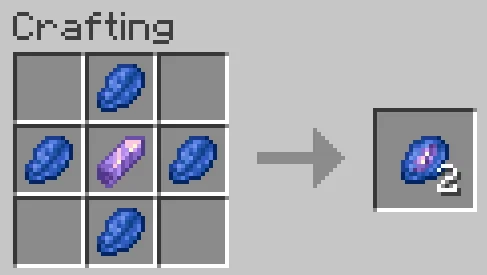
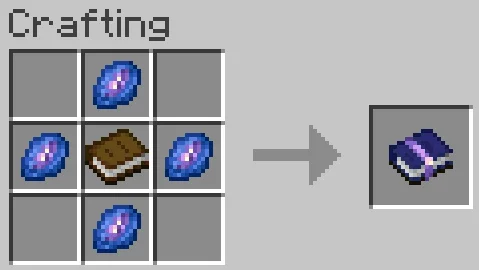
Never lose your levels again! Craft XP Books to store your experience and keep it safe from a coming death. Get it back whenever you want: read the book to retrieve it, or brew it in a brewing stand to create special Experience Bottles that can give you even more experience.
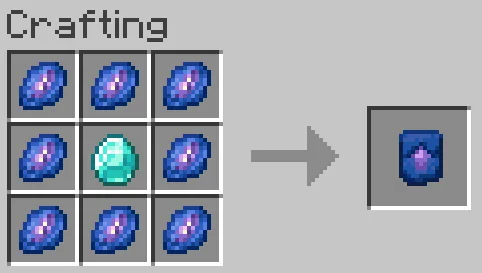
Upgrade your books with a smithing template so they store more and lose less. You can also pick one of the built-in data packs to play a completely different progression, without writing a single file. And if you like to tinker, the books, the upgrades and the brewing are all data-driven: tune them with your own data pack.
TO READ WHEN UPDATING FROM A VERSION OLDER THAN V1.6
⚠️ v1.6 UPDATE: XP Book II and III were removed, and item data changed! v1.6 converts everything: update to v1.6 first, open your world, and put your books in a crafting table to update them.
⚠️ Since v1.6.1, this conversion is gone: books and bottles that were not converted with v1.6 lose their content, so don't skip v1.6!
This is a short description, full description below.
Not a fan of the default progression? Since v1.6.1, the mod ships with ready-to-use data packs. They are disabled by default. Enable at most one:
Available data packs
Data pack · XP Book · Upgrades
none (Default) · 15 levels, gives back 85%, 1 level per brewed bottle · Diamond (30 levels, 90%, 3), Netherite Ingot (50 levels, 95%, 5), Nether Star (100 levels, 100%, 10)
Easy-Default xp_storage:easy_default · 15 levels, gives back 100% · Same as default, all at 100%
Legacy xp_storage:legacy · 30 levels, gives back 100%, 1 level per brewed bottle · None
Balanced-Legacy xp_storage:balanced_legacy · 30 levels, gives back 90%, 3 levels per brewed bottle · None
OP-Legacy xp_storage:op_legacy · 100 levels, gives back 100%, 5 levels per brewed bottle · None
If several are enabled, only the topmost one in /datapack list is used, and operators get a warning. Your books keep their data: switching only changes the books crafted or upgraded afterwards.
Recipes
This means the experience to go from level 0 to level X! That's not the same amount as the experience from level Y to level X+Y!
How to use?
Customize with data packs
Everything about the books lives in recipes. Override a recipe by putting a file with the same id in your data pack. If you also use a built-in data pack, enable yours after it (above it in /datapack list).
The crafted book carries its data in its result:
"result": {
"id": "xp_storage:xp_book",
"components": {
"xp_storage:book_component": {
"level": 0, "capacity": 15, "xpFromUsing": 85, "xpFromBrewing": 1, "barColor": 1856424
}
}
}
Smithing recipes, one per book level: baseLevel is the level of the book you put in. Add a level_3 recipe to go further!
{
"type": "xp_storage:xp_book_upgrade",
"template": "xp_storage:xp_book_upgrade_smithing_template",
"base": "xp_storage:xp_book",
"addition": "minecraft:diamond",
"baseLevel": 0,
"resultCapacity": 30,
"resultXpFromUsing": 90,
"resultXpFromBrewing": 3,
"resultBarColor": 10615784
}
Two brewing recipes: xp_storage:brewing/experience_bottle (the first brew, from a mundane potion) and xp_storage:brewing/experience_bottle_upgrade (a brewed bottle brewed again). Change the potion, restrict the book, or set the bottles' maximum level. max_level is optional: remove it and bottles have no maximum level.
{
"type": "xp_storage:experience_brewing",
"input": {"item": "minecraft:potion", "potion_contents": {"potions": "minecraft:mundane"}},
"reagent": {"item": "xp_storage:xp_book"},
"output": {"id": "minecraft:experience_bottle"},
"max_level": 30
}
Operators get a warning if two data packs give an upgrade for the same book level.
Écrite par Pardys. À lire avec les images sur Modrinth.
Ce mod est nécessaire sur le serveur et chez chaque joueur qui rejoint.
Installe Fabric pour Minecraft 1.19 – 26.x.
Ajoute les mods dont il a besoin : API Fabric.
Télécharge le fichier .jar depuis Modrinth et place-le dans le dossier mods de ton répertoire .minecraft.
Lance Minecraft avec le profil Fabric.
Plus simple : dans Prism Launcher ou la Modrinth App, cherche XP Storage dans les mods de ton instance et clique sur Install. Le loader et les mods requis sont ajoutés pour toi.
| Ressource | Téléchargements | Versions | Mise à jour | Prix |
|---|---|---|---|---|
| XP Storagecelle que tu regardais | 2.9M | 1.19 – 26.x | il y a 9 jours | Gratuit |
| Tom's Simple Storage Modtom5454 | 21.1M | 1.16 – 26.x | il y a 26 jours | Gratuit |
 Sophisticated StorageSalandora | 9.8M | 1.19 – 1.21 | 3 mai 2026 | Gratuit |
 Nether ChestedFuzs | 7M | 1.19 – 26.x | 28 sept. 2026 | Gratuit |
Oui. XP Storage prend en charge Minecraft 26.x. Toutes les versions prises en charge : 26.x, 1.21, 1.20, 1.19.
Oui. XP Storage se télécharge gratuitement sur Modrinth.
Les deux. Le serveur et chaque joueur doivent avoir XP Storage installé.
Oui : Fabric API. Installe-le avant XP Storage.
Oui. La dernière mise à jour date des dernières 24 heures.
Les plus proches sont Tom's Simple Storage Mod, Sophisticated Storage et Nether Chested. Comparer toutes les alternatives
Tom's Simple Storage ModMods · 1.16 – 26.xSimple vanilla style storage mod
Sophisticated StorageMods · 1.19 – 1.21This is the Unofficial Fabric version of Sophisticated Storage.
Nether ChestedMods · 1.19 – 26.xUse the Nether's power to store 8 times more items than usual in this chest.
 Applied Energistics 2Mods · 1.18 – 26.x
AE2: A popular automation and storage mod
 More DelightMods · 1.19 – 26.x
Extra meals, knives, and ingredients for Farmer's Delight that improve your culinary experience.
 Storage DrawersMods · 1.8 – 26.x
Interactive bulk storage solution
Connecte-toi pour laisser un avis.