NouveauCraftRank SitesSite web et boutique gratuitsCrée la tienne ›
AshlarLogiciel serveur gratuit basé sur Paper, avec protection DDoS et anti-backdoor Voir Ashlar ›CommunautéPose des questions, partage tes constructions et trouve des joueurs Rejoindre le forum ›
Ressources / Modpacks / Dnz Client/Modpack

Dnz Client/Modpack

This modpack/client that adds a better performance and interface.

ModpacksGratuit26.x
par Dnz_26 · repris depuis Modrinth
Télécharger ›

Téléchargement direct depuis Modrinth · 42 téléchargements
Dnz Client/Modpack, capture 1

Ce qu'il fait

Dnz Client/Modpack (modpack) est une création de Dnz_26. This modpack/client that adds a better performance and interface.

Versions prises en charge : Minecraft 26.x. On compte 42 téléchargements sur Modrinth. La dernière mise à jour date du 14/10/2026.

Versions prises en charge

26.x

Historique des versions

Dnz Client/Modpack a publié 10 versions sur Modrinth depuis le 24/09/2026. 10 sont sorties au cours de l'année passée. La plus récente est 1.38.0+mc26.2, sortie le 14/10/2026. Elle est faite pour Minecraft 26.2. Elle fonctionne sur Fabric. Le téléchargement fait 6.5 MB.

VersionPubliéMinecraftType
1.38.0+mc26.214/10/202626.2Stable
1.38.0+mc26.314/10/202626.3Stable
1.37.0+mc26.312/10/202626.3Stable
1.37.0+mc26.212/10/202626.2Stable
1.7.0+mc26.324/09/202626.3Stable
Description de l'auteur sur Modrinth

DNZ Client

IMPORTANT:Coded and designed some parts with in help of ai.
Free. Open source. Built for players.

🌐 Official website:

DNZ Client is an all-in-one Minecraft client for 26.2 and 26.3 that gives you more frames, less stutter and the features you actually use, all set up and ready the moment you press play. No accounts to create, no ads, no paywalls, no tracking. Just a faster, cleaner Minecraft.

This modpack is the complete DNZ experience: DNZ Client together with the performance mods we picked and tested, installed in one click.


⚡ Performance first

Performance is the number one rule at DNZ. Every decision starts with one question: does it make the game smoother?

  • Hand-picked performance mods, the same set DNZ Launcher installs: Sodium, Sodium Extra, Lithium, Entity Culling, ImmediatelyFast, FerriteCore, Dynamic FPS, BadOptimizations, Debugify and more. Each one fixes a different bottleneck: rendering, game logic, memory, hidden entities, idle windows.
  • Measured, not guessed. We run the pack through our own automated FPS benchmark (the same busy scene every time) and compare average FPS and 1% lows. A mod only stays in if it makes the game smoother.
  • DNZ Fast ** (built in, on by default): on busy servers, DNZ skips drawing the things that cost frames but don't matter far away (hologram armor stands, item frames, paintings, dropped items, XP orbs, signs, banners, heads) and caps the particle count. **Players and mobs are never hidden, so nothing changes in a fight.
  • Smart first start: VSync off and no FPS cap once, so your first match already runs at full speed. After that, your own choice is always kept.

🎨 Our own drawing engine, no Chromium

Clients that draw their menus with Chromium (a full web browser running inside the game) lose FPS: the browser takes RAM, CPU and graphics time in the background, even while you play.

DNZ uses no Chromium at all. DNZ's menus are made for Minecraft:

  • On Minecraft 26.2, DNZ menus are drawn by our own vector renderer built on NanoVG, straight on your graphics card. While a DNZ menu builds its frame, every shape and text is recorded and then drawn by the GPU in one pass: sharp at any size, smooth animations, and almost no cost to your FPS.
  • On Minecraft 26.3, DNZ menus use Minecraft's own renderer while the GPU renderer is being brought over.
  • No Chromium, no background services, no extra processes. What runs is the game and DNZ, nothing else.

✦ Built-in features

HUD (35+ modules)

Drag, resize and switch every module on its own.

  • Combat: Keystrokes, CPS, Target Info (health, armor, distance), Combo counter, Reach display
  • Info: FPS, Ping, Coordinates, Direction, Yaw / Pitch, Biome, Dimension, Speed, Clock, Game Time, Date, Session time, TPS, Frame Time, RAM, Server, Players, Entities, Chunks, Light level
  • Gear: Armor status, Durability, Item Count, Saturation, XP Level
  • Look At: shows the block or creature you are looking at
  • HUD editor: move everything with your mouse, scroll to resize, right-click for settings

Gameplay

  • Minimap: always know where you are
  • Custom Crosshair: 6 styles with size, gap, thickness, color and outline
  • Hitboxes: one key, clear view
  • Zoom: smooth zoom on a key
  • Food info: saturation on the hunger bar, and food values in item tooltips
  • Shulker Preview: see what's inside a shulker box without opening it
  • Clean Hotbar: one see-through rounded bar instead of nine boxes, the selected slot lit in the accent color

The DNZ menu

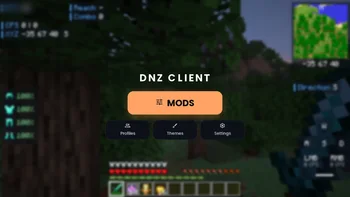
  • Right Shift opens the DNZ screen: one big MODS button, plus Profiles (your skins), Themes and Settings
  • Every module one click away, sorted into HUD, Combat, Quality of Life and Other, with search
  • Themes: pick the look you like
  • Settings of other installed mods (like Sodium's video settings) open right from the DNZ menu

Social & online

  • Cloud Save: your key binds and DNZ settings follow your Minecraft account to every computer. Off until you turn it on, and nothing is sent while it's off.
  • Open World: host your single-player world for friends in one click. They join from anywhere, no port forwarding, no extra program.
  • Friends: add players by name; they get a star in the player list and you see when they join or leave
  • Discord status: shows "Playing DNZ Client" with where and how long. One switch turns it off, and streamer mode hides the server.
  • Skin changer: change your skin right from the pause menu

For creators: script mods

  • Write your own small mods in JavaScript: a single file in .minecraft/dnzclient/scripts, reloaded live while the game runs. No Java, no build tools.

DNZ Schematic (included)

  • Shows .litematic buildings as see-through blocks in your world and marks every wrong, missing or extra block. Build layer by layer with a material list. Press M.

🚀 DNZ Launcher (optional, free)

Want even more? DNZ Launcher is our own launcher, made for DNZ Client and built for speed:

  • One click to play: installs and updates DNZ Client and every performance mod by itself
  • Microsoft sign-in (DNZ Launcher is reviewed and allowed by Mojang for sign-in), and you stay signed in
  • Mod & texture pack library: search Modrinth and CurseForge together, install with one click. The same mod from both sites is recognized, so you never get two copies.
  • AUTO settings: scans your PC (RAM, processor, graphics card) and sets the game up for high FPS and low input delay. Your old settings are backed up, and one click undoes it.
  • Laptop boost: on laptops with two graphics chips, the game runs on the strong one
  • Tuned Java settings for fewer micro-stutters
  • Profiles for different versions and mod sets
  • Import your worlds, mods, servers and settings from other launchers in one go
  • Server list with one-click join
  • Animated 3D skin on the home page, accent colors, and the launcher in English, Turkish and German
  • Updates itself safely: every update is signed, and the launcher checks the signature before installing

👉 Download it free at dnzclient.com


🔓 Open source

DNZ Client is open source under the GPL-3.0 license. Every line is public on GitHub: read it, check it, build it yourself, or help make it better. Nothing is hidden.

🛡️ Privacy

  • No tracking, no analytics, no advertising, no telemetry.
  • DNZ never sees your Microsoft password or Minecraft access token. Sign-in happens on Microsoft's own page.
  • DNZ servers only store what you choose to send (like Cloud Save, which is off until you turn it on).

📦 What's in this pack

DNZ Client · DNZ Schematic · Fabric API · Sodium · Sodium Extra · Mod Menu · Lithium · Entity Culling · ImmediatelyFast · FerriteCore · Dynamic FPS · BadOptimizations · Ixeris · Gnetum · OBE · Cull Fewer Leaves · AsyncLogger · Debugify

Minecraft: 26.2 and 26.3 · Loader: Fabric · Side: client only (join any server)

💬 Feedback & help

DNZ is new and independent.

If you like DNZ, follow the project here and share it with a friend. It helps more than you think! ❤️


DNZ Client is not an official Minecraft product and is not approved by or associated with Mojang or Microsoft.

Écrite par Dnz_26. À lire avec les images sur Modrinth.

Comment installer Dnz Client/Modpack

  1. Ce modpack tourne sur Fabric for Minecraft 26.x. Le launcher avec lequel tu l'installes s'en occupe.

  2. Télécharge le fichier .mrpack depuis Modrinth.

  3. Ouvre-le avec un launcher qui lit les .mrpack, comme Modrinth App ou Prism Launcher : il crée une nouvelle instance avec tous les mods et réglages.

  4. Donne assez de mémoire à l'instance : la plupart des modpacks veulent 4 à 8 Go.

  5. Pour y jouer à plusieurs sur un serveur, utilise les fichiers serveur du modpack s'il y en a ; sinon installe les mêmes mods sur le serveur.

Compatibilité

Versions de Minecraft
26.x
Fonctionne sur
Fabric
Édition
Java
Nécessite
Rien d'autre
Licence
GPL
Prix
Gratuit
Suivi
Mis à jour activement (11/11/2026)

Dnz Client/Modpack comparé à des ressources similaires Comparer toutes les alternatives

RessourceTéléchargementsVersionsMise à jourPrix
Dnz Client/Modpackcelle que tu regardais4226.xil y a 27 joursGratuit
Waddon1's Performance Modpackwaddon136K1.19 – 26.xil y a 1 jourGratuit
Act. & Betterzdkrr242K1.20 – 26.xil y a 22 joursGratuit
FrostClientzippiik129K1.21 – 26.xil y a 25 joursGratuit

Questions

Est-ce que Dnz Client/Modpack fonctionne sur Minecraft 26.x ?

Oui. Dnz Client/Modpack prend en charge Minecraft 26.x. Toutes les versions prises en charge : 26.x.

Est-ce que Dnz Client/Modpack est gratuit ?

Oui. Dnz Client/Modpack se télécharge gratuitement sur Modrinth.

Dnz Client/Modpack est-il encore mis à jour ?

Oui. La dernière mise à jour date des dernières 24 heures.

Quelles sont les meilleures alternatives à Dnz Client/Modpack ?

Les plus proches sont Waddon1's Performance Modpack, Act. & Better et FrostClient. Comparer toutes les alternatives

Alternatives à Dnz Client/Modpack

Act. & BetterModpacks · 1.20 – 26.x

🌍 A fully client-side modpack that tries to replicate the atmosphere as when playing with Actions & Stuff for Java Edition. The modpack combines excellent ⚡…

Gratuit241,576 téléchargements
FrostClientModpacks · 1.21 – 26.x

Frost Client is a clean, minimal performance modpack for 1.21.11 — the spiritual successor to FoxClient, rebuilt for modern Minecraft with more stability…

Gratuit129,169 téléchargements
OneClientModpacks · 1.21 – 26.x

All in one modpack for OneClient by Polyfrost, the client for everyone. Optimized FPS / performance, world hosting, QoL features, in one place. Polydium…

Gratuit119,651 téléchargements
Comparer toutes les alternatives ›

Avis

–★★★★★
0 avis
50
40
30
20
10

Connecte-toi pour laisser un avis.