
This project adds advanced sorting features.
Gratuit3 téléchargements
This project is a create addon w/ a copy lathe, a jacquard loom, a barrel organ and a cnc mill, each one does one weird job
Téléchargement direct depuis Modrinth · 0 téléchargements
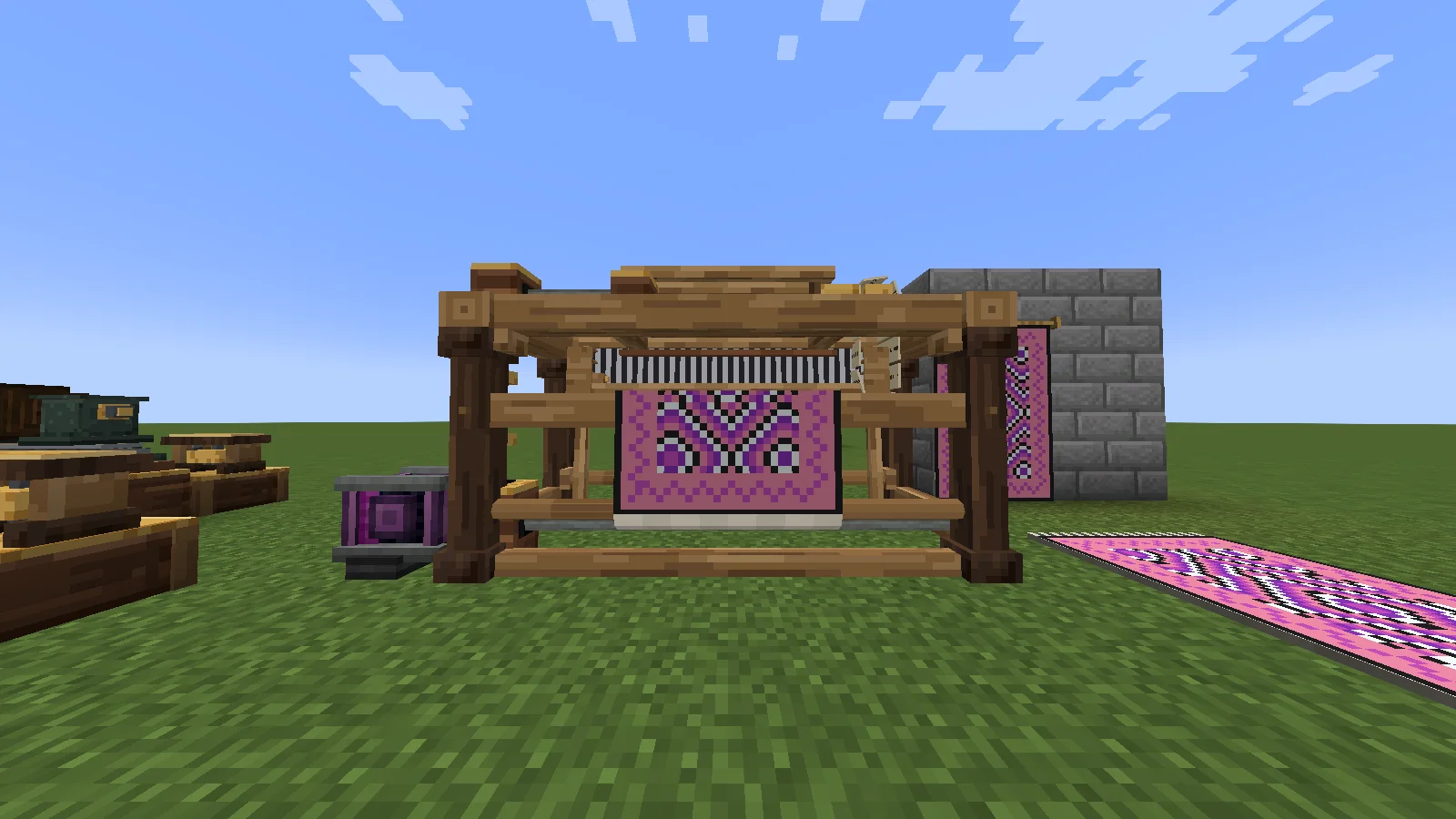
Create: Odds 'N Ends (mod) est une création de ImEden6. This project is a create addon w/ a copy lathe, a jacquard loom, a barrel organ and a cnc mill, each one does one weird job.
Versions prises en charge : Minecraft 1.21. La dernière mise à jour date du 16/11/2026.
La plus récente est 0.1.0, sortie le 15/11/2026. Elle est faite pour Minecraft 1.21.1. Elle fonctionne sur NeoForge. Le téléchargement fait 1.0 MB.
| Version | Publié | Minecraft | Type |
|---|---|---|---|
0.1.0 | 15/11/2026 | 1.21.1 | Stable |
Four odd machines for Create. The copy lathe takes blocks and makes them into different shapes. The jacquard loom takes punched cards and weaves images. The barrel organ plays a punched track using pipes, drums and whistles. Finally, the CNC mill lets you run Create's deploying recipes and sequenced assemblies in one box.
All of them run on rotation and work with funnels and mechanical arms. You can hold W over any of them in your inventory to see their Ponder scenes.
Take a block and make it into a baluster, vase, table leg or any shape you wish! The material will not change, so an oak log will become an oak spindle and quartz will become quartz. Blocks from other mods can also be used.
To make it:
If you want to make another of the same thing you've made, make a tracer set 2 blocks behind the lathe, with 3 rails and a holder on either end. Place your item into a holder and the lathe will mimic it, ignoring the template.
This weaves tapestries from a chain of punched cards. You draw your image on the card punch, punch the cards and weave them.
To make it:
You can hang the tapestry on a wall or lay it out as a rug. The chain stays in the loom, so you can keep weaving copies.
Plays music from books using wind chests. The organ body itself does not make any noise. Connect wind lines from the copper port on the side to wind chests. Whatever is on the chest will play.
The box on the side will let you choose between Play once or Loop. The organ can be paused using redstone. If on Play once it will give a quick pulse at the end of your song.
You can put these on the wind chests:
If you put a dye in the filter of the chest it will only play that voice. If there's nothing on the chest it will still blow its notes and give off redstone. This makes a line of chests turn your score into a sequencer for lamps or doors.
A 4x3x3 mill made from brass. To create the box, place CNC frames. On one of the short sides place the pendant in the centre. On the other place the CNC drive in the centre of the bottom. Wrench the pendant. Spin the drive.
By default this lets you run Create's deploying recipes and complete sequenced assemblies (that don't have any fluid steps). The assembly will cost 1 loop of parts and will be much faster than a Create line. Any tools that you would keep in a deployer (axes etc.) will need to be placed in the mill but will not be consumed. You can add your own recipes to the mill using the createoddsnends:cnc recipe type in modpacks.
Manually, you can press the pendant or click the front to open the doors. Place your parts in and take your finished items out (1 stack per click). The machine will not cut if the doors are open. To automate, place your parts in through the hatch on top. Finished items come out through the hatch on the pendant's end of the machine. Funnels, chutes, hoppers, arms and other mods' pipes will all work. Arms can also be used on the front. The mill finishes what it is cutting, then the doors open for the arm.
What versions?
NeoForge 1.21.1 with Create 6.0.10 or higher (6.0 line).
I tested with 6.0.10
Do I need JEI/EMI?
No. Both, or just one, will give you recipe pages for turning, punching, weaving and the CNC.
Can I customise the CNC?
Yes. In the server config you can disable the borrowed recipes by setting cnc.deploying and cnc.sequencedAssembly to false. You can also adjust how much the assembly costs with cnc.assemblyLoopsCharged and how fast it runs with cnc.assemblyStepTicks.
I've played older versions of Create: Cool Stuffs. Will my world break?
No. Old blocks, items, designs and scores will transfer over.
Can I use this in a modpack?
Yes! The code is MIT and the assets are All Rights Reserved (don't use the textures/models in your own mod).
Écrite par ImEden6. À lire avec les images sur Modrinth.
Ce mod est nécessaire sur le serveur et chez chaque joueur qui rejoint.
Installe NeoForge pour Minecraft 1.21.
Ajoute les mods dont il a besoin : Create.
Télécharge le fichier .jar depuis Modrinth et place-le dans le dossier mods de ton répertoire .minecraft.
Lance Minecraft avec le profil NeoForge.
Plus simple : dans Prism Launcher ou la Modrinth App, cherche Create: Odds 'N Ends dans les mods de ton instance et clique sur Install. Le loader et les mods requis sont ajoutés pour toi.
| Ressource | Téléchargements | Versions | Mise à jour | Prix |
|---|---|---|---|---|
| Create: Odds 'N Endscelle que tu regardais | 0 | 1.21 | il y a 1 jour | Gratuit |
| organizer proinqwizitor57 | 3 | 1.13 | il y a 27 jours | Gratuit |
 Do a Barrel Rollenjarai | 11.8M | 1.17 – 26.x | 21 sept. 2026 | Gratuit |
 Container SearchVethre | 114 | 1.20 – 26.x | 10 oct. 2026 | Gratuit |
Pas encore. La version la plus récente prise en charge est Minecraft 1.21.
Oui. Create: Odds 'N Ends se télécharge gratuitement sur Modrinth.
Les deux. Le serveur et chaque joueur doivent avoir Create: Odds 'N Ends installé.
Oui : Create. Installe-le avant Create: Odds 'N Ends.
Oui. La dernière mise à jour date des dernières 24 heures.
Les plus proches sont organizer pro, Do a Barrel Roll et Container Search. Comparer toutes les alternatives
This project adds advanced sorting features.
Do a Barrel RollMods · 1.17 – 26.xMicrosoft flight simulator for Minecraft elytras.
Container SearchMods · 1.20 – 26.xThis project is a quality of life mod that indexes and organize the contents of containers into one in game menu to allow the player to easily find what they…
 Loom LimitMods · 1.21
Allows up to 64 banner layers, expands the limit to 16 by default
 ProjectEMods · 1.20 – 1.21
Put your EMC to work. A ProjectE addon featuring precise resource automation, magic and kinetic power integrations, black hole recycling, a Curios charm, and…
 Projection Opens Genshin / CrashMods · 1.21 – 26.x
Detects projection mods (Litematica/Schematica) and either opens the Genshin Impact website or crashes the game.
Connecte-toi pour laisser un avis.