
 Amethyst ShadersShadery · 1.8 – 1.21
[WIP] A Semi-Realistic Minecraft Shaderpack, with a Vibrant Visuals Style. Based on Complementary Reimagined.
Za darmoPobrania: 465,505


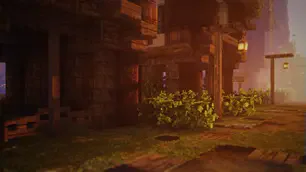
RedHat Shaders to paczka shaderów, autor: mlgimposter. A shaderpack based on older versions of Chocapic13 Shaders.
Obsługiwane wersje: Minecraft 1.8 – 26.x. Liczba pobrań w serwisie Modrinth: 1,041,157. Ostatnia aktualizacja: 30.04.2026.
RedHat Shaders ma 5 wydań na Modrinth od 20.01.2023. Jedna z nich wyszła w ostatnim roku. Najnowsza to 34.3.1, wydana 30.04.2026. Jest zrobiona dla Minecraft 1.10 – 1.20.3. Działa na Iris i Optifine. Plik ma 190 KB.
| Wersja | Wydano | Minecraft | Typ |
|---|---|---|---|
34.3.1 | 30.04.2026 | 1.10 – 1.20.3 | Wydanie |
34.3 | 15.08.2024 | 1.10 – 1.20.3 | Wydanie |
34.2 | 24.06.2024 | 1.10 – 1.20.3 | Wydanie |
34.1 | 13.05.2023 | 1.7.10 – 1.19.4 | Wydanie |
34.0 | 20.01.2023 | 1.7.10 – 1.19.3 | Wydanie |
RedHat is a shaderpack that for Iris and Optifine.
It is an edit of an old version of Chocapic13, and has many features.
RedHat's main features are lighting effects such as Godrays (3D, or 2D, if you have a low-end machine), Shadows, Underwater Light Absorption, and many more.
The shaderpack features reflections too, and reflects some light on all surfaces, to make everything look more similar to the Minecraft trailers style.
There are many cinematic options such as Lens Flares, Depth of Field (Chromatic Aberration included), Grain, Tilt Shift, and others.
The colors, which change depending on the time, make everything more realistic yet they keep the fantasy vibe.
There are many effects related to movement as well. All foliage or hanging things such as lanterns wave. Along those there are Waving Hand and Waving Camera options too, configurable as well.
If that wasn't enough, RedHat supports all versions from 1.7.10 up to 1.21, and it supports custom skyboxes!
Lastly, there are many atmospherics effects such as Fog and Clouds, Round moon and sun, and other things like PBR support, Auto-Exposure, Stars, and many, many other things.
There are a lot of ways you can customize the shaderpack, and make it look like the way you want.
GPU: Must support OpenGL 3.2 and have at least 1GB of VRAM. AMD, NVIDIA and Intel are all supported (You'll have to decrease some settings to play smoothly with Intel GPUs).
CPU: Must have a minimum clock speed of 1GHz
RAM: Must have located at least 1.5-2GB of RAM to your game
OS: Windows (7,8, 8.1, 10, 11), Linux (Mesa drivers might lead to issues)
Shadermod: Optifine or Iris
MC Version: 1.7.10, up to 1.21
Light Settings Recommendation: i3/i5 3-4th Gen, 4GB DDR3 RAM, GT 1030 2GB GDDR5
Balanced Settings Recommendation: i5/i7 8-9th Gen, 8GB DDR4 RAM, GTX 1050 Ti 4GB GDDR5
Heavy Settings Recommendation: i5/i7/i9 10th+ Gen, 16GB DDR5 RAM, GTX 1660 Ti 6GB GDDR6
If you use RedHat without meeting these requirements, then keep in mind you'll take a risk.
RedHat is a pretty heavy shaderpack, thus do not expect it to be FPS friendly on the default settings.
Autor: mlgimposter. Z obrazkami na Modrinth.
Zainstaluj Iris (z Sodium) albo OptiFine dla swojej wersji Minecrafta: shadery potrzebują jednego z nich.
Pobierz plik .zip z Modrinth. Nie rozpakowuj go.
W Minecrafcie otwórz Opcje, potem Ustawienia grafiki, potem Shadery i kliknij Otwórz folder shaderów.
Wrzuć plik .zip do tego folderu, wybierz RedHat Shaders z listy i kliknij Gotowe.
Shadery mocno obciążają kartę graficzną. Jeśli gra zwalnia, wybierz niższy profil w ustawieniach shadera.
| Zasób | Pobrania | Wersje | Aktualizacja | Cena |
|---|---|---|---|---|
 RedHat Shadersten, który oglądałeś | 1M | 1.8 – 26.x | 30 kwi 2026 | Za darmo |
| Amethyst Shadersgamerbenyt | 466K | 1.8 – 1.21 | 14 gru 2025 | Za darmo |
 OPAL ShadersFENVEN | 398K | 1.19 – 26.x | 27 wrz 2026 | Za darmo |
 BSL ShadersCaptTatsu | 31.7M | 1.8 – 26.x | 21 wrz 2026 | Za darmo |
Tak. RedHat Shaders działa w wersji Minecrafta 26.x. Wszystkie obsługiwane wersje: 26.x, 1.21, 1.20, 1.19, 1.18, 1.17, 1.16, 1.13, 1.12, 1.8.
Tak. RedHat Shaders można pobrać za darmo z serwisu Modrinth.
Tak. Ostatnia aktualizacja wyszła w ciągu ostatniej doby.
Najbliższe to Amethyst Shaders, OPAL Shaders i BSL Shaders. Porównaj wszystkie alternatywy
Amethyst ShadersShadery · 1.8 – 1.21[WIP] A Semi-Realistic Minecraft Shaderpack, with a Vibrant Visuals Style. Based on Complementary Reimagined.
OPAL ShadersShadery · 1.19 – 26.xOPAL Shaders is a shaderpack for Minecraft Java Edition based on BSL Shaders created by Capt Tatsu. It aims to blend a fantasy atmosphere with natural colors…
BSL ShadersShadery · 1.8 – 26.xShaderpack for Minecraft: Java Edition. It's bright, colorful, and distinct.
 Bliss ShadersShadery · 1.17 – 26.x
A well performing fantasy styled shaderpack with emphasis on scene variation and customization.
 Rethinking VoxelsShadery · 1.19 – 1.21
[WIP] A gameplay shaderpack based on complementary reimagined that has coloured block light with sharp shadows
 AstraLex ShadersShadery · 1.16 – 26.x
Shaderpack with very high customization. If you like effects, this shaderpack is made for you!
Zaloguj się, aby wystawić opinię.