
 All-in-One VeinMiner & TreeFellePluginy · 1.16 – 26.x
The ultimate harvesting utility for veins, trees, and 3x3 excavation—featuring Custom Block Manager (with custom block difficulty modes), Tool Protection…
Za darmoPobrania: 174,246

FeverMine is a configurable Minecraft plugin that creates automatic mines with customizable regions, cooldowns, and rarity-based block distributions. Supports…
Bezpośrednie pobieranie z Modrinth · 5 pobrań
FeverMine to plugin do serwerów Paper / Spigot, autor: f1xerzyx. FeverMine is a configurable Minecraft plugin that creates automatic mines with customizable regions, cooldowns, and rarity-based block distributions. Supports…
Obsługiwane wersje: Minecraft 1.21 – 26.x. Liczba pobrań w serwisie Modrinth: 5. Zajmuje 114. miejsce w kategorii „pluginy ochrony i działek” (łącznie: 133). Ostatnia aktualizacja: 03.11.2026.
Najnowsza to 1.0.0, wydana 03.11.2026. Jest zrobiona dla Minecraft 1.21.11 – 26.2. Działa na Paper, Purpur i Spigot. Plik ma 34 KB.
| Wersja | Wydano | Minecraft | Typ |
|---|---|---|---|
1.0.0 | 03.11.2026 | 1.21.11 – 26.2 | Wydanie |
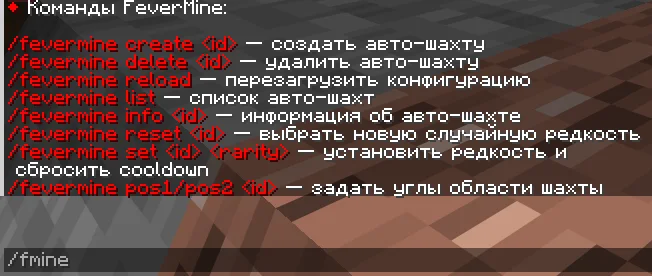
Komendy wymienione na stronie FeverMine w Modrinth:
/fevermine/fmine/mineWymienione tam uprawnienia, do nadania pluginem takim jak LuckPerms:
fevermine.command.createfevermine.command.deletefevermine.command.reloadfevermine.command.listfevermine.command.infofevermine.command.resetfevermine.command.setFeverMine is a Minecraft plugin that allows you to create fully configurable automatic mines with different rarities, weighted block generation, and automatic regeneration.
Create mines, customize their regions, configure block distributions, and let your server's mining experience evolve automatically!
━━━━━━━━━━━━━━━━━━━━
━━━━━━━━━━━━━━━━━━━━
Main command: /fevermine
Aliases: /fmine, /mine
Command · Description
/fevermine create · Create an automatic mine
/fevermine delete · Delete an automatic mine
/fevermine reload · Reload the plugin configuration
/fevermine list · Display all automatic mines
/fevermine info · Display information about a mine
/fevermine reset · Randomly select a new rarity based on configured chances
/fevermine set · Set a specific rarity and reset the cooldown
Permission · Description
fevermine.command.create · Create mines
fevermine.command.delete · Delete mines
fevermine.command.reload · Reload configuration
fevermine.command.list · View the mine list
fevermine.command.info · View mine information
fevermine.command.reset · Randomly reset mine rarity
fevermine.command.set · Set a specific mine rarity
━━━━━━━━━━━━━━━━━━━━
Each mine can have its own configuration, including:
Example:
mines:
default:
cooldown: 60
pos1:
world: "world"
x: 100
y: 64
z: 100
pos2:
world: "world"
x: 120
y: 50
z: 120
━━━━━━━━━━━━━━━━━━━━
FeverMine supports customizable rarities with independent generation chances and block distributions.
Example rarity configuration:
rarity:
common:
display_name: "AEE7ACommon"
chance: 50
blocks:
STONE: 40
GRANITE: 21
COBBLESTONE: 21
COAL_ORE: 4
DIAMOND_ORE: 1
mythic:
display_name: "&#F265F2Mythic"
chance: 30
blocks:
STONE: 36
GRANITE: 20
COBBLESTONE: 20
DIAMOND_ORE: 2
legendary:
display_name: "&#FFC800Legendary"
chance: 20
blocks:
STONE: 27
GRANITE: 22
COBBLESTONE: 22
DIAMOND_ORE: 3
ANCIENT_DEBRIS: 1
Rarity selection is based on configured chances, allowing you to create your own progression system.
━━━━━━━━━━━━━━━━━━━━
FeverMine supports two database types.
SQLite — A lightweight local database. Ideal for smaller servers.
MySQL — A remote database option for larger server setups.
Database type and connection settings can be configured in config.yml.
database:
type: SQLITE # SQLITE or MYSQL
sqlite:
file: "database.db"
mysql:
host: "localhost"
port: 3306
database: "fevermine"
username: "root"
password: "password"
━━━━━━━━━━━━━━━━━━━━
FeverMine integrates with PlaceholderAPI.
Available placeholders:
Placeholder · Description
%fevermine__display_name% · Mine display name
%fevermine__cooldown% · Time remaining until regeneration
%fevermine__current_rarity% · Current mine rarity
%fevermine__previous_rarity% · Previous mine rarity
%fevermine__next_rarity% · Next mine rarity
Replace `` with your mine's unique ID.
Example:
%fevermine_default_current_rarity%
%fevermine_default_cooldown%
━━━━━━━━━━━━━━━━━━━━
FeverMine includes three main configuration files:
━━━━━━━━━━━━━━━━━━━━
Property · Value
Plugin · FeverMine
Version · 1.0.0
Java · 21
Minecraft · 1.21.11 – 1.26.2
Server Software · Spigot / Paper / Purpur
Dependency · PlaceholderAPI
Databases · SQLite / MySQL
Required Dependency: PlaceholderAPI
━━━━━━━━━━━━━━━━━━━━
FeverMine — Make Your Mines Evolve.
Autor: f1xerzyx. Z obrazkami na Modrinth.
Upewnij się, że twój serwer działa na Paper i Spigot w Minecraft 1.21 – 26.x.
Pobierz plik .jar z Modrinth i wrzuć go do folderu plugins na serwerze.
Zrestartuj serwer. Unikaj /reload, wiele pluginów źle to znosi.
Wpisz /plugins w konsoli: FeverMine powinien być na zielono. Pliki konfiguracyjne tworzą się w folderze plugins przy pierwszym starcie.
Pełny poradnik: Jak zainstalować pluginy na serwerze Minecraft
| Zasób | Pobrania | Wersje | Aktualizacja | Cena |
|---|---|---|---|---|
| FeverMineten, który oglądałeś | 5 | 1.21 – 26.x | 8 d. temu | Za darmo |
| All-in-One VeinMiner & TreeFellein2bubble | 174K | 1.16 – 26.x | 22 d. temu | Za darmo |
 FoxAddition Anti-CheatZowi | 76K | 1.8 – 26.x | 6 paź 2024 | Za darmo |
 Grim AnticheatAoElite | 803K | 1.8 – 26.x | 2 d. temu | Za darmo |
Tak. FeverMine działa w wersji Minecrafta 26.x. Wszystkie obsługiwane wersje: 26.x, 1.21.
Tak. FeverMine można pobrać za darmo z serwisu Modrinth.
FeverMine działa na serwerach Paper i Spigot.
Tak. Ostatnia aktualizacja wyszła w ciągu ostatniej doby.
Najbliższe to All-in-One VeinMiner & TreeFelle, FoxAddition Anti-Cheat i Grim Anticheat. Porównaj wszystkie alternatywy
All-in-One VeinMiner & TreeFellePluginy · 1.16 – 26.xThe ultimate harvesting utility for veins, trees, and 3x3 excavation—featuring Custom Block Manager (with custom block difficulty modes), Tool Protection…
FoxAddition Anti-CheatPluginy · 1.8 – 26.xFoxAddition is an anti-cheat plugin designed to block certain types of hacks, possible to use it with another anti-cheat plugin making it an additional…
Grim AnticheatPluginy · 1.8 – 26.xFully async, multithreaded, predictive, open source, 3.01 reach, 1.005 timer, 0.01% speed, 99.99% antikb, "bypassable" 1.8-1.21 anticheat
 Click VillagersPluginy · 1.20 – 26.x
Click to pick up villagers, reset their trades, change their biomes, claim them and much more!
 Lightning Grim AnticheatPluginy · 1.8 – 26.x
Anticheat Perfected | 3.0005 reach | 99.999% antikb. Fork of GrimAC that's faster, with better reach checks, interact checks, and numerous bug fixes.
 Anti Enderman GriefPluginy · 1.16 – 26.x
Prevent endermen from picking up blocks! Available as plugin / datapack / mod
Zaloguj się, aby wystawić opinię.