
 Oak ShadersShadery · 1.19 – 26.x
Oak Shaders offers realistic water and a calm, peaceful visual style, enhancing the overall atmosphere with smooth lighting and a naturally soothing theme.
Za darmoPobrania: 11,011

A bright, realistic Minecraft scene showcasing smooth lighting, soft shadows, and clear water reflections, giving the world a calm and natural atmosphere.
Bezpośrednie pobieranie z Modrinth · 45,058 pobrań
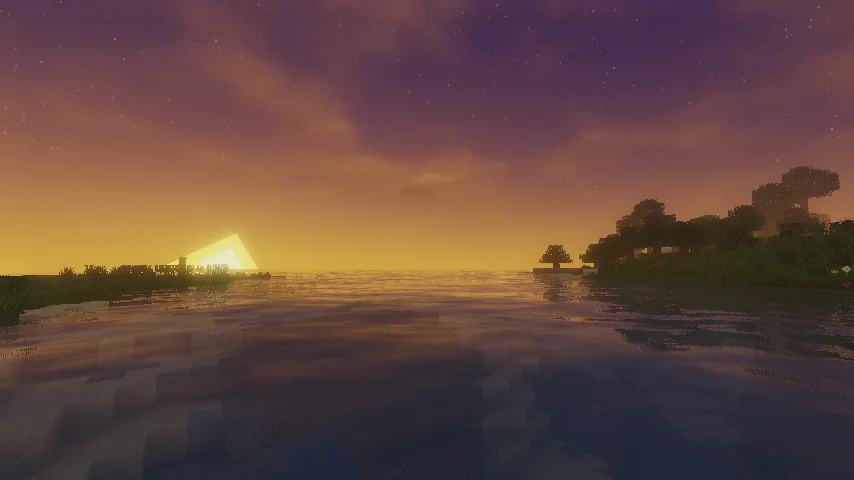
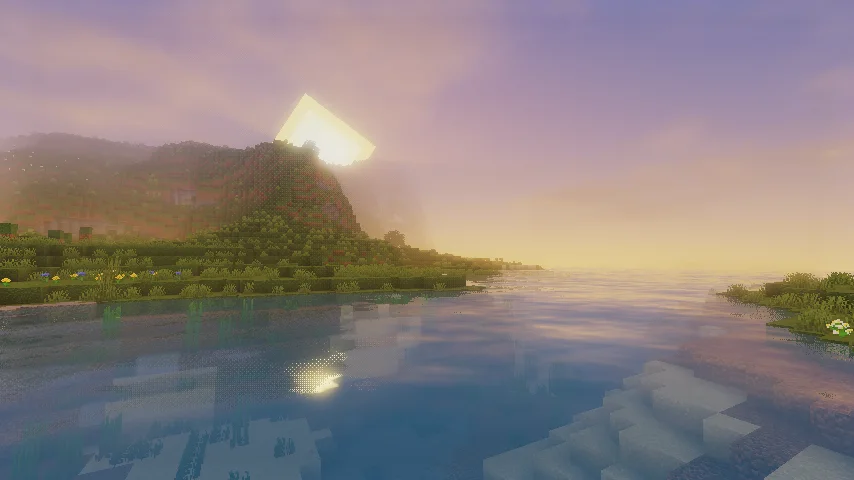
Earth Shaders to paczka shaderów, autor: GamesofDev. A bright, realistic Minecraft scene showcasing smooth lighting, soft shadows, and clear water reflections, giving the world a calm and natural atmosphere.
Obsługiwane wersje: Minecraft 1.20 – 26.x. Liczba pobrań w serwisie Modrinth: 45,058. Ostatnia aktualizacja: 30.04.2026.
Najnowsza to 1.0, wydana 30.04.2026. Jest zrobiona dla Minecraft 1.20 – 26.1.2. Działa na Iris i Optifine. Plik ma 323 KB.
| Wersja | Wydano | Minecraft | Typ |
|---|---|---|---|
1.0 | 30.04.2026 | 1.20 – 26.1.2 | Wydanie |
Earth Shaders reimagines your world with warm, natural sunlight and a soft cinematic glow that makes every biome feel alive. Sunbeams filter gently through the atmosphere, mountains fade into a light, believable fog that adds real depth to the horizon, and the overall lighting has been tuned to feel soft, warm, and immersive rather than flat or artificial.
Water is one of the biggest highlights: it's clear and reflective, letting you see detailed underwater terrain instead of a murky, opaque surface, while still catching light beautifully from above. Grass and terrain have been given richer, more vibrant shading so the landscape feels textured and full of life instead of dull or washed out.
Whether you're exploring, building, or recording content, Earth Shaders is built to deliver a clean, trailer-like visual style without sacrificing performance.
Found an issue or have feedback? Join the GlacierDevelopment Discord to report bugs, get help, chat with other Earth Shaders users, and take part in community giveaways.
If you enjoy Earth Shaders and want to support future development, donations are always appreciated.
You can also check out more content and updates on the GlacierServicesMC YouTube channel.
Earth Shaders is licensed under the MIT License, based on MellowShaders. You're free to use, modify, and distribute this shader pack in accordance with the terms of the MIT License, with credit to the original MellowShaders project.
Autor: GamesofDev. Z obrazkami na Modrinth.
Zainstaluj Iris (z Sodium) albo OptiFine dla swojej wersji Minecrafta: shadery potrzebują jednego z nich.
Pobierz plik .zip z Modrinth. Nie rozpakowuj go.
W Minecrafcie otwórz Opcje, potem Ustawienia grafiki, potem Shadery i kliknij Otwórz folder shaderów.
Wrzuć plik .zip do tego folderu, wybierz Earth Shaders z listy i kliknij Gotowe.
Shadery mocno obciążają kartę graficzną. Jeśli gra zwalnia, wybierz niższy profil w ustawieniach shadera.
| Zasób | Pobrania | Wersje | Aktualizacja | Cena |
|---|---|---|---|---|
| Earth Shadersten, który oglądałeś | 45K | 1.20 – 26.x | 30 kwi 2026 | Za darmo |
| Oak ShadersGamesofDev | 11K | 1.19 – 26.x | 1 lip 2026 | Za darmo |
 Butter ShadersTypon | 101K | 1.8 – 1.21 | 16 lut 2026 | Za darmo |
 Phero VisualsDark_PixelForge | 8,885 | 1.16 – 26.x | 5 d. temu | Za darmo |
Tak. Earth Shaders działa w wersji Minecrafta 26.x. Wszystkie obsługiwane wersje: 26.x, 1.21, 1.20.
Tak. Earth Shaders można pobrać za darmo z serwisu Modrinth.
Tak. Ostatnia aktualizacja wyszła w ciągu ostatniej doby.
Najbliższe to Oak Shaders, Butter Shaders i Phero Visuals. Porównaj wszystkie alternatywy
Oak ShadersShadery · 1.19 – 26.xOak Shaders offers realistic water and a calm, peaceful visual style, enhancing the overall atmosphere with smooth lighting and a naturally soothing theme.
Butter ShadersShadery · 1.8 – 1.21Enjoy beautiful lighting, soft shadows, and realistic water in Minecraft with great performance — perfect for both low-end and high-end devices.
Phero VisualsShadery · 1.16 – 26.xPhero Visuals Minecraft shader pack featuring vibrant lighting, realistic water, dynamic skies, soft shadows, cinematic atmosphere, and optimized performance…
 Luxora ShadersShadery · 1.21
Warm toned shader pack with realistic lighting, golden sunsets, water reflections, and smooth performance.
 Vanilish ShadersShadery · 1.8 – 1.21
A lightweight shader that adds a realistic, warm atmosphere and soft lighting to Minecraft while maintaining the vanilla style.
 Lumenite ShadersShadery · 1.20 – 26.x
A high-end shader focused on great visuals, packed with features like blocklight shadows, colored block lighting, CSM shadows, realistic water physics (vertex…
Zaloguj się, aby wystawić opinię.