
 ImmersiveThunderMody · 1.19 – 1.21
A fabric mod that adds realistic and dynamic thunder sounds to Minecraft based on the player’s distance from the lightning strike.
Za darmoPobrania: 3,873,181

Adds plenty of blocks and items to defend and secure your base with.
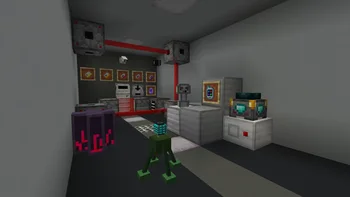

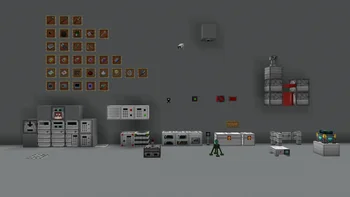
Adds plenty of blocks and items to defend and secure your base with.
SecurityCraft to zasób, autor: Geforce132. Obsługiwane wersje: Minecraft 1.8 – 26.x. Liczba pobrań w serwisie Modrinth: 5,940,476. Ostatnia aktualizacja: 12.10.2026.
SecurityCraft ma 171 wydań na Modrinth od 23.11.2022. 25 z nich wyszło w ostatnim roku. Najnowsza to v1.10.2.1-beta4, wydana 11.10.2026. Jest zrobiona dla Minecraft 26.3. Działa na NeoForge. Plik ma 5.4 MB.
| Wersja | Wydano | Minecraft | Typ |
|---|---|---|---|
v1.10.2.1-beta4 | 11.10.2026 | 26.3 | Beta |
v1.10.2.1-beta3 | 03.10.2026 | 26.3 | Beta |
v1.10.2.1-beta2 | 27.09.2026 | 26.3 | Beta |
v1.10.2.1-beta1 | 15.09.2026 | 26.3 | Beta |
v1.10.2.1 | 09.08.2026 | 26.2 | Wydanie |
SecurityCraft ma otwarty kod. Najnowsze wydanie na GitHubie to Secure Trading Station, reinforced tint improvements, quality of life changes, fixes, opublikowane 26.06.2026.
Przeczytaj wszystkie informacje o wydaniu na GitHubie
Wcześniej: Incognito mask, new reinforced blocks, frame fixes (25.10.2025), Cameras in frames, block breaking change, texture tweaks, fixes (01.05.2025).
Every block in the mod is owned by one specific player, the "Owner". The owner is the player who placed down the block. Only the owner of a block can interact with it, and only the owner can break it. Many blocks ignore their owner, meaning their functions do not apply to the owner, but only to other players. This behavior can be turned off per block in the screen that opens when rightclicking the block with a Universal Block Modifier. There is optional support for scoreboard team ownership, which can be enabled in the config. This results in every player on a team owning all blocks that were placed by a player who is also on that same team.\
If you have a mod like Jade or The One Probe installed, you can see who owns a block in that mod's overlay.
SecurityCraft adds reinforced blocks corresponding to many of the already existing vanilla blocks. These reinforced blocks are unbreakable variants of their vanilla counterpart, and have a slightly darker tint to distinguish them from, but otherwise look the same as, their vanilla versions. This tint can be turned off in the config file. Reinforced blocks are immovable by vanilla pistons, however they can be pushed by reinforced pistons.\
Not every vanilla block has a reinforced counterpart, and modded blocks are not and will not be supported by us. That said, there is an easy-to-use API for adding new reinforced blocks, and the team is glad to help out with using it for any mods that want to add reinforced blocks for their own or other mods' blocks.\
Reinforced blocks are created by reinforcing them with a universal block reinforcer. The different levels simply have more durability, and level 2 upwards can also remove the reinforcement.\
Here's a player reinforcing their house:\
There are numerous blocks added by the mod, which allow the player to secure their base from intruders. An exhaustive list would be too long for this description, so a few select blocks are outlined below to give you an overview of what to expect in the mod. For a complete list of all of the blocks and items in the mod you can check out the ingame manual, or the mod's wiki.
Many of SecurityCraft's blocks can be modified in various ways. This is done through modules. They add additional functionality such as redstone output, or allowing the block to act faster than it would without the module. A notable module is the disguise module, which allows SecurityCraft's blocks to look like any other block in the game, allowing for stealthy base defenses.\
\
Another very useful module is the allowlist module, which enables the owner to list names of players in a block. These players are then ignored by the block, and any password-protection, targeting system, etc. that it has.
The mod adds a few passcode-protected blocks that can only be accessed by players who know a numerical code that was previously set by the block's owner. There are a couple passcode-protected blocks that work just like their vanilla counterparts. These blocks include a chest and different furnaces. Most of these do not have a crafting recipe, and are instead created by rightclicking their vanilla variants with a key panel.
Passcode-protected blocks can be bypassed by the codebreaker. There is a 33% chance of the bypassing succeeding. The item has 3 uses, so handle with care! If the codebreaker is successful, the block will activate/open, and the player can access it.
If you have a mod like Jade or The One Probe installed, you can see the passcode of your own passcode-protected blocks. This can be turned off, and only the owner can see the passcode. As of SecurityCraft v1.9.7, no one can see the passcode anymore, not even with the help of mods.
There are many mines added by SecurityCraft that players can use as defensive measures. A special type of mine are the so called block mines, which mimic commonly found blocks such as stone, dirt, deepslate, or sand, as well as all existing ores. These mines look just the same as their normal variants, however they are explosive to the touch. If a player who is not the owner breaks such a block mine, it will explode and leave a fiery crater.\
\
The mod also has other explosive gadgets. These include a standard mine that explodes when being stepped on, and a device that shoots mines at nearby mobs. All of these mines can be accessed by the mine remote access tool. Rightclicking a mine with the tool binds the mine to it, and subsequently allows to remotely defuse, arm, or detonate it.
Noxus created a very good showcase of the mod, highlighting key features and explaining the basics, as well as explaining all the blocks in the mod (as of v1.9.5). Take a look:
[](nodecraft.com/r/securitycraft)\
SecurityCraft is partnered with Nodecraft!
Want your very own Minecraft server (or Terraria, Satisfactory, CS:GO, or one of 30+ other games)? You can easily set up your server by using the promo code securitycraft at checkout, or the following referral link, and get 30% (or more, depending on current sales) off: nodecraft.com/r/securitycraft \
By using our referral link/code, you directly support the development of the mod without needing to pay more, as Nodecraft gives us a share of what you pay them!
Check out the official SecurityCraft server on SecurityCraft v1.10.1-beta2 for MC 1.21.10!\
Join in Minecraft using securitycraft.nodecraft.gg
Autor: Geforce132. Z obrazkami na Modrinth.
Ten mod jest potrzebny na serwerze i u każdego gracza, który dołącza.
Zainstaluj Forge i NeoForge dla Minecraft 1.8 – 26.x.
Pobierz plik .jar z Modrinth i wrzuć go do folderu mods w katalogu .minecraft.
Uruchom Minecraft z profilem Forge.
Z CraftRank Launcherem pominiesz te kroki: otwórz Mody, wyszukaj SecurityCraft i kliknij Zainstaluj.
| Zasób | Pobrania | Wersje | Aktualizacja | Cena |
|---|---|---|---|---|
| SecurityCraftten, który oglądałeś | 5.9M | 1.8 – 26.x | 29 d. temu | Za darmo |
| ImmersiveThundernetcatgirl | 3.9M | 1.19 – 1.21 | 30 cze 2025 | Za darmo |
 Mte's Eneteritemtetheking | 12 | 1.21 – 26.x | 29 sie 2026 | Za darmo |
 GraveStone Modhenkelmax | 12.6M | 1.19 – 26.x | 1 paź 2026 | Za darmo |
Tak. SecurityCraft działa w wersji Minecrafta 26.x. Wszystkie obsługiwane wersje: 26.x, 1.21, 1.20, 1.19, 1.18, 1.17, 1.16, 1.13, 1.12, 1.8.
Tak. SecurityCraft można pobrać za darmo z serwisu Modrinth.
Obie. Serwer i każdy gracz muszą mieć zainstalowany SecurityCraft.
Tak. Ostatnia aktualizacja wyszła w ciągu ostatniej doby.
Najbliższe to ImmersiveThunder, Mte's Eneterite i GraveStone Mod. Porównaj wszystkie alternatywy
ImmersiveThunderMody · 1.19 – 1.21A fabric mod that adds realistic and dynamic thunder sounds to Minecraft based on the player’s distance from the lightning strike.
Mte's EneteriteMody · 1.21 – 26.xthis mod adds the Eneterite!!!
GraveStone ModMody · 1.19 – 26.xPlaces a gravestone with your inventory items inside when you die
 Create Big CannonsMody · 1.18 – 1.21
A Minecraft mod for building large cannons with the Create mod.
 Fabric Seasons: ExtrasMody · 1.19 – 1.21
Custom blocks and items to make your Fabric Seasons experience better.
 BountifulMody · 1.17 – 1.21
Adds bounty boards, giving rewards for collecting different blocks and items.
Zaloguj się, aby wystawić opinię.