
 Vanilla Plus ShaderShadery · 1.16 – 1.21
A shaderpack that gives Minecraft a modern visual overhaul while staying faithful to its original look.
Za darmoPobrania: 2,756,638
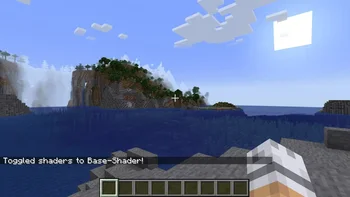
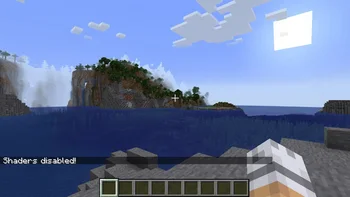
A shaderpack for Iris that accurately recreates the vanilla look
Base-Shader to paczka shaderów, autor: Bestsoft100. Obsługiwane wersje: Minecraft 1.21. Liczba pobrań w serwisie Modrinth: 4,333. Ostatnia aktualizacja: 11.05.2025.
Base-Shader ma 3 wydań na Modrinth od 30.06.2024. Żadna nie wyszła w ostatnim roku. Najnowsza to 3.0, wydana 11.05.2025. Jest zrobiona dla Minecraft 1.21, 1.21.1. Działa na Iris. Plik ma 17 KB.
| Wersja | Wydano | Minecraft | Typ |
|---|---|---|---|
3.0 | 11.05.2025 | 1.21, 1.21.1 | Wydanie |
2.0 | 23.04.2025 | 1.21, 1.21.1 | Wydanie |
1.0 | 30.06.2024 | 1.21, 1.21.1 | Wydanie |
Base-Shader ma otwarty kod. Najnowsze wydanie na GitHubie to 2.0, opublikowane 23.04.2025.
No content.
Wcześniej: 1.0 (23.04.2025).
This shaderpack accurately recreates all vanilla effects in an Iris shaderpack.
This pack can be used as a base to create other shaderpacks, or it can be played with directly, since it adds a few options to for a little more customization.
Currently in Version 1.0, there are options in the shader menu to disable the entity shading and the fog. By editing the shader.properties file it's also possible to turn off the vignette and the directional light
As of Version 1.0 I have not tested every feature in the game to make sure everything is accurate, so far I have only done the effects that are always visible, like fog and lighting. If you find any issues you can report them here
Autor: Bestsoft100. Z obrazkami na Modrinth.
Zainstaluj Iris (z Sodium) albo OptiFine dla swojej wersji Minecrafta: shadery potrzebują jednego z nich.
Pobierz plik .zip z Modrinth. Nie rozpakowuj go.
W Minecrafcie otwórz Opcje, potem Ustawienia grafiki, potem Shadery i kliknij Otwórz folder shaderów.
Wrzuć plik .zip do tego folderu, wybierz Base-Shader z listy i kliknij Gotowe.
Shadery mocno obciążają kartę graficzną. Jeśli gra zwalnia, wybierz niższy profil w ustawieniach shadera.
| Zasób | Pobrania | Wersje | Aktualizacja | Cena |
|---|---|---|---|---|
| Base-Shaderten, który oglądałeś | 4,333 | 1.21 | 11 maj 2025 | Za darmo |
| Vanilla Plus ShaderRRe36 | 2.8M | 1.16 – 1.21 | 28 lut 2025 | Za darmo |
 Mode 13h: MS-DOSifyHandLock_ | 4,228 | 1.20 – 26.x | 1 paź 2026 | Za darmo |
 Insanity ShaderElocinDev | 8M | 1.8 – 1.21 | 13 cze 2024 | Za darmo |
Jeszcze nie. Najnowsza obsługiwana wersja to Minecraft 1.21.
Tak. Base-Shader można pobrać za darmo z serwisu Modrinth.
Tak. Ostatnia aktualizacja wyszła w ciągu ostatniej doby.
Najbliższe to Vanilla Plus Shader, Mode 13h: MS-DOSify i Insanity Shader. Porównaj wszystkie alternatywy
Vanilla Plus ShaderShadery · 1.16 – 1.21A shaderpack that gives Minecraft a modern visual overhaul while staying faithful to its original look.
Mode 13h: MS-DOSifyShadery · 1.20 – 26.xAn Iris shader pack for Minecraft that recreates the look of late-90s MS-DOS 3D graphics with deliberate retro accuracy.
Insanity ShaderShadery · 1.8 – 1.21A stylized, horror themed Iris shaderpack with high customizability and performance.
 Aurora's ShadersShadery · 1.20 – 1.21
Based on Complimentary Unbound, a beautifully colorful Vanilla+ shader meant for making the game look good while maintaining good performance and vanilla feel.
 ReverieShadery · 1.20 – 26.x
Shader with a foggy and warm look. It leverages new features added by Iris for effects previously impossible to achieve.
 Simplicissimus ShaderShadery · 1.12 – 1.20
A shaderpack that tries to stay as simple as possible while still adding dynamic shadows and preserving as much of the vanilla rendering as possible.
Zaloguj się, aby wystawić opinię.