
 Zephyr StarlightShadery · 1.21
Experimental real-time path traced shaderpack for Minecraft
Za darmoPobrania: 19,299
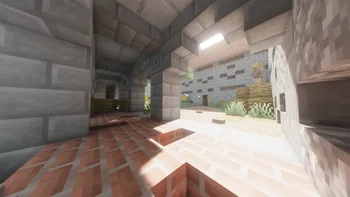
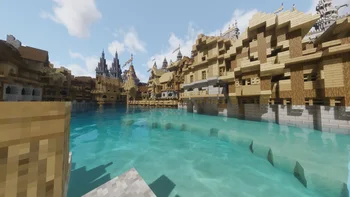
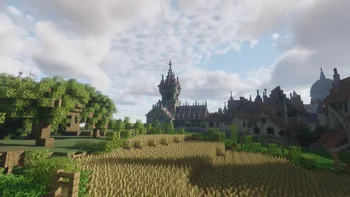
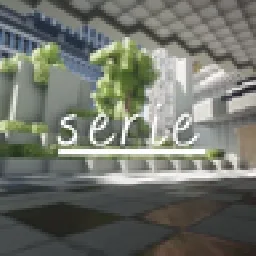
Serie to paczka shaderów, autor: clorece. Serie is an experimental path-traced shaderpack for Minecraft Java Edition.
Obsługiwane wersje: Minecraft 1.18 – 26.x. Liczba pobrań w serwisie Modrinth: 4,016. Ostatnia aktualizacja: 30.06.2026.
Serie ma 2 wydań na Modrinth od 19.06.2026. 2 z nich wyszło w ostatnim roku. Najnowsza to 6.30.2026b, wydana 30.06.2026. Jest zrobiona dla Minecraft 1.18 – 26.2. Działa na Iris. Plik ma 14.7 MB.
| Wersja | Wydano | Minecraft | Typ |
|---|---|---|---|
6.30.2026b | 30.06.2026 | 1.18 – 26.2 | Beta |
6.19.2026b | 19.06.2026 | 1.18 – 1.21.11 | Beta |
Serie is the path-traced successor to Allium and will serve as the base rewrite for allium's upcoming versions.
Serie is under active development. Expect settings, buffer layouts, and visual behavior to change between builds, as well as bugs!
The latest beta version should support 26.x versions of Minecraft using Iris and OpenGL as the Graphics API. Vulkan is planned but I have no idea as to when I will be able to work on Vulkan Support. Probably until Aperture is released :p
Serie is developed for Iris. OptiFine is NOT supported.
Do not extract a release ZIP unless its outer archive contains another shaderpack folder or ZIP.
Repository builds contain the newest changes and may be less stable than releases.
Please open an issue on the GitHub Issues page and include:
Before reporting a visual artifact, test once with default settings and confirm whether Distant Horizons or another rendering mod is involved.
The repository branch is the active development version. Stable builds, when available, are published through GitHub Releases.
Contributions and focused bug reports are welcome. When changing shader code, test at multiple render scales, during camera motion, at day/night transitions, underwater, and with Distant Horizons both enabled and disabled.
Autor: clorece. Z obrazkami na Modrinth.
Zainstaluj Iris (z Sodium) albo OptiFine dla swojej wersji Minecrafta: shadery potrzebują jednego z nich.
Pobierz plik .zip z Modrinth. Nie rozpakowuj go.
W Minecrafcie otwórz Opcje, potem Ustawienia grafiki, potem Shadery i kliknij Otwórz folder shaderów.
Wrzuć plik .zip do tego folderu, wybierz Serie z listy i kliknij Gotowe.
Shadery mocno obciążają kartę graficzną. Jeśli gra zwalnia, wybierz niższy profil w ustawieniach shadera.
| Zasób | Pobrania | Wersje | Aktualizacja | Cena |
|---|---|---|---|---|
 Serieten, który oglądałeś | 4,016 | 1.18 – 26.x | 30 cze 2026 | Za darmo |
| Zephyr StarlightKirilpro6284 | 19K | 1.21 | 23 lut 2026 | Za darmo |
 BSL ShadersCaptTatsu | 31.7M | 1.8 – 26.x | 21 wrz 2026 | Za darmo |
 Sildur's Vibrant ShadersSildur | 732K | 1.8 – 26.x | 15 wrz 2026 | Za darmo |
Tak. Serie działa w wersji Minecrafta 26.x. Wszystkie obsługiwane wersje: 26.x, 1.21, 1.20, 1.19, 1.18.
Tak. Serie można pobrać za darmo z serwisu Modrinth.
Tak. Ostatnia aktualizacja wyszła w ciągu ostatniej doby.
Najbliższe to Zephyr Starlight, BSL Shaders i Sildur's Vibrant Shaders. Porównaj wszystkie alternatywy
Zephyr StarlightShadery · 1.21Experimental real-time path traced shaderpack for Minecraft
BSL ShadersShadery · 1.8 – 26.xShaderpack for Minecraft: Java Edition. It's bright, colorful, and distinct.
Sildur's Vibrant ShadersShadery · 1.8 – 26.xVery optimized shaderpack for MC: Java edition, around since 2012! Runs on any hardware and supports every MC version since 1.7.10.
 Soft Voxels LiteShadery · 1.16 – 1.20
A minimalistic and performant path-traced shaderpack.
 OPAL ShadersShadery · 1.19 – 26.x
OPAL Shaders is a shaderpack for Minecraft Java Edition based on BSL Shaders created by Capt Tatsu. It aims to blend a fantasy atmosphere with natural colors…
 Lux V1Shadery · 1.8 – 26.x
Lux is a high fidelity Minecraft: Java Edition shader pack based on Capt Tatsu's BSL Shaders.
Zaloguj się, aby wystawić opinię.