
 Flyable Fighter Jets+Narzędzia i inne · 1.21 – 26.x
This project adds 3 new flyable fighter jets, the JMM, the F-16 and the Gripen, download the needed resorcepack for plane textures!
Za darmoPobrania: 182

This datapack adds easy-to-use trigger volumes that can be spawned with a single command and configured to run commands and functions on enter, exit or every…
Bezpośrednie pobieranie z Modrinth · 8 pobrań
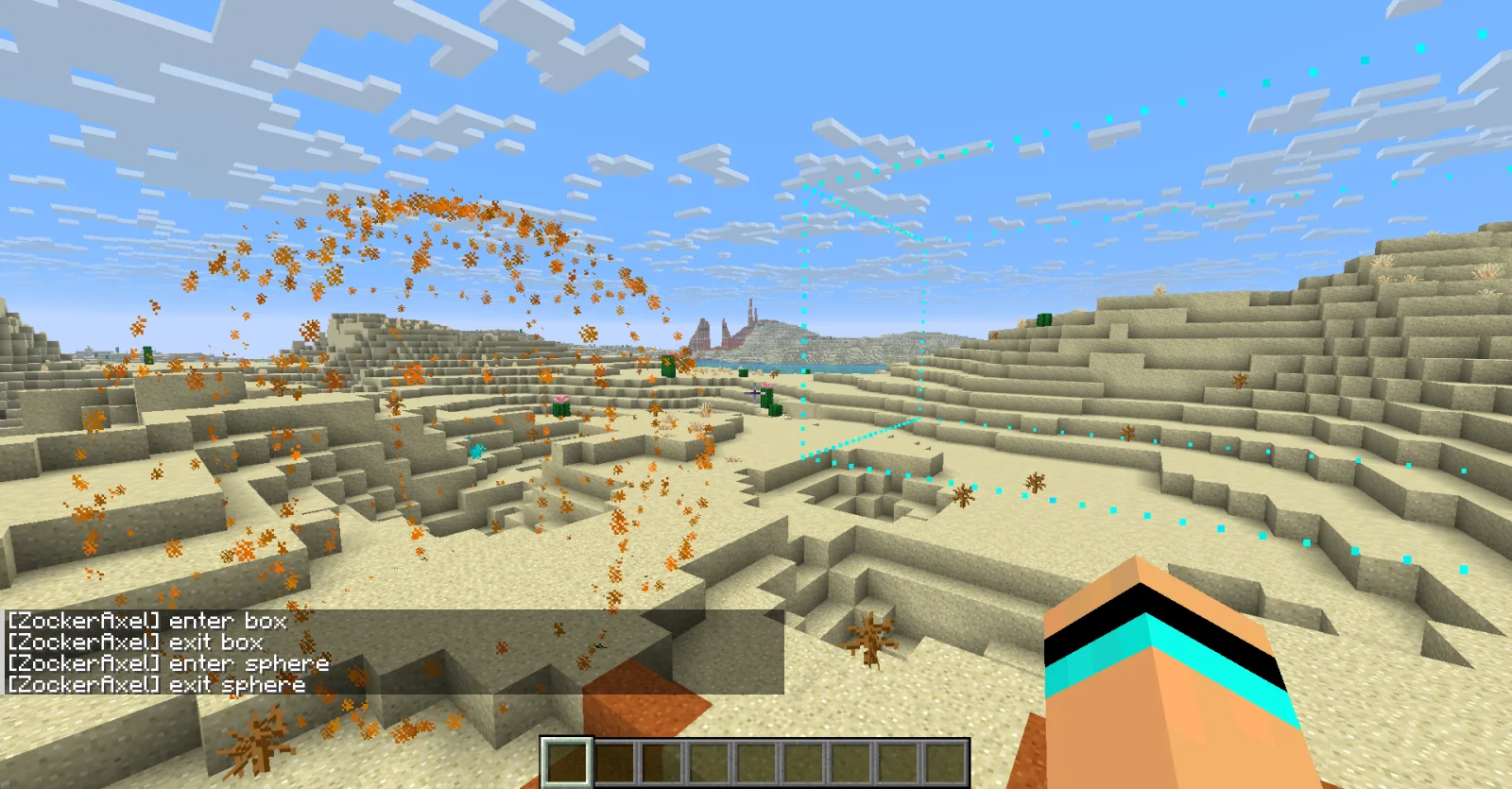
TVOL Trigger Volumes to zasób, autor: ZockerAxel. This datapack adds easy-to-use trigger volumes that can be spawned with a single command and configured to run commands and functions on enter, exit or every…
Obsługiwane wersje: Minecraft 26.x. Liczba pobrań w serwisie Modrinth: 8. Ostatnia aktualizacja: 09.11.2026.
TVOL Trigger Volumes ma 2 wydań na Modrinth od 09.11.2026. 2 z nich wyszło w ostatnim roku. Najnowsza to 1.0.2, wydana 09.11.2026. Jest zrobiona dla Minecraft 26.3. Działa na Data pack. Plik ma 26 KB.
| Wersja | Wydano | Minecraft | Typ |
|---|---|---|---|
1.0.2 | 09.11.2026 | 26.3 | Wydanie |
1.0.1 | 09.11.2026 | 26.3 | Wydanie |
TVOL Trigger Volumes ma otwarty kod. Najnowsze wydanie na GitHubie to Update 1.0.2 - Replace screenshot pack.png, opublikowane 09.11.2026.
Wcześniej: Update 1.0.1 - Removing ai-generated content and include readme (09.11.2026), Release 1.0 (09.11.2026).
TVOL Trigger Volumes adds easy-to-use trigger volumes that can be spawned with a single command and configured to run commands and functions on enter, exit or every tick inside.
Summon a marker entity (technically any entity type is allowed, so you could attach volumes to moving entities etc.), add the tag for the shape and target detection you need, configure size and define event commands and/or functions.
Syntax:
/summon marker ~ ~ ~ {Tags:["tvol.."],data:{tvol:{,condition:,}}}
You can toggle visual outlines with
/function tvol:toggle_outline
Conditions are passed into an existing entity @e[] (or @a[]) target selector through a macro and may therefore include any custom selector arguments, but it is most useful to restrict entity types, e.g. with type=minecraft:cow to restrict detection to cows.
Defaults to type=!#tvol:ignored, which excludes markers, armor stands, item displays, block displays, text displays and interaction entities by default.
You may specify any number of callbacks. Use the event name as a key and a compound tag with a function and/or command to run specified.
Example: on_enter:{command:"say hi",function:"my_datapack:area_entered"},on_exit:{command:"say bye"},on_stay:{function:"my_datapack:area_stay"}
If you don't intend on using an event, you don't need to specify it at all and you may use both a command and a function at the same time (command will execute before function).
Player-detection sphere with enter and exit command
/summon marker ~ ~ ~ {Tags:["tvol.sphere.player"],data:{tvol:{radius:7.5,on_enter:{command:"say enter sphere"},on_exit:{command:"say exit sphere"}}}}
Box with glowing cows
/summon marker ~ ~ ~ {Tags:["tvol.box.entity"],data:{tvol:{dx:15,dy:3,dz:5,condition:"type=cow",on_stay:{command:"effect give @s minecraft:glowing 1 0 true"}}}}
Entity-detection box
/summon marker ~ ~ ~ {Tags:["tvol.box.entity"],data:{tvol:{dx:20,dy:5,dz:20,on_enter:{command:"say I entered the box",function:"my_datapack:enter_box"},on_exit:{function:"my_datapack:exit_box"}}}}
There are a couple of utility functions:
There are also functions for creating simple boxes or spheres which do not have any event listeners set up.
Autor: ZockerAxel. Z obrazkami na Modrinth.
| Zasób | Pobrania | Wersje | Aktualizacja | Cena |
|---|---|---|---|---|
| TVOL Trigger Volumesten, który oglądałeś | 8 | 26.x | 3 d. temu | Za darmo |
| Flyable Fighter Jets+aspectfromthetap | 182 | 1.21 – 26.x | 5 d. temu | Za darmo |
 Orbital Mob Cannonjipton | 594 | 26.x | 7 d. temu | Za darmo |
 Complete sorting system in a single orderI_Am_The_Best_But_In_Modrinth | 144 | 1.20 – 26.x | 4 d. temu | Za darmo |
Tak. TVOL Trigger Volumes działa w wersji Minecrafta 26.x. Wszystkie obsługiwane wersje: 26.x.
Tak. TVOL Trigger Volumes można pobrać za darmo z serwisu Modrinth.
Tak. Ostatnia aktualizacja wyszła w ciągu ostatniej doby.
Najbliższe to Flyable Fighter Jets+, Orbital Mob Cannon i Complete sorting system in a single order. Porównaj wszystkie alternatywy
Flyable Fighter Jets+Narzędzia i inne · 1.21 – 26.xThis project adds 3 new flyable fighter jets, the JMM, the F-16 and the Gripen, download the needed resorcepack for plane textures!
Orbital Mob CannonNarzędzia i inne · 26.xSummon mobs on your player's location using fishing rod activion
Complete sorting system in a single orderNarzędzia i inne · 1.20 – 26.xAuto sorting system in one command !
 EnchantixNarzędzia i inne · 26.x
This Datapack/Mod adds new enchantments that try to feel vanilla friendly.
 Rustic MatchaNarzędzia i inne · 26.x
This datapack adds compatibility for Rustic Delight's food to work with Matcha Flavoureds reworked regeneration system
 Sapling to stickNarzędzia i inne · 1.21
This datapack adds recipes allowing to recycle saplings into stick. It's 1:1, 1 sapling = 1 stick. It works with modded saplngs too, any kind of item…
Zaloguj się, aby wystawić opinię.