NoweCraftRank SitesDarmowa strona i sklepZrób swoją ›
AshlarDarmowe oprogramowanie serwera oparte na Paper, z ochroną przed DDoS i backdoorami Zobacz Ashlar ›Security RadarA free check of your server's login, anti-bot and proxy settings, only with your OK Zobacz, jak to działa ›SpołecznośćZadawaj pytania, dziel się budowlami i znajdź ludzi do gry Dołącz do forum ›
Zasoby / Pluginy / BetterWaystones

BetterWaystones

Build waystones, discover them while exploring and travel between them with a menu - no client mod, no resource pack. Folia support.

PluginyZa darmo26.x
autor: hassanbwo · pobrane z Modrinth
Pobierz ›

Bezpośrednie pobieranie z Modrinth · 4 pobrań

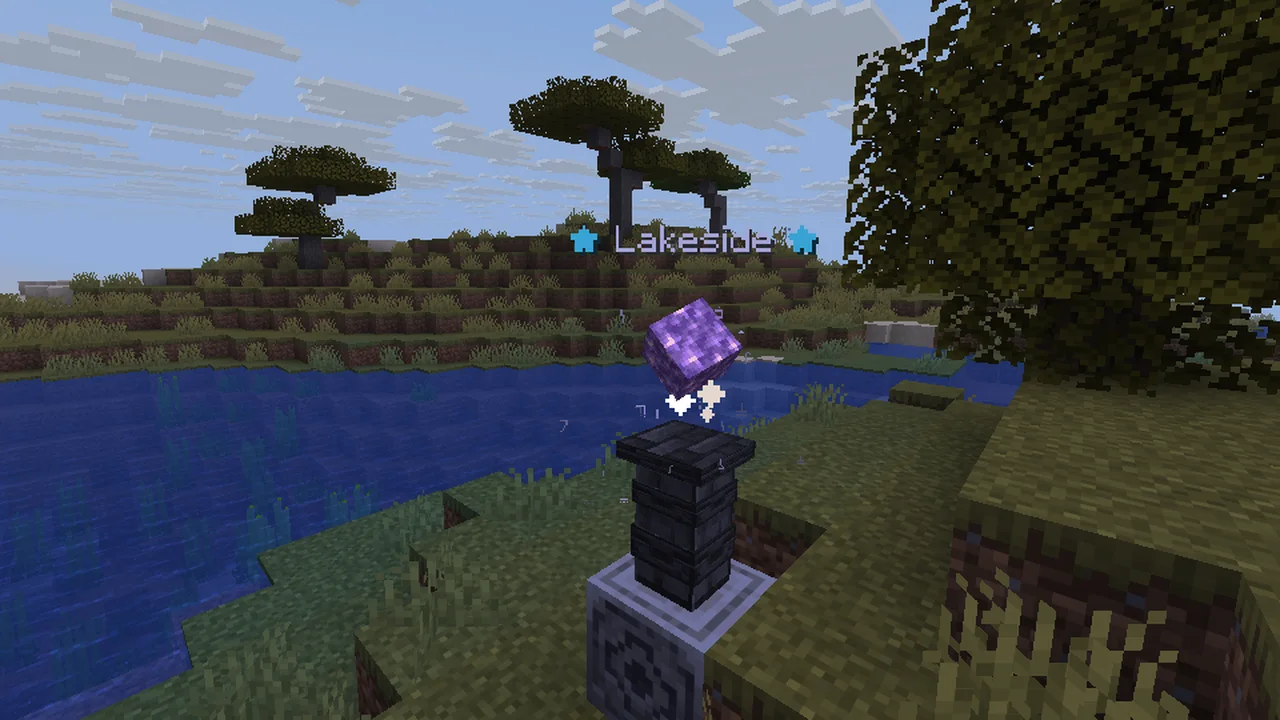
BetterWaystones, zrzut ekranu 1

Co robi

BetterWaystones to plugin do serwerów Paper / Spigot, autor: hassanbwo. Build waystones, discover them while exploring and travel between them with a menu - no client mod, no resource pack. Folia support.

Obsługiwane wersje: Minecraft 26.x. Liczba pobrań w serwisie Modrinth: 4. Zajmuje 85. miejsce w kategorii „pluginy teleportacji i warpów” (łącznie: 101). Ostatnia aktualizacja: 13.11.2026.

Obsługiwane wersje

26.x

Historia wersji

BetterWaystones ma 3 wydań na Modrinth od 10.11.2026. 3 z nich wyszło w ostatnim roku. Najnowsza to 1.1.1, wydana 13.11.2026. Jest zrobiona dla Minecraft 26.1 – 26.3. Działa na Folia, Paper i Purpur. Plik ma 120 KB.

WersjaWydanoMinecraftTyp
1.1.113.11.202626.1 – 26.3Wydanie
1.1.010.11.202626.1 – 26.3Wydanie
1.0.010.11.202626.1 – 26.3Wydanie

Komendy

Komendy wymienione na stronie BetterWaystones w Modrinth:

/waystone/waystones

Uprawnienia

Wymienione tam uprawnienia, do nadania pluginem takim jak LuckPerms:

betterwaystones.command.menubetterwaystones.usebetterwaystones.placebetterwaystones.limitbetterwaystones.bypass.costbetterwaystones.admin
Opis autora na Modrinth

BetterWaystones

Build waystones, discover them while exploring and travel between them. Every waystone has its own 3D model with a glowing, turning crystal - no client mod and no resource pack needed. For Paper, Purpur and Folia 26.x - perfect for survival, SMP and adventure servers.

How it works

  1. Craft a waystone and place it - type a name in the chat.
  2. Right-click a waystone of another player to discover it.
  3. Right-click any waystone: the menu shows all waystones you know, with distance and cost.
  4. Click one - after a short warmup you travel there. Moving or taking damage cancels it.

Features

  • Own 3D model from vanilla blocks: rune column, glowing crystal (amethyst, gold for server waystones, dark glass for private ones), hologram with the name
  • Discover waystones (right-click, optionally automatically when walking by)
  • Menu with owner, coordinates, distance and cost, favorites, sorting (distance, name, last used) and filters
  • XP costs by distance, warmup, cooldown, travel between dimensions - all configurable
  • Private, public and server waystones, trusted friends for private ones (/waystone trust)
  • Owner settings (sneak + right-click): rename, own icon, private/public, remove
  • Travel scroll (menu from anywhere) and return scroll (back to the last waystone), both craftable - see Scrolls below
  • Safe arrival in front of the waystone, never inside blocks
  • Protected against explosions, pistons, Endermen and fire, minimum distance and limit per player (more with permissions)
  • Crash-safe storage, Folia support
  • 9 languages: English, German, French, Spanish, Polish, Russian, Portuguese, Turkish and Chinese
  • New config options are added automatically, optional auto update from Modrinth (off by default)

Scrolls

Two craftable items for when there is no waystone nearby. Both work like a trip at a waystone: same XP costs, cooldown and warmup, moving or taking damage cancels the trip. The scroll is only used up when you really arrive - a cancelled trip doesn't cost the scroll.

Travel scroll - for the long way home

  • Right-click it anywhere - in a cave, at sea, deep in the nether - and the travel menu opens
  • Pick any waystone you have discovered and travel there
  • Perfect for explorers: build a waystone at home, carry a few scrolls on your adventure

Return scroll - one click, back again

  • Right-click it to travel straight back to the last waystone you used - no menu
  • Ideal after a mining trip or a raid: you get back exactly where you started

Admins can turn each scroll off (items.travel_scroll / items.return_scroll in the config.yml - no recipe, no function) or hand them out as rewards: /waystone give travel_scroll 5.

Recipes

Waystone - ender pearl, chiseled stone bricks, amethyst shard, stone bricks

Travel scroll - paper, ender pearl and amethyst shard (any order)

Return scroll - paper, ender pearl and gold nugget (any order)

Commands & permissions

  • /waystones - your waystones, or the travel menu from anywhere if enabled (command.opens_menu: true or the permission betterwaystones.command.menu)
  • /waystone trust / untrust - friends for your private waystones
  • /waystone give [waystone|travel_scroll|return_scroll] [amount] - admin
  • /waystone server - make the waystone you look at a server waystone (or back) - admin
  • /waystone list [player], tp , remove , reload - admin

Permission · Default
betterwaystones.use · everyone · use waystones
betterwaystones.place · everyone · place waystones
betterwaystones.command.menu · - · /waystones opens the travel menu from anywhere
betterwaystones.limit. · - · more waystones than max_per_player
betterwaystones.bypass.cost / .cooldown / .limit / .distance / .dimension · OP · skip the rule
betterwaystones.admin · OP · admin commands, update notices

Requirements

  • Paper, Purpur or Folia 26.1 - 26.3, Java 25
  • No other plugins needed

Bug report & support

If you need help or have a bug please contact me via discord (add hassanbwo). I will guarantee quick help - Thanks for supporting :)

config.yml

==========================================

BetterWaystones – config.yml

==========================================

Build waystones, discover them while exploring and travel between them.

Right-click a waystone -> discover it and open the travel menu

Sneak + right-click your waystone -> settings (rename, icon, private/public, remove)

Travel scroll -> open the travel menu anywhere (used up)

Return scroll -> back to the last waystone you used (used up)

A waystone is a lodestone with a stone brick wall on top - no resource pack needed.

All messages are in messages_en.yml / messages_de.yml (MiniMessage like or and & color codes)

Check the plugin page for more information: modrinth.com/plugin/betterwaystones

==========================================

If you need help or have a bug please contact me via discord (add hassanbwo).

I will guarantee quick help - Thanks for supporting :)

==========================================

waystone:

Players can craft waystones (otherwise only /waystone give)

recipe: true

Minimum distance between two waystones (blocks, 0 = no minimum)

min_distance: 50

Waystones per player (-1 = no limit). More with the permission betterwaystones.limit.

max_per_player: 5

Name above the waystone

hologram: true

Small particles when players are nearby

particles: true

teleport:

Seconds before the teleport (0 = instant)

warmup_seconds: 3

The teleport is cancelled when the player moves or gets damage during the warmup

cancel_on_move: true
cancel_on_damage: true

Seconds until the player can travel again

cooldown_seconds: 30

Costs in XP levels: xp_levels + xp_levels_per_500_blocks for every 500 blocks, at most max_xp_levels

cost:
xp_levels: 1
xp_levels_per_500_blocks: 1
max_xp_levels: 10

Travel between overworld, nether and end

cross_dimension: true

Costs for a trip into another dimension: xp_levels x multiplier

cross_dimension_multiplier: 2

discover:

A waystone is discovered with a right-click

on_right_click: true

Also discover waystones when walking by (radius in blocks, 0 = off)

auto_radius: 0

items:

Travel scroll: open the travel menu anywhere (paper + ender pearl + amethyst shard)

travel_scroll: true

Return scroll: back to the last used waystone (paper + ender pearl + gold nugget)

return_scroll: true

command:

/waystones opens the travel menu from anywhere (instead of listing your waystones).

Costs, cooldown and warmup still apply. Single players or groups get it with the permission

betterwaystones.command.menu even if this is false. /waystones list always shows the list.

opens_menu: false

Worlds without waystones

disabled_worlds:

  • example_world

------------------------------------------

Language of all messages: en (English), de (Deutsch), fr (Français), es (Español),

pl (Polski), ru (Русский), pt (Português), tr (Türkçe) or zh (简体中文)

You can add your own language, e.g. messages_it.yml -> language: it

/waystone reload (permission betterwaystones.admin) reloads config and messages.

------------------------------------------

language: en

Updates from Modrinth: a newer version is always announced in the console.

enabled: download new versions automatically. Downloads are checked with the SHA-512 checksum from Modrinth

and installed on the next server restart (plugins/update folder). Only releases for your

Minecraft version and server software (Paper, Purpur, Folia) are downloaded.

major_versions: also download big updates (e.g. 2.x -> 3.0) automatically, otherwise they are only announced.

auto_update:
enabled: false
major_versions: false


More plugins by BetterPlugins

All for Paper, Purpur and Folia 26.x, in English, German, French, Spanish, Polish, Russian, Portuguese, Turkish and Chinese - see the whole BetterPlugins collection:

BetterRIP - Graves that keep your items in their slots and your experience
BetterTimber - Fell whole trees with one hit - protection-plugin safe
BetterTimberEnchantment - Timber enchantment for BetterTimber - enchanting table, villagers, loot
BetterAFK - Stylish AFK holograms, auto-AFK, kick and more
BetterCarry - Carry and throw players, mobs and chests
BannerForLabyMod - Custom image banner above the tab list for LabyMod
BetterSort - Sort chests with one click, hotbar refill and quick stack

Autor: hassanbwo. Z obrazkami na Modrinth.

Jak zainstalować BetterWaystones

  1. Upewnij się, że twój serwer działa na Paper i Spigot w Minecraft 26.x.

  2. Pobierz plik .jar z Modrinth i wrzuć go do folderu plugins na serwerze.

  3. Zrestartuj serwer. Unikaj /reload, wiele pluginów źle to znosi.

  4. Wpisz /plugins w konsoli: BetterWaystones powinien być na zielono. Pliki konfiguracyjne tworzą się w folderze plugins przy pierwszym starcie.

Pełny poradnik: Jak zainstalować pluginy na serwerze Minecraft

Kompatybilność

Wersje Minecraft
26.x
Działa na
Paper, Spigot
Edycja
Java
Wymaga
Niczego więcej
Licencja
MIT
Cena
Za darmo
Utrzymanie
Aktywnie aktualizowany (14.11.2026)

BetterWaystones w porównaniu z podobnymi Porównaj wszystkie alternatywy

ZasóbPobraniaWersjeAktualizacjaCena
BetterWaystonesten, który oglądałeś426.x1 dzień temuZa darmo
Click VillagersClickism737K1.20 – 26.x11 d. temuZa darmo
Just TPAJustPlayerDE246K1.19 – 26.x25 cze 2026Za darmo
Donut RTP & RTP ZoneNAIZO24K1.20 – 26.x10 d. temuZa darmo

Pytania

Czy BetterWaystones działa w wersji Minecrafta 26.x?

Tak. BetterWaystones działa w wersji Minecrafta 26.x. Wszystkie obsługiwane wersje: 26.x.

Czy BetterWaystones jest za darmo?

Tak. BetterWaystones można pobrać za darmo z serwisu Modrinth.

Na jakim oprogramowaniu serwera działa BetterWaystones?

BetterWaystones działa na serwerach Paper i Spigot.

Czy BetterWaystones jest nadal aktualizowany?

Tak. Ostatnia aktualizacja wyszła w ciągu ostatniej doby.

Jakie są najlepsze alternatywy dla BetterWaystones?

Najbliższe to Click Villagers, Just TPA i Donut RTP & RTP Zone. Porównaj wszystkie alternatywy

Alternatywy dla BetterWaystones

ElevatePluginy · 1.20 – 26.x

Elevators! Jump to go up a floor, sneak to go down. Floor numbers, named floors, 16 craftable colors. Bukkit, Spigot, Paper, Purpur & Folia 1.20–26.x.

Za darmoPobrania: 10
WaystonePluginy · 26.x

A Paper plugin giving players the ability to craft and place Waystones anywhere on the server and teleport between them.

Za darmoPobrania: 89
Porównaj wszystkie alternatywy ›

Opinie

–★★★★★
Opinie: 0
50
40
30
20
10

Zaloguj się, aby wystawić opinię.