
 WaystonesMody · 1.16 – 26.x
Teleport from waystone to waystone or craft magical scrolls to warp.
Za darmoPobrania: 27,964,518
Enderbook to mod, autor: Kirtren. Bind magic pages to places or players and teleport from your Enderbook for Ender Shards - a Warp Book remake with brewing and teleport plates.
Obsługiwane wersje: Minecraft 26.x. Liczba pobrań w serwisie Modrinth: 10. Ostatnia aktualizacja: 21.09.2026.
Enderbook ma 4 wydań na Modrinth od 21.09.2026. 4 z nich wyszło w ostatnim roku. Najnowsza to 1.0.0, wydana 21.09.2026. Jest zrobiona dla Minecraft 26.3. Działa na NeoForge. Plik ma 81 KB.
| Wersja | Wydano | Minecraft | Typ |
|---|---|---|---|
1.0.0 | 21.09.2026 | 26.3 | Wydanie |
1.0.0 | 21.09.2026 | 26.3 | Wydanie |
1.0.0 | 21.09.2026 | 26.2 | Wydanie |
1.0.0 | 21.09.2026 | 26.2 | Wydanie |
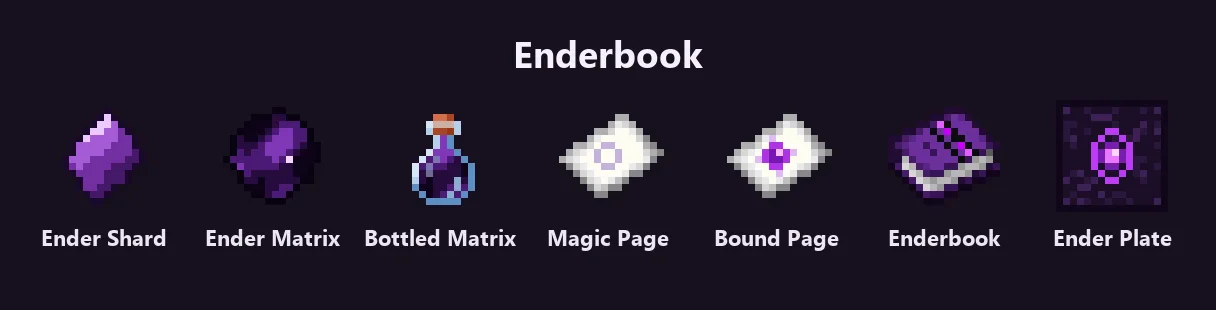
Enderbook brings the Warp Book idea to modern Minecraft: bind a Magic Page to a spot or a player, keep your pages in an Enderbook and open it to jump there. Every trip costs Ender Shards, a new enderman drop, so teleporting is cheap nearby and expensive far away. Ender Plates do the same for a fixed spot: sneak on one and off you go.
Ender Shard - dropped by endermen (40%). The fuel for every teleport; it is taken from your inventory when you jump.
Ender Matrix - 8 Ender Pearls around an Ender Shard. Put it in a brewing stand over Water Bottles to get Bottles of Ender Matrix. Crafting with a bottle gives the empty Glass Bottle back.
Magic Page - Bottle of Ender Matrix + Paper. Sneak + right-click a block to bind the page to that spot, or a player to bind it to them. A bound page is named after its coordinates and dimension (or the player); rename it in an anvil if you like. Right-click a bound page to teleport there directly - the page is used up. Put a bound page alone in a crafting grid to reset it.
Enderbook - Book, Bottle of Ender Matrix, 2 Ender Pearls, an Ender Shard and 4 Obsidian. Holds up to 40 bound pages. In the inventory it behaves like a bundle: click a page onto the book to add it (right-click adds one, left-click the whole stack), right-click the book with an empty cursor to take the last page out. Right-click the book in the world to open it: every page is listed with its current cost in shards, click one to teleport, the small "x" ejects it. Pages bound to players follow them wherever they are (the player has to be online).
Ender Plate - Bottle of Ender Matrix, 2 Ender Shards, a Magic Page and 3 Obsidian. A low plate you stand on: right-click it with a bound page to bind the plate (the page is used up), then sneak on it to teleport, same cost as a page. A bound plate glows (light level 7) and gives off portal particles. Break it and the dropped item keeps its target; craft the item alone to reset it. Needs a pickaxe.
Autor: Kirtren. Z obrazkami na Modrinth.
Ten mod jest potrzebny na serwerze i u każdego gracza, który dołącza.
Zainstaluj Fabric i NeoForge dla Minecraft 26.x.
Pobierz plik .jar z Modrinth i wrzuć go do folderu mods w katalogu .minecraft.
Uruchom Minecraft z profilem Fabric.
Prościej: w Prism Launcher lub Modrinth App wyszukaj Enderbook w modach swojej instancji i kliknij Install. Loader i potrzebne mody zostaną dodane za ciebie.
| Zasób | Pobrania | Wersje | Aktualizacja | Cena |
|---|---|---|---|---|
 Enderbookten, który oglądałeś | 10 | 26.x | 21 wrz 2026 | Za darmo |
| WaystonesBlayTheNinth | 28M | 1.16 – 26.x | 2 d. temu | Za darmo |
 GraveStone Teleport Addoniisra-dev | 36 | 1.21 | 16 wrz 2026 | Za darmo |
 Better Recipe Bookmarshmallow | 5.7M | 1.17 – 1.21 | 8 lip 2024 | Za darmo |
Tak. Enderbook działa w wersji Minecrafta 26.x. Wszystkie obsługiwane wersje: 26.x.
Tak. Enderbook można pobrać za darmo z serwisu Modrinth.
Obie. Serwer i każdy gracz muszą mieć zainstalowany Enderbook.
Tak. Ostatnia aktualizacja wyszła w ciągu ostatniej doby.
Najbliższe to Waystones, GraveStone Teleport Addon i Better Recipe Book. Porównaj wszystkie alternatywy
WaystonesMody · 1.16 – 26.xTeleport from waystone to waystone or craft magical scrolls to warp.
GraveStone Teleport AddonMody · 1.21An addon for GraveStone Mod that enables ender pearl-powered obituary teleportation.
Better Recipe BookMody · 1.17 – 1.21Adds brewing, smithing, and QOL changes to the vanilla recipe book
This mod removes books pages limit(100)
 ScribbleMody · 1.20 – 26.x
Expertly edit your books with rich formatting options, page utilities and more!
 ScholarMody · 1.20 – 26.x
Two-page book editing/viewing, easy formatting, colored books, literate mobs and other book-related improvements
Zaloguj się, aby wystawić opinię.