
 HotelsXPluginy · 1.21 – 26.x
Manage player-owned hotels on your Minecraft server — rooms, pricing, check-ins, Vault payments, and rotatable decoration presets. Folia & Paper compatible…
Za darmoPobrania: 30,224
Źródło i własność. Ta strona została wygenerowana automatycznie z publicznych danych, które Modrinth udostępnia przez swoje publiczne API. Nazwa, opisy, obrazy, znaki towarowe i wszelkie inne treści tego projektu należą do a2013aron i ich odpowiednich właścicieli. CraftRank nie jest autorem tego projektu i nie jest powiązany z jego autorem ani z Modrinth, ani przez nich popierany lub sponsorowany.
Hosting i dystrybucja. CraftRank nie hostuje, nie przechowuje, nie wgrywa i nie rozpowszechnia plików do pobrania tego projektu, a na serwerach CraftRank nie jest przechowywany żaden taki plik. Każde pobranie jest udostępniane bezpośrednio przez Modrinth z jego własnych serwerów; przycisk Pobierz jedynie prowadzi do pliku tam. Licencja podana na Modrinth to MIT-0.
Korzystanie z publicznych API. Modrinth, Hangar (PaperMC) i SpigotMC (przez API Spiget) udostępniają publicznie swoje API zewnętrznym stronom i aplikacjom. Warunki korzystania z Modrinth dają użytkownikom API licencję na pobieranie, wyświetlanie i odpytywanie treści przez ich własne usługi (sekcja „API Usage”), a twórcy publikujący na Modrinth udzielają Modrinth i jego licencjobiorcom prawa do wyświetlania i rozpowszechniania ich treści osobom trzecim (sekcja „User Contributions”). CraftRank korzysta z tych API zgodnie z opublikowanymi zasadami platform: przedstawia się w każdym zapytaniu i przestrzega limitów.
Brak gwarancji. Informacje na tej stronie są udostępniane „tak jak są”, bez żadnej gwarancji. Pobieranie i używanie tego projektu odbywa się na własne ryzyko i podlega licencji oraz warunkom jego autora.
Zgłoszenia naruszeń praw autorskich (DMCA). Zgłoszenie może złożyć wyłącznie właściciel praw autorskich lub osoba upoważniona do działania w jego imieniu, a musi ono pochodzić od osoby pełnoletniej albo jej rodzica lub opiekuna prawnego. Ważne zgłoszenie wysłane na abuse@craftrank.org musi zawierać: link do tej strony; utwór, którego naruszenie się zarzuca; Twoje imię i nazwisko, adres pocztowy, numer telefonu i e-mail; oświadczenie, że w dobrej wierze uważasz, iż korzystanie nie jest dozwolone przez właściciela, jego przedstawiciela ani prawo; oświadczenie, złożone pod rygorem odpowiedzialności za fałszywe zeznania, że zgłoszenie jest prawdziwe i że jesteś właścicielem lub osobą upoważnioną; oraz Twój podpis fizyczny lub elektroniczny. Niekompletne zgłoszenia nie są rozpatrywane. Ważne zgłoszenia są obsługiwane w ciągu 48 godzin, bez potrzeby zgłaszania przez Google.
Fałszywe zgłoszenia. Kto świadomie i nieprawdziwie twierdzi, że materiał narusza prawa, odpowiada za wyrządzone szkody, w tym koszty i honoraria prawników (17 U.S.C. § 512(f)). Zgłoszenia składane w złej wierze lub przez osoby, którym nie przysługują prawa, są rejestrowane i będą kwestionowane.
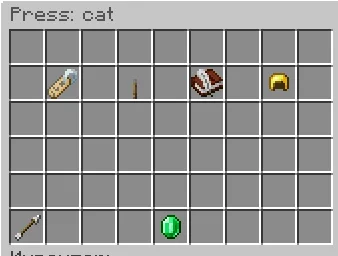
CommandPress to plugin do serwerów Paper / Spigot, autor: a2013aron. create lists of commands, activate them with 1 command. You can make permissions and configure permissions...
Obsługiwane wersje: Minecraft 1.21. Liczba pobrań w serwisie Modrinth: 1. Zajmuje 342. miejsce w kategorii „pluginy do administracji i uprawnień” (łącznie: 362). Ostatnia aktualizacja: 18.11.2026.
Najnowsza to 1.1.0, wydana 18.11.2026. Jest zrobiona dla Minecraft 1.21 – 1.21.11. Działa na Paper. Plik ma 14 KB.
| Wersja | Wydano | Minecraft | Typ |
|---|---|---|---|
1.1.0 | 18.11.2026 | 1.21 – 1.21.11 | Wydanie |
Komendy wymienione na stronie CommandPress w Modrinth:
/restartShort description: Activation of commands by "tapping".
Different than the volume of the CommandPortal.
A module from a set of artifacts from an open Paper 1.21 combine. Before selling, open the plugin.yml of your JAR: the list of commands and rights is the source of truth.
The functions correspond to the role of the "CommandPress" module. Do not turn it on "just in case" during the rating season without a test.
See plugin.yml. Admin-do not distribute nodes to everyone.
After the first launch, check the data folder. Backup before mass edits.
Servers that need this role, not the entire commercial stack.
There is no promise of parity with large commercial counterparts and there is no "100 ME/Mythic".
Required? No.
Conflict with the core? Turn on when the role is clear.
Paper 1.21, Java 21, JAR → plugins/, startup log.
TPS measurement after activation; disable it at events if not needed.
Depends on your stack (MV, WE, etc.).
JAR name, version from plugin.yml, Paper, steps, related plugins.
Before enabling CommandPress on the main world, make a short checklist: the purpose of the module, the responsible administrator, which commands are allowed to moderators, which rollback to do in case of an error. Save the previous JAR and the data folder. Run through a typical player's day on the test server: input, main commands, output, re-entry. If the module touches combat, portals, or redstone, check the two worlds and restart. Document non-standard settings in a single staff channel, not in private messages.
CommandPress is delivered in an ecosystem of open Paper 1.21 modules alongside SimpleItems, GUIPro, ParkourBattle, PvPMonster, CommandPortal, ParticleStudio, and RSPro. It is not necessary to install everything at once: take the modules according to the server role. The EN descriptions are in paired files *_Modrinth_EN.md .
When updating CommandPress, check the version in plugin.yml against the JAR file name. After copying to plugins/, look at the console for class/config errors. If there is a doctor, save its output "before/after". Major YAML format changes should be accompanied by a backup of schemes/items/guis.
Minimize the issue of admin-permission. Separately, decide whether regular players can open GUIs, install controllers, or create portals. Log any commands that give items or change the world using the standard server tools.
If possible, keep your messages to the player in the language of the audience. This Modrinth card is in Russian; the lines inside the plugin can be mixed — edit language/config if necessary.
When planning a season, write down which worlds are affected by CommandPress, who has the right to change the configuration, and what the rollback procedure looks like. If the module creates entities, files, or regions, add them to the overnight backup. On a public server, avoid issuing an op for the sake of "quickly checking the team": create a separate permission group. After a major Paper patch, rebuild or recheck CommandPress on staging with the same set of plugins as on the prod.
For GUI commands, make sure that closing the inventory does not leave any metadata stuck on the player. For combat and parkour modules, check the fair outcome at discount. For portals and redstone schemes, check the behavior after /restart and after soft-reload, if you use it.
Briefly: what the player got, what has changed for the moderator, whether there are actions after the update (new resource pack, YAML migration). For CommandPress, don't hide breaking changes under the phrase "minor edits."
Doctor — plug-in diagnostics. Soft-dependency — works without a neighbor plug-in, expands if available. Staging — test contour. Integrity — consistency of loading without NPE on smoke-check.
These terms are the same throughout the combine; the CommandPress card uses them in the same sense.
Does it make sense to keep CommandPress turned off in empty worlds? Yes, if the module is not in use, the attack surface is smaller and support is easier. Issue 1 is fixed for the release checklist.
Does it make sense to keep CommandPress turned off in empty worlds? Yes, if the module is not in use, the attack surface is smaller and support is easier. Question 2 is fixed for the release checklist.
The CommandPress module is included in the open set of Paper 1.21. Its task is to close a narrow role without duplicating the SimpleItems/GUIPro core unnecessarily. Before enabling it on the main world, determine the responsible administrator, the list of commands for moderators, and the rollback method (previous JAR + data folder).
On staging, replay a typical day: player input, main module scenario, exit, logout, server restart. If the module creates entities, files, or regions, add them to the backup. Don't issue an op "to test the team" — create a permission group.
After updating, check the version in plugin.yml with the JAR name. Save the doctor or a fragment of the console "before/after". Describe YAML breaking changes explicitly in the patch note.
Minimize the admin-permission. Commands that give out items or change blocks must be logged. Ban experimental builds during the rating seasons.
Soft dependencies are not 100% equal to commercial ModelEngine/Mythic. If you need a full Mythic, set Mythic. This description file is in Russian; the paired EN may differ in wording, but it should not promise false parity.
CommandPress is usually placed after the base core. For the first week, the module is played on the test world with a copy of the datapack. Then they transfer the config, but they do not transfer the "garbage" schemes/ menus from old experiments. The responsible person is recorded in the staff role table.
The success of CommandPress is not "just started", but a measurable scenario: the number of commands used per day, the absence of error in the log, the absence of complaints about GUI-lock, predictable TPS. Keep a simple table before/after a major patch.
Make a one-page memo: the three main commands of CommandPress, what to do in case of an error, who to ping. Do not allow new moderators to join destructive teams without a staging session.
On Velocity/Bungee, the CommandPress world effects are put on the backend. The anti—cheat may swear at sudden teleports/speed - add exceptions deliberately, do not "disable the anti-cheat entirely."
Краткое описание: Активация команд «нажатием».
Иначе, чем объём CommandPortal.
Модуль из набора артефактов открытого Paper 1.21 комбайна. Перед продом откройте plugin.yml вашего JAR: список команд и прав — источник истины.
Функции соответствуют роли модуля «CommandPress». Не включайте его «на всякий случай» на рейтинговом сезоне без теста.
См. plugin.yml. Admin-узлы не раздавайте всем.
После первого запуска проверьте data-папку. Бэкап до массовых правок.
Сервера, которым нужна именно эта роль, а не весь коммерческий стек.
Нет обещания паритета с крупными коммерческими аналогами и нет «100 ME/Mythic».
Обязателен? Нет.
Конфликт с ядром? Включайте при ясной роли.
Paper 1.21, Java 21, JAR → plugins/, лог старта.
Замер TPS после включения; отключайте на ивентах, если не нужен.
Зависит от вашего стека (MV, WE и т.д.).
Имя JAR, version из plugin.yml, Paper, шаги, связанные плагины.
Перед включением CommandPress на основном мире составьте короткий чеклист: цел
Autor: a2013aron. Z obrazkami na Modrinth.
Upewnij się, że twój serwer działa na Paper i Spigot w Minecraft 1.21.
Pobierz plik .jar z Modrinth i wrzuć go do folderu plugins na serwerze.
Zrestartuj serwer. Unikaj /reload, wiele pluginów źle to znosi.
Wpisz /plugins w konsoli: CommandPress powinien być na zielono. Pliki konfiguracyjne tworzą się w folderze plugins przy pierwszym starcie.
Pełny poradnik: Jak zainstalować pluginy na serwerze Minecraft
| Zasób | Pobrania | Wersje | Aktualizacja | Cena |
|---|---|---|---|---|
 CommandPressten, który oglądałeś | 1 | 1.21 | 10 d. temu | Za darmo |
| HotelsX1234567890AZ1 | 30K | 1.21 – 26.x | 23 d. temu | Za darmo |
 UltraRanksCreativeDM | 17 | 1.20 – 26.x | 17 d. temu | Za darmo |
 TabListPingBobcat00 | 44K | 1.18 – 26.x | 13 gru 2025 | Za darmo |
Jeszcze nie. Najnowsza obsługiwana wersja to Minecraft 1.21.
Tak. CommandPress można pobrać za darmo z serwisu Modrinth.
CommandPress działa na serwerach Paper i Spigot.
Tak. CommandPress to plugin serwerowy: trafia do folderu plugins serwera, a nie do folderu mods w grze gracza.
Tak. Ostatnia aktualizacja wyszła w ciągu ostatniej doby.
Najbliższe to HotelsX, UltraRanks i TabListPing. Porównaj wszystkie alternatywy
HotelsXPluginy · 1.21 – 26.xManage player-owned hotels on your Minecraft server — rooms, pricing, check-ins, Vault payments, and rotatable decoration presets. Folia & Paper compatible…
UltraRanksPluginy · 1.20 – 26.xRanks with GUI editor, prefixes, tab list & permissions. Available in 5 languages.
TabListPingPluginy · 1.18 – 26.xShows players' ping times in the tab list
 PermissionManagerPluginy · 1.20 – 1.21
A light wieght permission management plugin for paper and folia
 AdvancedServerListPluginy · 1.19 – 26.x
A highly customizable plugin to create custom Server Lists with MOTD, Favicon, Playercount and more.
 ServerPermissionsPluginy
Serwery Add permissions to access your
Zaloguj się, aby wystawić opinię.