
 FancyHologramsPlugins · 1.19 – 26.x
Create fancy looking text, item or block holograms with display entities.
Grátis346,117 downloads
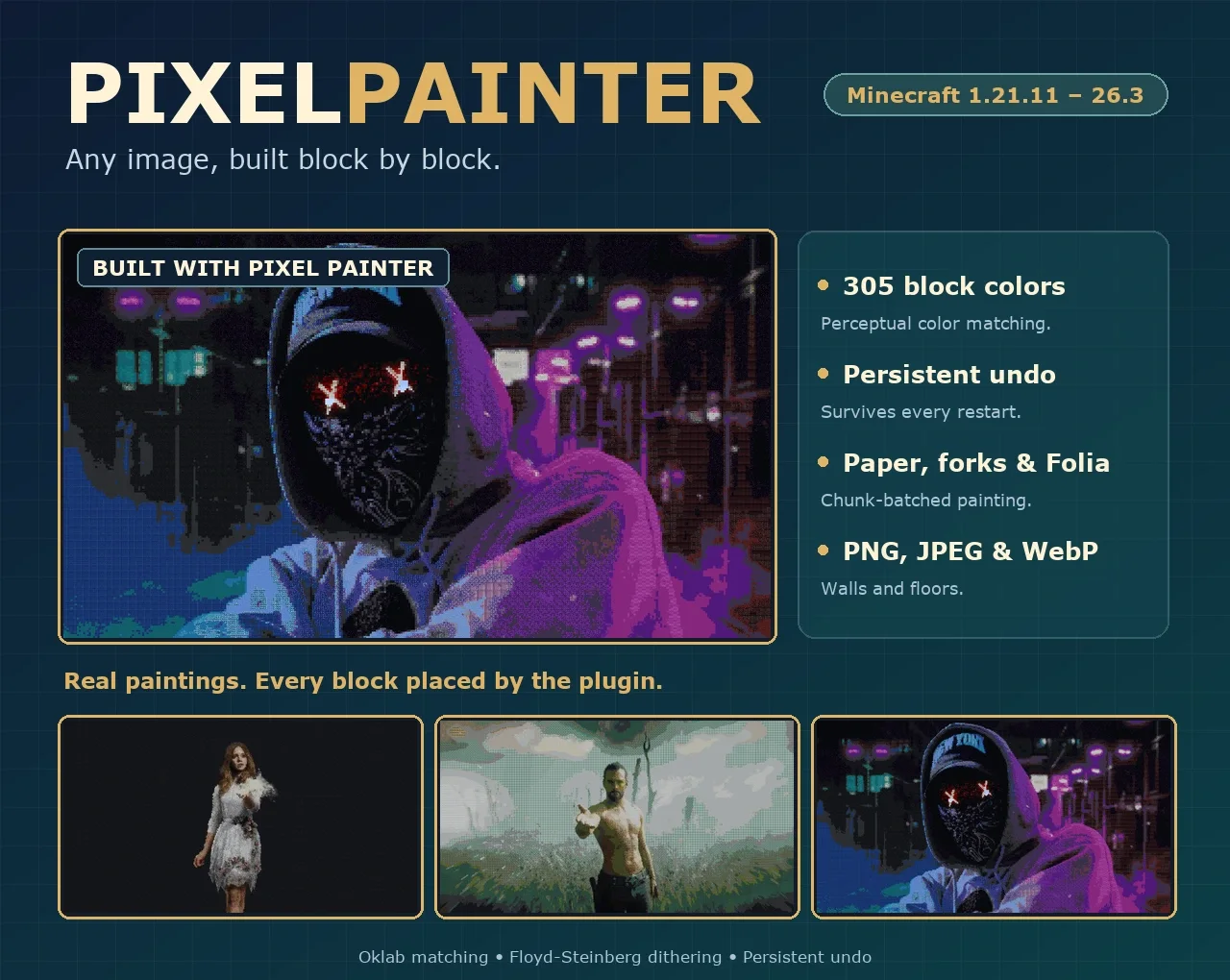
Despical criou Pixel Painter (plugin) para servidores Paper / Spigot. Turn PNG, JPEG and WebP images into Minecraft block art with perceptual color matching and persistent undo.
É compatível com o Minecraft 1.21 – 26.x. Tem 13 downloads em Modrinth. Isso o coloca na posição 107 entre os 122 plugins cosméticos e de exibição listados aqui. A última atualização saiu em 05/11/2026.
Pixel Painter teve 2 versões no Modrinth desde 02/11/2026. 2 saíram no último ano. A mais recente é 2.0.2, lançada em 05/11/2026. Ela é feita para o Minecraft 1.21.11 – 26.3. Ela roda em Folia, Paper e Purpur. O download tem 1.0 MB.
| Versão | Lançado | Minecraft | Tipo |
|---|---|---|---|
2.0.2 | 05/11/2026 | 1.21.11 – 26.3 | Estável |
2.0.1 | 02/11/2026 | 1.21.11 – 26.3 | Estável |
Os comandos citados na página de Pixel Painter no Modrinth:
/ppPixel Painter é de código aberto. A versão mais recente no GitHub é PixelPainter 2.0.2, publicada em 05/11/2026.
Full Changelog: 2.0.1...2.0.2
Antes: PixelPainter 2.0.1 (02/11/2026), PixelPainter 2.0.0 (30/10/2026).
305 block colors · Oklab color matching · Persistent undo
Paint PNG, JPEG and WebP images straight into your world.
**Explore the documentation** · **Quick start**
Drop an image into the plugin folder, stand where you want the art to begin and run one command. Pixel Painter matches every pixel to the closest block, builds the picture in your world and keeps a journal so you can undo it, even after a restart.
PNG, JPEG and WebP sources are painted as vertical walls or horizontal floor art in eight directions. Pick an exact height in blocks and the width follows the original aspect ratio. Transparent pixels can be kept as empty space.
305 opaque block materials are matched with Oklab perceptual color distance, with optional Floyd-Steinberg dithering for smoother gradients. Choose the full palette or limit it to the block families you want.
/pp list
/pp preview portrait.png 64 all true true
/pp create portrait.png north 64 true all true
/pp undo
Put image files in plugins/PixelPainter/images, stand at the bottom-left block of the picture and run /pp create. Every command and permission is listed in the documentation.
Documentation · Source · Issues · Discord · SpigotMC · BuiltByBit
Escrita por Despical. Leia com imagens no Modrinth.
Confira se o seu servidor roda Paper e Spigot no Minecraft 1.21 – 26.x.
Baixe o arquivo .jar pelo Modrinth e coloque na pasta plugins do seu servidor.
Reinicie o servidor. Evite /reload, muitos plugins não lidam bem com ele.
Digite /plugins no console: Pixel Painter deve aparecer em verde. Os arquivos de configuração são criados na pasta plugins na primeira inicialização.
Guia completo: Como instalar plugins em um servidor de Minecraft
| Recurso | Downloads | Versões | Última atualização | Preço |
|---|---|---|---|---|
 Pixel Paintero que você estava vendo | 13 | 1.21 – 26.x | há 6 dias | Grátis |
| FancyHologramsOliver | 346K | 1.19 – 26.x | há 6 dias | Grátis |
 ImageFrameLOOHP | 270K | 1.13 – 26.x | 18 set 2026 | Grátis |
 FancyNpcsOliver | 491K | 1.19 – 26.x | há 11 dias | Grátis |
Sim. Pixel Painter é compatível com o Minecraft 26.x. Todas as versões compatíveis: 26.x, 1.21.
Sim. Você pode baixar Pixel Painter de graça em Modrinth.
Pixel Painter roda em servidores Paper e Spigot.
Sim. A última atualização saiu no último dia.
Os mais parecidos são FancyHolograms, ImageFrame e FancyNpcs. Comparar todas as alternativas
FancyHologramsPlugins · 1.19 – 26.xCreate fancy looking text, item or block holograms with display entities.
ImageFramePlugins · 1.13 – 26.xPut images on maps and walls!
FancyNpcsPlugins · 1.19 – 26.xSimple, lightweight and fast NPC plugin using packets
 BuildPastePlugins · 1.13 – 26.x
Build your dream world in seconds with 10,000+ instant structures
 TabTPSPlugins · 1.8 – 26.x
Monitor your server's performance in the tab menu, boss bar, and action bar
 MiniMOTDPlugins · 1.8 – 26.x
Minecraft plugin/mod to set the server list MOTD using MiniMessage for formatting, supporting RGB colors.
Entre para deixar uma avaliação.