
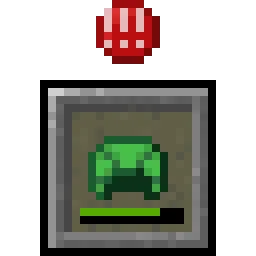
 uku's Armor HUDMods · 1.20 – 26.x
Minimalist vanilla-like widget to display your armor items and their durability. Forked by uku.
Grátis10,168,690 downloads
Overflowing Bars (mod) é obra de Fuzs. Expand health, armor and armor toughness bars beyond vanilla. Nice and compact without confusing colors.
É compatível com o Minecraft 1.18 – 26.x. Tem 10,563,254 downloads em Modrinth. A última atualização saiu em 26/09/2026.
Overflowing Bars teve 49 versões no Modrinth desde 20/04/2023. 8 saíram no último ano. A mais recente é 26.3.0, lançada em 26/09/2026. Ela é feita para o Minecraft 26.3. Ela roda em NeoForge. O download tem 85 KB.
| Versão | Lançado | Minecraft | Tipo |
|---|---|---|---|
26.3.0 | 26/09/2026 | 26.3 | Estável |
26.3.0 | 26/09/2026 | 26.3 | Estável |
26.2.0 | 19/06/2026 | 26.2 | Estável |
26.2.0 | 19/06/2026 | 26.2 | Estável |
26.1.0 | 28/04/2026 | 26.1, 26.1.1, 26.1.2 | Estável |
Overflowing Bars é de código aberto. A versão mais recente no GitHub é v26.3.0-mc26.3.x, publicada em 26/09/2026.
Antes: [NEOFORGE] [26.2.x] v26.2.0 (19/06/2026), [FABRIC] [26.2.x] v26.2.0 (19/06/2026).
[](lunapixel.studio/discord) [](https://x.com/Fuss…)
Overflowing Bars expands Minecraft's health, armor, and armor toughness bars beyond vanilla while keeping them compact and easy to read. Instead of adding extra rows of icons, the mod stacks bars into clear layers that take up far less space. 📊
When your stats exceed vanilla limits, a row counter shows exactly how many layers of health, armor, or toughness you have. No memorizing color schemes or guessing which layer you're viewing. 🔢
The mod also adds a dedicated armor toughness bar, bringing an important defensive stat into the HUD that vanilla doesn't display. 🛡️
For proper support of armor and toughness values beyond vanilla limits, install AttributeFix by DarkhaxDev. 🌟
⏩ INSTALLATION REQUIRED ON CLIENT
⏩ REQUIRES PUZZLES LIB TO BE INSTALLED (FABRIC & NEOFORGE)
⏩ REQUIRES FABRIC API TO BE INSTALLED (FABRIC)
⏩ REQUIRES FORGE CONFIG API PORT TO BE INSTALLED (FABRIC)
If available for a mod, configuration is possible directly from in-game using the mod menu (requires Mod Menu by Prospector to be installed on Fabric).
For manual configuration using an external text editor all files are found at .minecraft/config, named as MOD_ID-client.toml, MOD_ID-common.toml, or MOD_ID-server.toml, depending on the type of config. Not all types might exist for a mod, if any at all.
🌟 Thanks to LocusWay and their Overpowered Armor Bar mod for inspiring the layered armor bar.
🌟 Thanks to Vazkii and their Quark mod for inspiring the armor and toughness overlay icon.
🌟 Thanks to cadaverous_queen and their Rustic mod for the armor toughness icon and the original idea for that bar.
🌟 Thanks to mDiyo and their Mantle mod for originally coming up with the stacking hearts display.
[](modrinth.com/mod/effect-insights)
[](modrinth.com/mod/leaves-be-gone)
[](modrinth.com/mod/falling-leaves-plus)
[](modrinth.com/mod/enchanting-infuser)
[](modrinth.com/mod/stylish-effects)
[](modrinth.com/mod/trading-post)
[](modrinth.com/mod/stoneworks)
[](modrinth.com/mod/magnum-torch)
[](modrinth.com/mod/sea-life)
[](modrinth.com/mod/natural-waters)
© 2026 @heyitsfuzs. All rights reserved. This page was last edited on 11 September 2026, at 06:44 (UTC).
Escrita por Fuzs. Leia com imagens no Modrinth.
Este mod roda só no seu jogo. Os servidores não precisam dele, então você pode usar em qualquer servidor.
Instale Fabric, Forge e NeoForge para o Minecraft 1.18 – 26.x.
Adicione os mods que ele precisa: Puzzles Lib.
Baixe o arquivo .jar pelo Modrinth e coloque na pasta mods do seu diretório .minecraft.
Abra o Minecraft com o perfil Fabric.
Mais fácil: no Prism Launcher ou no Modrinth App, procure Overflowing Bars nos mods da sua instância e clique em Install. Ele adiciona o loader e os mods necessários para você.
| Recurso | Downloads | Versões | Última atualização | Preço |
|---|---|---|---|---|
 Overflowing Barso que você estava vendo | 10.6M | 1.18 – 26.x | 26 set 2026 | Grátis |
| uku's Armor HUDuku | 10.2M | 1.20 – 26.x | 4 out 2026 | Grátis |
 Armor HudSaolGhra | 1.4M | 1.20 – 26.x | 16 set 2026 | Grátis |
 Immersive ArmorsLuke100000 | 7.7M | 1.16 – 26.x | 28 jul 2026 | Grátis |
Sim. Overflowing Bars é compatível com o Minecraft 26.x. Todas as versões compatíveis: 26.x, 1.21, 1.20, 1.19, 1.18.
Sim. Você pode baixar Overflowing Bars de graça em Modrinth.
Do lado do cliente. Overflowing Bars vai na sua própria pasta mods e funciona em qualquer servidor, inclusive sem mods.
Sim: Puzzles Lib. Instale antes de Overflowing Bars.
Sim. A última atualização saiu no último dia.
Os mais parecidos são uku's Armor HUD, Armor Hud e Immersive Armors. Comparar todas as alternativas
uku's Armor HUDMods · 1.20 – 26.xMinimalist vanilla-like widget to display your armor items and their durability. Forked by uku.
Armor HudMods · 1.20 – 26.xThe Armor HUD Mod adds a visual overlay to Minecraft that displays your armor's condition with color-coded durability bars. This makes it easier to keep track…
Immersive ArmorsMods · 1.16 – 26.xA lot of unique and vanilla-faithful armor sets.
 VivyVitalsMods · 1.20
A client-side HUD that shows the health of whatever you're looking at. Nameplate, health bar, absorption, armor, and damage numbers on every hit. Works on any…
 Armor StatuesMods · 1.19 – 26.x
Unlock the full potential of armor stands! Works on vanilla servers, too.
 SupplementariesMods · 1.16 – 1.21
Vanilla+ additions: Jars, signposts, faucets, weather vanes spring launchers, sconces, planters, lights, decoration and automation
Entre para deixar uma avaliação.