
 FakePlayersPlugins · 1.21
Real server-side fake players for Paper 1.21.11 — they walk, fight, use items, run commands and survive restarts.
Grátis245 downloads
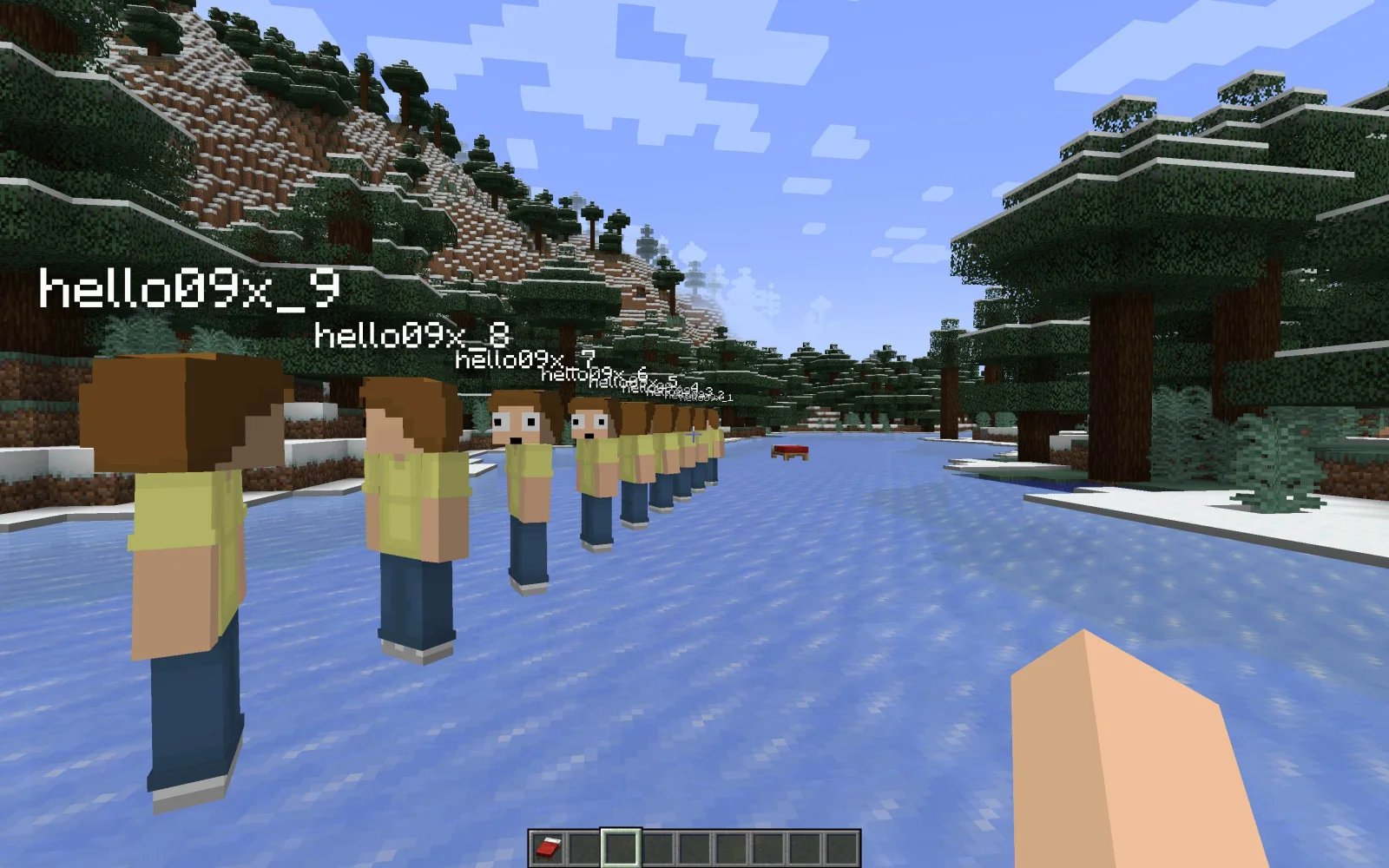
hello09x criou fakeplayer (plugin) para servidores Paper / Spigot. A plugin for minecraft server to spawn fake players, inspired by Carpet Mod.
É compatível com o Minecraft 1.20 – 1.21. Tem 24,067 downloads em Modrinth. Isso o coloca na posição 26 entre os 59 plugins de tecnologia listados aqui. A última atualização saiu em 13/12/2024.
A mais recente é 0.3.13, lançada em 13/12/2024. Ela é feita para o Minecraft 1.20 – 1.21.4. Ela roda em Paper e Purpur. O download tem 1.5 MB.
| Versão | Lançado | Minecraft | Tipo |
|---|---|---|---|
0.3.13 | 13/12/2024 | 1.20 – 1.21.4 | Estável |
Os comandos citados na página de fakeplayer no Modrinth:
/ban/tp/fp/register/loginPermissões citadas lá, para dar com um plugin como o LuckPerms:
fakeplayer.command.spawnfakeplayer.command.killfakeplayer.command.selectfakeplayer.command.selectionfakeplayer.command.listfakeplayer.command.distancefakeplayer.command.dropfakeplayer.command.dropstackfakeplayer.command.dropinvfakeplayer.command.skinfakeplayer.command.invseefakeplayer.command.sleepfakeplayer.command.wakeupfakeplayer.command.statusfakeplayer.command.respawnfakeplayer.command.tpfakeplayer é de código aberto. A versão mais recente no GitHub é 0.3.19 (1.21.10), publicada em 06/11/2025.
Requirements:
前置:
Antes: 0.3.18 (25/07/2025), 0.3.17 (22/07/2025).
This is a server side plugin inspired by Carpet-Mod for Minecraft 1.20.x and 1.21.x and above.
Click me to visit a demo video.
Fakeplayer only generates a template config file named config.tmpl.yml.
You need to rename this file to config.yml as your configuration file.
This approach can let you preview new content when you are upgrading it.
Command · Description · Permission · Note
/fp spawn · Spawn a fake player · fakeplayer.command.spawn
/fp kill · Kill a fake player · fakeplayer.command.kill
/fp killall · Kill all fake players on the server · OP
/fp select · Select a fake player as default · fakeplayer.command.select · Available when player spawned more then 1 fake players
/fp selection · View selected fake player · fakeplayer.command.selection · Available only when player spawned more then 1 fake players
/fp list · List spawned fake players · fakeplayer.command.list
/fp distance · Show distance to a fake player · fakeplayer.command.distance
/fp drop · Drop held item · fakeplayer.command.drop
/fp dropstack · Drop entire stack of the held item · fakeplayer.command.dropstack
/fp dropinv · Drop all items in the inventory · fakeplayer.command.dropinv
/fp skin · Copy skin from another player · fakeplayer.command.skin · 60 seconds cooldown if copy from a offline player
/fp invsee · Open an inventory of a fake player · fakeplayer.command.invsee · Right-clicking on fake players has the same effect
/fp sleep · Sleep · fakeplayer.command.sleep
/fp wakeup · Wake up · fakeplayer.command.wakeup
/fp status · Show player status · fakeplayer.command.status
/fp respawn · Respawn a dead fake player · fakeplayer.command.respawn · Available when server config does not kick on fake player death
/fp tp · Teleport to a fake player · fakeplayer.command.tp
/fp tphere · Teleport a fake player to you · fakeplayer.command.tphere
/fp tps · Swap positions with fake player · fakeplayer.command.tps
/fp set · Change the configuration of a fake player · fakeplayer.command.set
/fp config · Change default configuration · fakeplayer.command.config
/fp expme · Transfer exp to you · fakeplayer.command.expme
/fp attack · Attack · fakeplayer.command.attack
/fp mine · Mine · fakeplayer.command.mine
/fp use · Use/Interact/Place · fakeplayer.command.use
/fp jump · Jump · fakeplayer.command.jump
/fp stop · Stop all actions · fakeplayer.command.stop
/fp turn · Turn around · fakeplayer.command.turn
/fp look · Look at specified location · fakeplayer.command.look
/fp move · Move · fakeplayer.command.mvoe
/fp ride · Ride · fakeplayer.command.ride
/fp sneak · Sneak · fakeplayer.command.sneak
/fp sprint · Sprinting · fakeplayer.command.sprint
/fp swap · Swap main and off-hand items · fakeplayer.command.swap
/fp hold · Hold corresponding hotbar item · fakeplayer.command.hold
/fp cmd · Execute command · fakeplayer.command.cmd
/fp reload · Reload config file · OP
Each player can configure his own configuration, it will take effect on the next spawning
Command examples:
Configuration Item · Note
collidable · Whether collision box is enabled
invulnerable · Whether invincible mode is enabled
wolverine · Whether super heal mode is enabled
look_at_entity · Automatically look at nearby attackable entities (including players), can be combined with attack to automatically fight monsters
pickup_items · Whether to pick up items
skin · Whether to use your skin
replenish · Whether to auto-replenish
autofish · Whether to autofish
Click to visit
Each command has its own permission node, but we provided some permissions packs
fakeplayer.spawn includes the following permissions:
fakeplayer.tp includes the following permissions:
fakeplayer.action includes the following permissions:
If your server does not restrict various player commands, you can use this directly.
fakeplayer.basic includes all secure permissions, except for /fp cmd commands.
Make sure the translation file is encoding with UTF-8
Some plugin change the Connection of the fake player, You can set prevent-kicking to ALWAYS to solve it.
prevent-kicking: ALWAYS
By default, fake players are in invincible mode. Players need to manually turn off invincible mode with /fp config set invulnerable false to attract aggression. After turning it off, they will
receive hunger and health effects. You may need to use res or beacon to ensure the fake player's hunger and health.
This may be because plugins like AutheMe detect that fake players have not logged in for a long time. You can include the login command in the configuration file's self-commands to prevent the
plugin from kicking out players for being idle:
self-commands:
Escrita por hello09x. Leia com imagens no Modrinth.
Confira se o seu servidor roda Paper e Spigot no Minecraft 1.20 – 1.21.
Baixe o arquivo .jar pelo Modrinth e coloque na pasta plugins do seu servidor.
Reinicie o servidor. Evite /reload, muitos plugins não lidam bem com ele.
Digite /plugins no console: fakeplayer deve aparecer em verde. Os arquivos de configuração são criados na pasta plugins na primeira inicialização.
Guia completo: Como instalar plugins em um servidor de Minecraft
| Recurso | Downloads | Versões | Última atualização | Preço |
|---|---|---|---|---|
 fakeplayero que você estava vendo | 24K | 1.20 – 1.21 | 13 dez 2024 | Grátis |
| FakePlayersd3xtty | 245 | 1.21 | 5 out 2026 | Grátis |
 PacketEventsretrooper | 924K | 1.8 – 26.x | 23 set 2026 | Grátis |
 Axiom Paper PluginMoulberry | 278K | 1.20 – 26.x | 21 set 2026 | Grátis |
Ainda não. A versão mais recente compatível é o Minecraft 1.21.
Sim. Você pode baixar fakeplayer de graça em Modrinth.
fakeplayer roda em servidores Paper e Spigot.
Sim. A última atualização saiu no último dia.
Os mais parecidos são FakePlayers, PacketEvents e Axiom Paper Plugin. Comparar todas as alternativas
FakePlayersPlugins · 1.21Real server-side fake players for Paper 1.21.11 — they walk, fight, use items, run commands and survive restarts.
PacketEventsPlugins · 1.8 – 26.xPacketEvents is a protocol library tailored to Minecraft Java Edition, designed to facilitate the processing and transmission of packets.
Axiom Paper PluginPlugins · 1.20 – 26.xThe Paper Plugin of the server-side implementation for Axiom, the all in one tool for editing Minecraft worlds.
 GunshellPlugins · 1.12 – 1.21
With this plugin you can add guns, ammo, throwables and melee weapons to your server.
 LoginToPlugins · 1.8 – 26.x
A complete authentication solution for Minecraft servers, providing secure login, database storage, premium autologin and secure otp code with qrcode
 NPC PluginPlugins · 1.17 – 26.x
API do Customizable NPCs via GUI and
Entre para deixar uma avaliação.