НовоеCraftRank SitesБесплатный сайт и магазинСделай свой ›
AshlarБесплатное серверное ПО на базе Paper с защитой от DDoS и бэкдоров Смотреть Ashlar ›Security RadarA free check of your server's login, anti-bot and proxy settings, only with your OK Как это работает ›СообществоЗадавайте вопросы, делитесь постройками и находите, с кем играть В форум ›
Ресурсы / Моды / Accurate Block Outline

Accurate Block Outline

The block outline that actually matches the block

МодыБесплатно26.x
от DanielTheGamer3746 · из каталога Modrinth
Скачать ›

Прямая загрузка с Modrinth · 3 загрузок

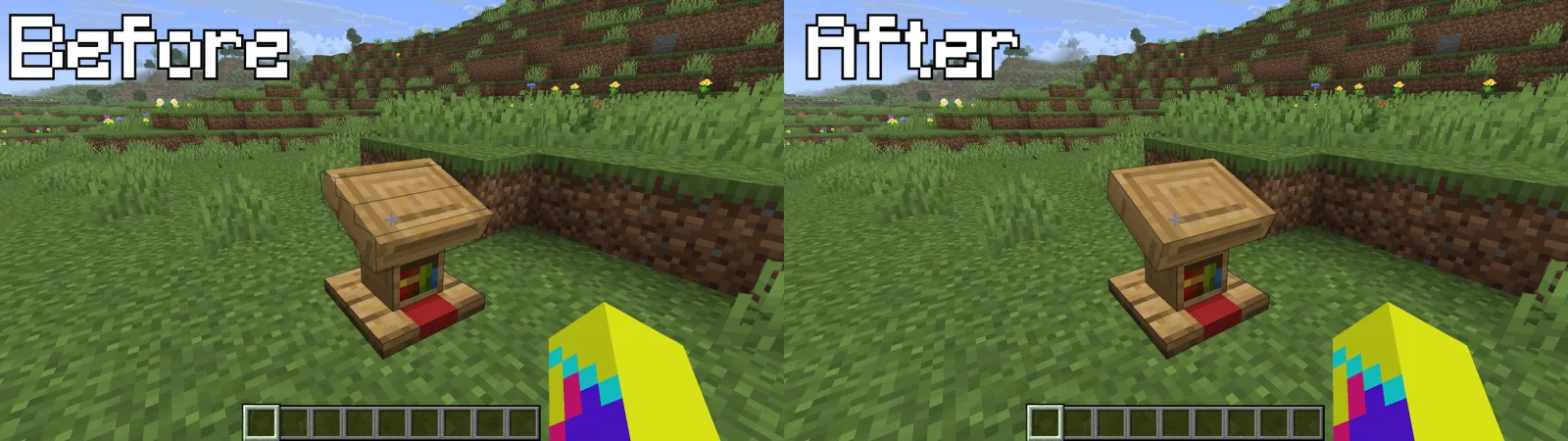
Accurate Block Outline, скриншот 1

Что он умеет

Accurate Block Outline — мод от DanielTheGamer3746. The block outline that actually matches the block.

Поддерживаемые версии: Minecraft 26.x. Скачиваний на Modrinth: 3. Последнее обновление: 18.10.2026.

Поддерживаемые версии

26.x

История версий

Новейшая — 1.0.0, вышла 18.10.2026. Она сделана для Minecraft 26.3. Работает на Fabric. Размер файла — 65 KB.

ВерсияВыпущенMinecraftТип
1.0.018.10.202626.3Релиз
Описание автора на Modrinth

Accurate Block Outline

The block outline that actually matches the block.

In vanilla Minecraft, the outline you see when you look at a block is just a stack of boxes. On a lectern it ignores the tilted top. On a flower it's a square around nothing. On tall grass or a door it only covers the half you're looking at.

Accurate Block Outline traces the outline from the block's real model and texture, so it hugs exactly what you see.

Features

Outlines that follow the model

The outline is built from the block's actual 3D model, not its hitbox.

  • Rotated and slanted parts are followed exactly: the lectern's tilted book stand, levers, grindstones, bells, big dripleaf.
  • Detailed blocks get clean outlines, such as stairs (straight, inner and outer), fences, hoppers, cauldrons, anvils, brewing stands and campfires.
  • Only real edges are drawn. Lines between flat parts of the same surface are left out, so the outline stays clean.

Pixel-perfect plants and see-through blocks

Many blocks are flat squares with a mostly transparent texture. The outline follows only the pixels you can actually see:

  • Flowers, saplings, grass and crops get an outline shaped like the plant itself, at every growth stage.
  • Ladders, rails, vines, lily pads, chains and fire show their real shape, not a full square.
  • Cactus outlines hug the body, spikes included.
  • Leaves follow their see-through edges on Fancy graphics, and stay a clean cube when cutout leaves are turned off.

Two-block objects outlined as one

Look at either half and the outline covers the whole thing, with no line across the middle:

  • Doors
  • Tall grass, large ferns, sunflowers, lilacs, rose bushes, peonies
  • Tall seagrass, small dripleaf, pitcher plants
  • Beds and double chests

Modded blocks built the same way as these vanilla blocks work too.

Looks exactly like vanilla

Only the outline's shape changes. Its color, thickness and the High Contrast Block Outline accessibility option all stay vanilla's.

Toggle it anytime, no restart

  • With Mod Menu: open the mod's settings and flip Accurate Outlines on or off. It changes instantly.
  • Without Mod Menu: edit config/accurate_block_outline.json and set "enabled" to true or false. The change applies in game within a second.

{
"enabled": true
}

Good to know

  • Client-side only. Works in singleplayer and on any server, with nothing needed on the server.
  • Only the outline changes. What you can click and hit is exactly the same as vanilla.
  • Works on both graphics backends. OpenGL and Vulkan (Options → Video Settings → Graphics API).
  • Works with Sodium. Outlines are traced from the same models Sodium renders.
  • No impact on FPS. Each outline is worked out once and remembered. The first time you look at a detailed or see-through block, it's traced in the background, so you may see the vanilla outline for a frame or two.
  • Some blocks keep the vanilla outline: glass, ice, slime, honey and other translucent blocks (their outline already matches), plus single chests, signs and other blocks the game draws without a block model.

Requirements

Minecraft · 26.3
Mod loader · Fabric (Loader 0.19.5 or newer)
Required · Fabric API
Optional · Mod Menu, for the in-game settings screen
Compatible · Sodium

Installation

  1. Install Fabric Loader for Minecraft 26.3.
  2. Put Fabric API and Accurate Block Outline in your mods folder.
  3. (Optional) Add Mod Menu to get the settings screen.
  4. Launch the game and look at a lectern.

License

MIT. Feel free to include it in modpacks.

Автор: DanielTheGamer3746. С картинками — на Modrinth.

Как установить Accurate Block Outline

  1. Этот мод работает только в твоей игре. Серверам он не нужен, так что его можно использовать на любом сервере.

  2. Установи Fabric для Minecraft 26.x.

  3. Скачай .jar-файл с Modrinth и положи его в папку mods в каталоге .minecraft.

  4. Запусти Minecraft с профилем Fabric.

  5. Проще: в Prism Launcher или Modrinth App найдите Accurate Block Outline в модах своей сборки и нажмите Install. Загрузчик и нужные моды добавятся сами.

Совместимость

Версии Minecraft
26.x
Работает на
Fabric
Где работает
Только клиент (твоя игра)
Издание
Java
Требует
Mod Menu
Лицензия
MIT
Цена
Бесплатно
Поддержка
Активно обновляется (15.11.2026)

Вопросы

Работает ли Accurate Block Outline на Minecraft 26.x?

Да. Accurate Block Outline поддерживает Minecraft 26.x. Все поддерживаемые версии: 26.x.

Можно ли скачать Accurate Block Outline бесплатно?

Да. Accurate Block Outline можно бесплатно скачать на Modrinth.

Accurate Block Outline работает на клиенте или на сервере?

На клиенте. Accurate Block Outline кладётся в твою папку mods и работает на любом сервере, даже без модов.

Нужно ли Accurate Block Outline что-то ещё?

Да: Mod Menu. Установи это до Accurate Block Outline.

Accurate Block Outline ещё обновляется?

Да. Последнее обновление вышло за последние сутки.

Альтернативы для Accurate Block Outline

Отзывы

–★★★★★
Отзывов: 0
50
40
30
20
10

Войди, чтобы оставить отзыв.