
 Open InventoryEklentiler · 1.16 – 26.x
OpenInv is a powerful Minecraft admin plugin that lets staff view and edit player inventories and ender chests using /inv commands, featuring a modern GUI…
Ücretsiz55,125 indirme

Feature-packed 3D Cube Generators with GUI editor, AutoMine, Auto Smelt, and virtual storage for Paper & Folia.
Modrinth üzerinden doğrudan indirme · 1 indirme
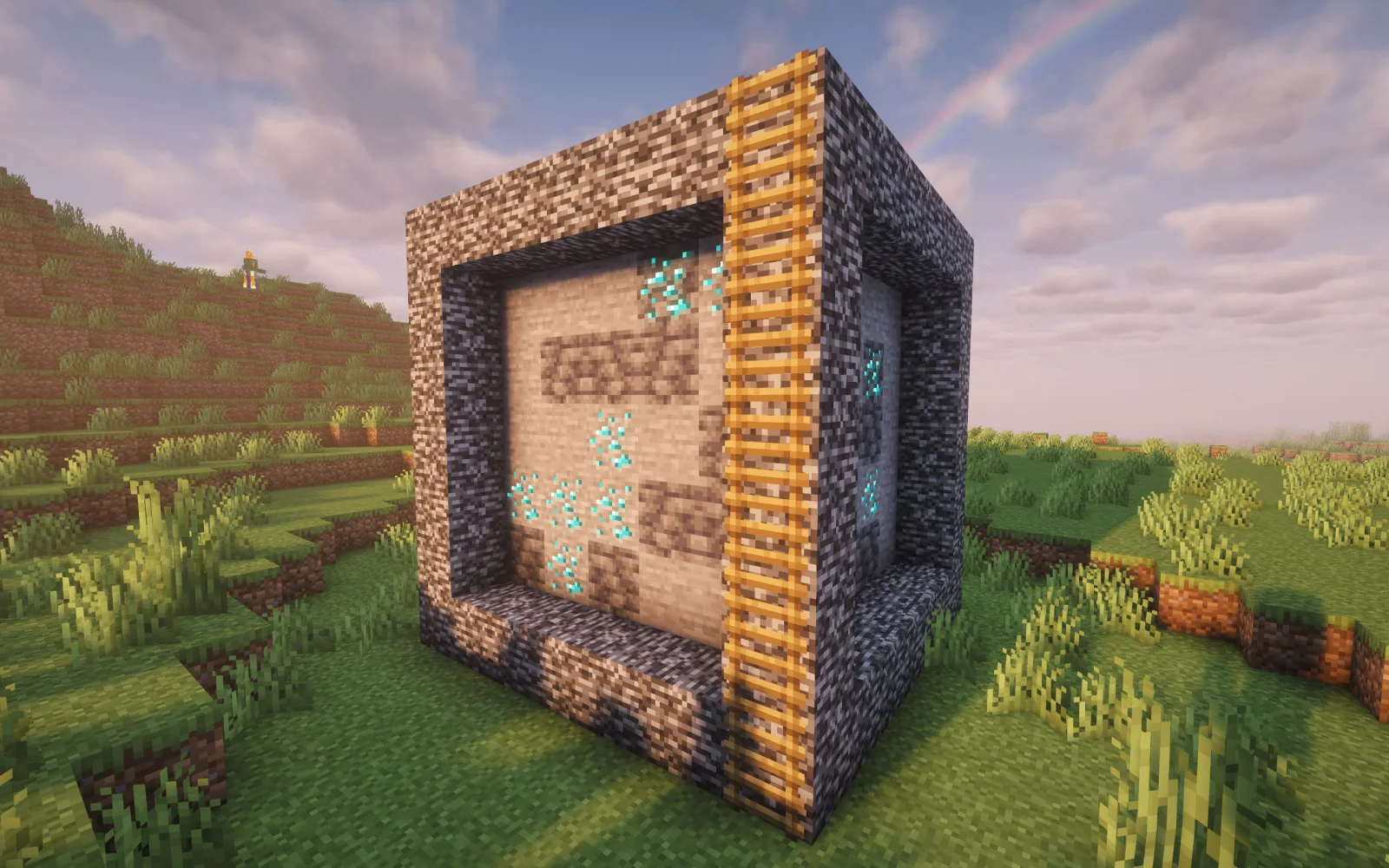
Minecubes, mmk13861 tarafından Paper / Spigot sunucuları için yapılmış bir eklenti. Feature-packed 3D Cube Generators with GUI editor, AutoMine, Auto Smelt, and virtual storage for Paper & Folia.
Desteklediği sürümler: Minecraft 1.17 – 26.x. Modrinth üzerinde 1 kez indirildi. Böylece burada listelenen depolama eklentileri (29 adet) arasında 29. sırada yer alıyor. Son güncelleme 06.11.2026 tarihinde çıktı.
En yenisi 05.11.2026 tarihinde çıkan 2.1.0. Minecraft 1.17 – 26.2 için yapıldı. Bukkit, Folia, Paper, Purpur ve Spigot üzerinde çalışır. İndirme boyutu 71 KB.
| Sürüm | Yayın tarihi | Minecraft | Tür |
|---|---|---|---|
2.1.0 | 05.11.2026 | 1.17 – 26.2 | Kararlı |
Minecubes için Modrinth sayfasında geçen komutlar:
/mc/minecube/minecubes/cg/cubegenOrada geçen yetki düğümleri (LuckPerms gibi bir eklentiyle verilir):
minecubes.autosmeltminecubes.adminminecubes.useminecubes.unplaceminecubes.giveminecubes.*minecubes.placeminecubes.storageminecubes.automineMinecubes açık kaynaklıdır. GitHub'daki en yeni sürümü 05.11.2026 tarihinde yayınlanan MineCubes v2.1.0.
Tüm sürüm notlarını GitHub'da oku
Öncekiler: v2.0.0 (05.11.2026).
MineCubes is a modern, high-performance Minecraft 3D cube generator plugin designed for Minecraft 1.17 through 1.21.x and modern server engines like Paper, DivineMC, Leaf, and Folia 26.2.
It allows server administrators and players to create, customize, place, and automate 3D cube generators with weighted block drop chances, virtual Double Chest storage, AutoMine automation, and integrated Auto Smelt.
Command · Permission · Description
/mc or /minecube · minecubes.use · Displays the help menu.
/mc list · minecubes.use · Lists all your placed MineCubes and their coordinates.
/mc unplace [template/id] · minecubes.unplace · Picks up your MineCube and returns the item.
/mc give [amount] · minecubes.give · Gives a linked MineCube item to a player.
/mc template list · minecubes.admin · Lists all created templates.
/mc template create [size] [type] [regen] · minecubes.admin · Creates a new template.
/mc template edit · minecubes.admin · Opens the GUI block and percentage editor.
/mc template linkitem · minecubes.admin · Links your held item to the template.
/mc template setsize · minecubes.admin · Sets the template size (odd number $\ge 3$).
/mc template setregen · minecubes.admin · Sets the regeneration interval in seconds.
/mc template settype · minecubes.admin · Sets the generator frame type.
/mc template remove · minecubes.admin · Removes an existing template.
/mc reload · minecubes.admin · Reloads configurations and templates.
Aliases: /mc, /minecubes, /minecube, /cg, /cubegen
Permission · Default · Description
minecubes.* · op · Grants access to all MineCubes features.
minecubes.use · true · Allows using basic commands (/mc, /mc list).
minecubes.place · true · Allows placing a MineCube item in the world.
minecubes.unplace · true · Allows picking up your placed MineCube.
minecubes.storage · op · Allows opening the virtual Storage and toggling Storage Mode.
minecubes.automine · op · Allows enabling AutoMine automation.
minecubes.autosmelt · op · Allows enabling Auto Smelt during AutoMine.
minecubes.give · op · Allows giving MineCube items to players.
minecubes.admin · op · Administrative permission for templates and management.
(Legacy cubegen. permission nodes are also fully supported for backwards compatibility).*
templates:
default:
name: "Default MineCube"
size: 5
type: "protect"
regen: 10
blocks:
STONE: 70.0
COBBLESTONE: 20.0
COAL_ORE: 7.0
IRON_ORE: 3.0
diamond:
name: "Diamond MineCube"
size: 5
type: "protect"
regen: 8
blocks:
STONE: 50.0
DEEPSLATE: 30.0
DIAMOND_ORE: 15.0
DEEPSLATE_DIAMOND_ORE: 5.0
Join our official Discord community for support, updates, and feature requests:
The original concept of this plugin originated from m0hammad6335/CubeGen. It has been completely rebuilt, modernized for modern Minecraft and Folia engines, and expanded by mmk1386 with interactive GUI tools, AutoMine, Auto Smelt, virtual 54-slot storage, smart placement mechanics, and ladder climbing.
If you appreciate MineCubes and would like to support development:
This project is licensed under the MIT License.
Yazan: mmk13861. Resimli halini Modrinth sayfasında oku.
Sunucunun Minecraft 1.17 – 26.x üzerinde Paper ve Spigot çalıştırdığından emin ol.
.jar dosyasını Modrinth üzerinden indir ve sunucunun plugins klasörüne koy.
Sunucuyu yeniden başlat. /reload kullanma, birçok eklenti bununla sorun çıkarır.
Konsola /plugins yaz: Minecubes yeşil olarak listelenmeli. Ayar dosyaları ilk açılışta plugins klasöründe oluşturulur.
Detaylı rehber: Minecraft sunucusuna eklenti nasıl kurulur
| Kaynak | İndirmeler | Sürümler | Son güncelleme | Fiyat |
|---|---|---|---|---|
| Minecubesbaktığın | 1 | 1.17 – 26.x | 5 gün önce | Ücretsiz |
| Open Inventoryinfie03 | 55K | 1.16 – 26.x | 26 gün önce | Ücretsiz |
 Backpacks & MoreUltroGhast | 38K | 1.17 – 26.x | 16 Eyl 2026 | Ücretsiz |
 Take It Outrofumer | 120K | 1.20 – 26.x | 6 gün önce | Ücretsiz |
Evet. Minecubes, Minecraft 26.x sürümünü destekliyor. Desteklenen tüm sürümler: 26.x, 1.21, 1.20, 1.19, 1.18, 1.17.
Evet. Minecubes, Modrinth üzerinden ücretsiz indirilebilir.
Minecubes, Paper ve Spigot sunucularında çalışır.
Evet. Son güncelleme son 24 saat içinde çıktı.
En yakın olanlar Open Inventory, Backpacks & More ve Take It Out. Tüm alternatifleri karşılaştır
Open InventoryEklentiler · 1.16 – 26.xOpenInv is a powerful Minecraft admin plugin that lets staff view and edit player inventories and ender chests using /inv commands, featuring a modern GUI…
Backpacks & MoreEklentiler · 1.17 – 26.xBackpacks Datapack (1.17+) adds visible, working, customizable backpacks with 27-slot storage—no mods needed.
Take It OutEklentiler · 1.20 – 26.xMinecraft mod that lets you pick blocks from shulker boxes using mouse wheel, Easy Place, or right-click — perfect for Litematica schematics and printers.
 Bundles PotionsEklentiler · 1.21 – 26.x
Bundle Potions is a plugin/datapack that lets players put potions into bundles.
高安全性貴重物品保護插件。採用零信任純存儲白名單與智慧組件遮罩引擎,阻斷非法的合成、加工、偷換、複製與意外遺失。 A high-security plugin for protecting valuable items. Utilizing a zero-trust storage-only whitelist…
 Advanced BackupsEklentiler · 1.12 – 1.21
The backup mod to solve all your problems - actively maintained for almost any minecraft version!
Yorum yazmak için giriş yap.