
A chat plugin with a stats card when you hover a player's name, chat formats per rank and staff tools.
Ücretsiz4 indirme

Chat for Paper servers: formats per rank, private messages, mentions, item showcase, emojis, chat filters, chat games and cross-server chat.
Modrinth üzerinden doğrudan indirme · 1 indirme
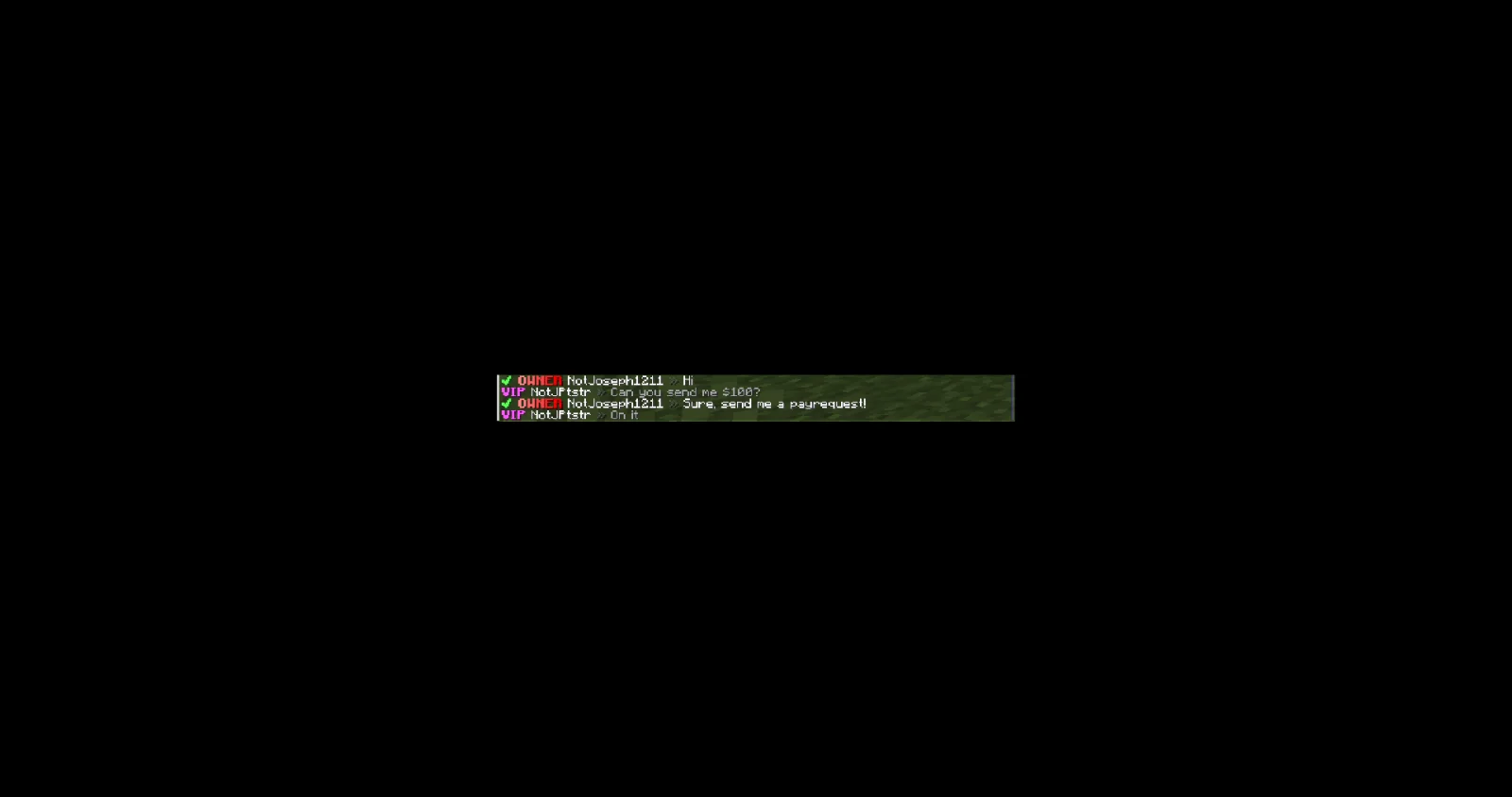
JPChat, JPPlugins tarafından Paper / Spigot sunucuları için yapılmış bir eklenti. Chat for Paper servers: formats per rank, private messages, mentions, item showcase, emojis, chat filters, chat games and cross-server chat.
Desteklediği sürümler: Minecraft 26.x. Modrinth üzerinde 1 kez indirildi. Böylece burada listelenen sesli sohbet ve sosyal eklentiler (166 adet) arasında 162. sırada yer alıyor. Son güncelleme 09.11.2026 tarihinde çıktı.
En yenisi 08.11.2026 tarihinde çıkan 1.0.0. Minecraft 26.3 için yapıldı. Paper üzerinde çalışır. İndirme boyutu 158 KB.
| Sürüm | Yayın tarihi | Minecraft | Tür |
|---|---|---|---|
1.0.0 | 08.11.2026 | 26.3 | Kararlı |
JPChat için Modrinth sayfasında geçen komutlar:
/namecolor/jpchat/jp/msg/tell/whisper/pm/message/msgtoggle/togglemsg/tpm/ignore/unignore/socialspy/spy/broadcastOrada geçen yetki düğümleri (LuckPerms gibi bir eklentiyle verilir):
jpchat.*jpchat.adminjpchat.namecolorjpchat.chatgames.playjpchat.chatgames.adminjpchat.msgjpchat.msg.togglejpchat.ignorejpchat.emojijpchat.itemjpchat.linkjpchat.socialspyjpchat.broadcastjpchat.notifyjpchat.colorjpchat.styleEverything for your Paper server's chat: how it looks, how players talk to each other, and how you keep it clean.
Part of JP Plugins, but it works on its own.
How chat looks
Talking to each other
Keeping it clean
Keeping it active
Optional
Type /jp as an operator to see every JP plugin you have installed, its version and which optional plugins it found.
Needs PlaceholderAPI.
Full docs, the default config and setup guides are on the JPChat page of the JP Plugins website.
Questions, bugs or ideas? Join the JP Plugins Discord.
JPChat is free to use on any server, including servers that make money, but it is not open source. Don't reupload, sell or share modified copies of it. The full terms are in LICENSE.txt inside the jar.
Yazan: JPPlugins. Resimli halini Modrinth sayfasında oku.
Sunucunun Minecraft 26.x üzerinde Paper ve Spigot çalıştırdığından emin ol.
.jar dosyasını Modrinth üzerinden indir ve sunucunun plugins klasörüne koy.
Sunucuyu yeniden başlat. /reload kullanma, birçok eklenti bununla sorun çıkarır.
Konsola /plugins yaz: JPChat yeşil olarak listelenmeli. Ayar dosyaları ilk açılışta plugins klasöründe oluşturulur.
Detaylı rehber: Minecraft sunucusuna eklenti nasıl kurulur
| Kaynak | İndirmeler | Sürümler | Son güncelleme | Fiyat |
|---|---|---|---|---|
| JPChatbaktığın | 1 | 26.x | 5 gün önce | Ücretsiz |
| Chat Cardandrey5650 | 4 | 1.21 – 26.x | 8 gün önce | Ücretsiz |
 voxchatirinque | 9 | 1.19 – 26.x | 13 gün önce | Ücretsiz |
| Direct Messagesandrey5650 | 4 | 1.21 – 26.x | 8 gün önce | Ücretsiz |
Evet. JPChat, Minecraft 26.x sürümünü destekliyor. Desteklenen tüm sürümler: 26.x.
Evet. JPChat, Modrinth üzerinden ücretsiz indirilebilir.
JPChat, Paper ve Spigot sunucularında çalışır.
Evet: LuckPerms, PlaceholderAPI. Bunu JPChat öncesinde kur.
Evet. Son güncelleme son 24 saat içinde çıktı.
En yakın olanlar Chat Card, voxchat ve Direct Messages. Tüm alternatifleri karşılaştır
A chat plugin with a stats card when you hover a player's name, chat formats per rank and staff tools.
voxchatEklentiler · 1.19 – 26.xVoxChat is a server-side Minecraft plugin featuring local and global chat, private messaging, and customizable system notifications. Configure chat formats…
Private messages with custom formats, sounds, an action bar, ignore, a PM toggle and social spy.
 ChatStyleEklentiler · 1.21 – 26.x
A flexible chat plugin with customizable chat styles, local/global chat, private messages and spam filtering
 Voice MessagesEklentiler · 1.21 – 26.x
Voice messages in minecraft chat
 Simple RanksEklentiler · 1.20 – 26.x
Simple rank plugin allowing for custom-colored, ordered ranks in tab list, name tags, chat, and Placeholder API placeholders!
Yorum yazmak için giriş yap.