YeniCraftRank SitesÜcretsiz web sitesi ve mağazaKendininkini yap ›
AshlarPaper tabanlı, DDoS ve arka kapı korumalı ücretsiz sunucu yazılımı Ashlar'ı gör ›Security RadarA free check of your server's login, anti-bot and proxy settings, only with your OK Nasıl çalıştığını gör ›ToplulukSoru sor, yapılarını paylaş ve birlikte oynayacak kişiler bul Foruma katıl ›
Kaynaklar / Eklentiler / BetterRIP

BetterRIP

Graves keep every item in its original slot and your experience - with holograms, protection and Folia support. No more lost items!

EklentilerÜcretsiz26.x
geliştiren: hassanbwo · Modrinth üzerinden listelendi
İndir ›

Modrinth üzerinden doğrudan indirme · 6 indirme

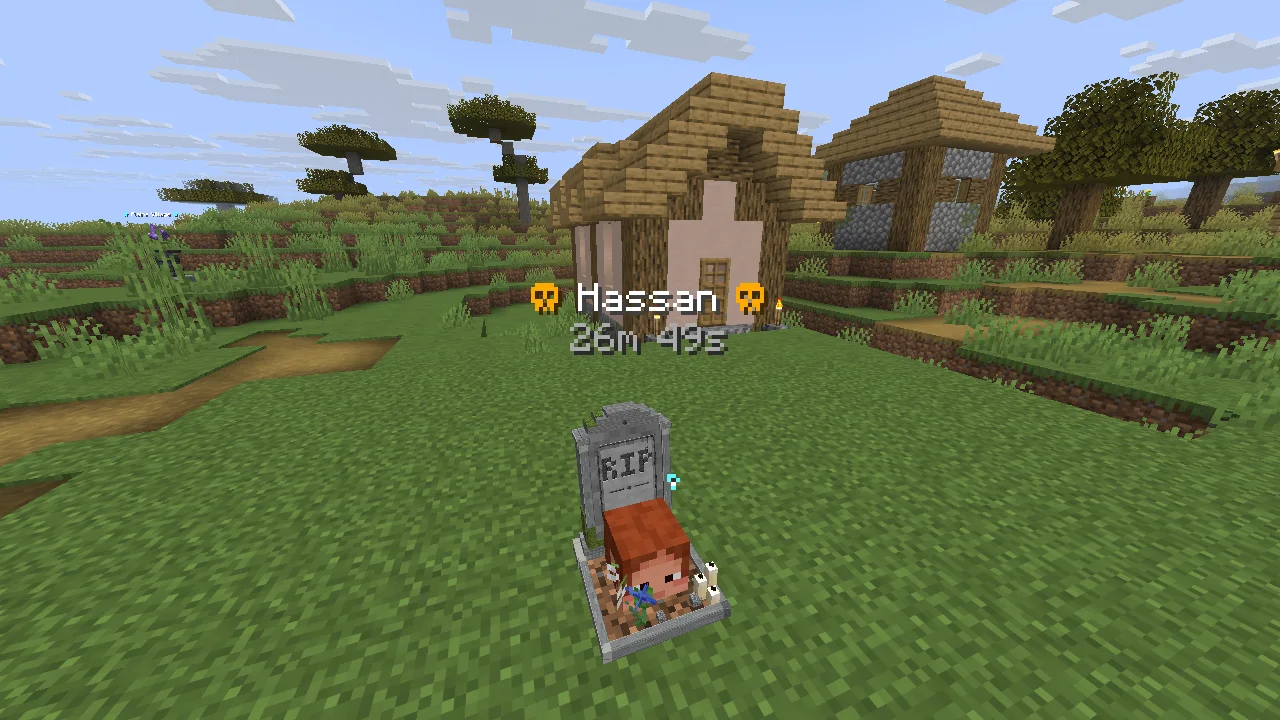
BetterRIP ekran görüntüsü 1

Ne yapar

BetterRIP, hassanbwo tarafından Paper / Spigot sunucuları için yapılmış bir eklenti. Graves keep every item in its original slot and your experience - with holograms, protection and Folia support. No more lost items!

Desteklediği sürümler: Minecraft 26.x. Modrinth üzerinde 6 kez indirildi. Böylece burada listelenen depolama eklentileri (33 adet) arasında 28. sırada yer alıyor. Son güncelleme 13.11.2026 tarihinde çıktı.

Desteklenen sürümler

26.x

Sürüm geçmişi

BetterRIP, 09.11.2026 tarihinden beri Modrinth üzerinde 5 sürüm yayınladı. Bunların 5 tanesi son bir yılda çıktı. En yenisi 13.11.2026 tarihinde çıkan 1.3.0. Minecraft 26.1 – 26.3 için yapıldı. Folia, Paper ve Purpur üzerinde çalışır. İndirme boyutu 100 KB.

SürümYayın tarihiMinecraftTür
1.3.013.11.202626.1 – 26.3Kararlı
1.2.111.11.202626.1 – 26.3Kararlı
1.2.011.11.202626.1 – 26.3Kararlı
1.1.010.11.202626.1 – 26.3Kararlı
1.0.009.11.202626.1 – 26.3Kararlı

Komutlar

BetterRIP için Modrinth sayfasında geçen komutlar:

/graves/rip/grave

Yetkiler

Orada geçen yetki düğümleri (LuckPerms gibi bir eklentiyle verilir):

betterrip.usebetterrip.open.othersbetterrip.teleportbetterrip.admin
Yazarın Modrinth açıklaması

BetterRIP

Never lose your items again. When a player dies, BetterRIP places a grave - a tombstone with the player's head and a hologram - right where they died. Everything stays inside: every item in its original slot and the experience. Right-click the grave and your armor is on again, your hotbar is exactly like before. For Paper, Purpur and Folia 26.x - perfect for SMP, survival and friends servers.

Tombstone

Every grave gets its own headstone with RIP chiseled into it - with pillars, an arched top, moss, candles and flowers. It is made of vanilla blocks, so no resource pack is needed, and it faces the same way as the player's head. You can change the engraving to your own text or turn the tombstone off.

How it works

  1. A player dies - a tombstone with their head appears, the hologram shows the name and the time left.
  2. The player gets a message with the coordinates, and the grave compass in the action bar shows the way: ☠ Grave ↗ 34m
  3. Right-click (or break) the grave: all items are back in their slots, the experience too.

Features

  • Original slots - armor is equipped again, offhand and hotbar are restored exactly
  • Keeps the experience - configurable percentage (vanilla only drops a small part)
  • Tombstone with RIP chiseled into it - own 3D model, no resource pack, engraving configurable
  • Grave compass - arrow and distance to your newest grave in the action bar, also tells you the world; /graves compass turns it off and on
  • Hologram with name and time left, the player's head on the grave, small soul particles
  • Protected - only the owner can open it first, it unlocks for everybody after a configurable time
  • Safe from explosions (TNT, creepers, withers), pistons and Endermen
  • Graves disappear after a configurable time - items drop or are deleted
  • Max graves per player - the oldest one disappears
  • Safe location - deaths in lava, water, inside blocks, in the void or above the build limit are handled
  • Crash-safe - graves are saved right away, nothing is lost after a crash or restart
  • /graves - your graves with coordinates and time left, admins can teleport to graves
  • keepInventory and disabled worlds are respected
  • Folia support - one jar for Paper, Purpur and Folia
  • MiniMessage messages, English, German, French, Spanish, Polish, Russian, Portuguese, Turkish and Chinese included
  • New config options are added automatically, optional auto update from Modrinth (off by default)

Commands & permissions

  • /graves - list your graves (aliases: /rip, /grave)
  • /graves compass - turn the grave compass off and on for yourself
  • /graves list - graves of another player
  • /graves teleport - teleport to a grave
  • /graves reload - reload config and messages

Permission · Default
betterrip.use · everyone · a grave is created on death
betterrip.open.others · OP · open other players' graves right away
betterrip.teleport · OP · /graves teleport
betterrip.admin · OP · /graves list , /graves reload, update notices

Requirements

  • Paper, Purpur or Folia 26.1 - 26.3, Java 25
  • No other plugins needed

Bug report & support

If you need help or have a bug please contact me via discord (add hassanbwo). I will guarantee quick help - Thanks for supporting :)

config.yml

==========================================

BetterRIP – config.yml

==========================================

When a player dies, a grave (the player's head) is placed where they died.

All items stay in it - in their original slots - and the experience too.

Right-click or break the grave to get everything back: armor is put on again,

the hotbar is restored exactly like before.

All messages are in messages_en.yml / messages_de.yml (MiniMessage like or and & color codes)

Check the plugin page for more information: modrinth.com/plugin/betterrip

==========================================

If you need help or have a bug please contact me via discord (add hassanbwo).

I will guarantee quick help - Thanks for supporting :)

==========================================

Minutes until a grave disappears (0 = graves never disappear)

expire_minutes: 30

What happens with the items when a grave disappears:

true = they drop on the ground, false = they are deleted

drop_items_on_expire: true

Minutes until everybody can open a grave (protects the items from other players first)

0 = everybody can open graves right away, -1 = only the owner (and admins) can ever open it

unlock_minutes: 10

Maximum graves per player. When a player dies more often, the oldest grave disappears.

0 = no limit

max_graves_per_player: 5

Keep the experience in the grave (percent of the experience the player had, 0 = vanilla behaviour)

Vanilla only drops a small part of the experience, a grave can keep much more.

experience_percent: 100

Put the items back into their original slots (armor, offhand, hotbar).

false = the items are just added to the inventory

restore_slots: true

Hologram above the grave (texts are in the messages file)

hologram:
enabled: true

Height above the grave block

height: 1.2

A tombstone around the grave head: headstone with an engraving, grave bed, moss, candles and flowers.

Made of vanilla blocks (display entities) - no resource pack needed. Only on solid ground.

tombstone:
enabled: true

Text on the headstone ("" = no text)

engraving: "RIP"

Grave compass: the owner sees the direction and distance to their newest grave in the action bar,

until the grave is opened or disappears. Players can turn it off and on with /graves compass.

compass:
enabled: true

The compass is hidden when the player is this close to the grave (blocks)

hide_distance: 3

Small soul particles at the grave

particles: true

Sounds (Minecraft sound names, "" = no sound)

sounds:
open: "entity.experience_orb.pickup"
created: "block.bell.resonate"

Worlds without graves (players drop their items like in vanilla)

disabled_worlds:

  • example_world

------------------------------------------

Language of all messages: en (English), de (Deutsch), fr (Français), es (Español),

pl (Polski), ru (Русский), pt (Português), tr (Türkçe) or zh (简体中文)

You can add your own language, e.g. messages_it.yml -> language: it

/graves reload (permission betterrip.admin) reloads config and messages.

------------------------------------------

language: en

Updates from Modrinth: a newer version is always announced in the console.

enabled: download new versions automatically. Downloads are checked with the SHA-512 checksum from Modrinth

and installed on the next server restart (plugins/update folder). Only releases for your

Minecraft version and server software (Paper, Purpur, Folia) are downloaded.

major_versions: also download big updates (e.g. 2.x -> 3.0) automatically, otherwise they are only announced.

auto_update:
enabled: false
major_versions: false


More plugins by BetterPlugins

All for Paper, Purpur and Folia 26.x, in English, German, French, Spanish, Polish, Russian, Portuguese, Turkish and Chinese - see the whole BetterPlugins collection:

BetterTimber - Fell whole trees with one hit - protection-plugin safe
BetterTimberEnchantment - Timber enchantment for BetterTimber - enchanting table, villagers, loot
BetterAFK - Stylish AFK holograms, auto-AFK, kick and more
BetterCarry - Carry and throw players, mobs and chests
BannerForLabyMod - Custom image banner above the tab list for LabyMod
BetterSort - Sort chests with one click, hotbar refill and quick stack
BetterWaystones - Build, discover and travel between waystones - own 3D model, no resource pack

Yazan: hassanbwo. Resimli halini Modrinth sayfasında oku.

BetterRIP nasıl kurulur

  1. Sunucunun Minecraft 26.x üzerinde Paper ve Spigot çalıştırdığından emin ol.

  2. .jar dosyasını Modrinth üzerinden indir ve sunucunun plugins klasörüne koy.

  3. Sunucuyu yeniden başlat. /reload kullanma, birçok eklenti bununla sorun çıkarır.

  4. Konsola /plugins yaz: BetterRIP yeşil olarak listelenmeli. Ayar dosyaları ilk açılışta plugins klasöründe oluşturulur.

Detaylı rehber: Minecraft sunucusuna eklenti nasıl kurulur

Uyumluluk

Minecraft sürümleri
26.x
Çalıştığı yer
Paper, Spigot
Sürüm türü
Java
Gerekenler
Başka bir şey gerekmez
Lisans
MIT
Fiyat
Ücretsiz
Bakım
Aktif olarak güncelleniyor (14.11.2026)

BetterRIP ve benzerleri karşılaştırması Tüm alternatifleri karşılaştır

KaynakİndirmelerSürümlerSon güncellemeFiyat
BetterRIPbaktığın626.x22 saat önceÜcretsiz
Item-lockclre20431.21 – 26.x20 gün önceÜcretsiz
DupeItemFixerCraftury181.21 – 26.x10 Ağu 2026Ücretsiz
TruhenpostLegicrafter126.x12 gün önceÜcretsiz

Sorular

BetterRIP, Minecraft 26.x ile çalışır mı?

Evet. BetterRIP, Minecraft 26.x sürümünü destekliyor. Desteklenen tüm sürümler: 26.x.

BetterRIP ücretsiz mi?

Evet. BetterRIP, Modrinth üzerinden ücretsiz indirilebilir.

BetterRIP hangi sunucu yazılımında çalışır?

BetterRIP, Paper ve Spigot sunucularında çalışır.

BetterRIP hâlâ güncelleniyor mu?

Evet. Son güncelleme son 24 saat içinde çıktı.

BetterRIP için en iyi alternatifler neler?

En yakın olanlar Item-lock, DupeItemFixer ve Truhenpost. Tüm alternatifleri karşılaştır

BetterRIP alternatifleri

Item-lockEklentiler · 1.21 – 26.x

高安全性貴重物品保護插件。採用零信任純存儲白名單與智慧組件遮罩引擎,阻斷非法的合成、加工、偷換、複製與意外遺失。 A high-security plugin for protecting valuable items. Utilizing a zero-trust storage-only whitelist…

Ücretsiz43 indirme

DupeItemFixerEklentiler · 1.21 – 26.x

Advanced item duplication detection and prevention for Paper & Folia with intelligent transaction analysis, quarantine, rollback and farm-safe protection.

Ücretsiz18 indirme
TruhenpostEklentiler · 26.x

Connect chests with a menu: items travel invisibly from senders to receivers, with item filters, protected and optionally public.

Ücretsiz1 indirme
Tüm alternatifleri karşılaştır ›

Yorumlar

–★★★★★
0 yorum
50
40
30
20
10

Yorum yazmak için giriş yap.