
 MeadowMods · 1.19 – 1.21
A Mod offering a slight overhaul for the meadow biome by adding two new sub biomes and introducing the process of crafting cheese.
Kostenlos7,994,713 Downloads
Camera mod with focus on process and aesthetics
Direkter Download von Modrinth · 14,888,526 Downloads
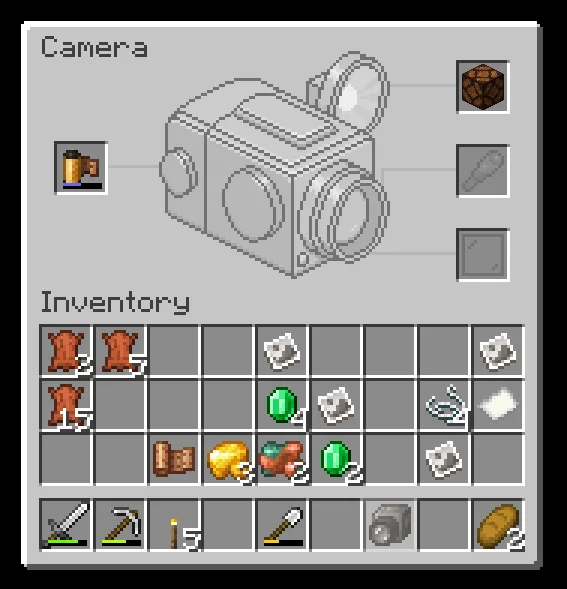
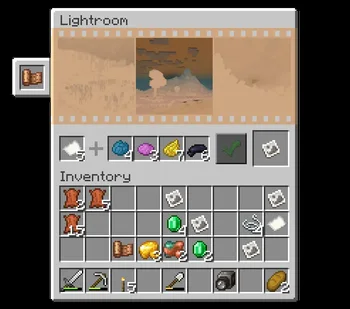
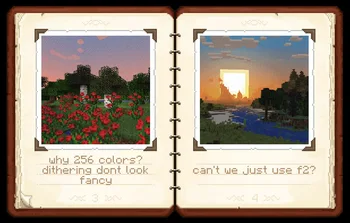
Exposure (Mod) stammt von mortuusars. Camera mod with focus on process and aesthetics.
Unterstützt wird Minecraft 1.19 – 1.21. Auf Modrinth gibt es 14,888,526 Downloads. Das letzte Update erschien am 09.11.2026.
Exposure hat seit 21.11.2023 162 Versionen auf Modrinth veröffentlicht. 33 davon erschienen im letzten Jahr. Die neueste ist 1.9.22, erschienen am 23.09.2026. Sie ist für Minecraft 1.20.1 gemacht. Sie läuft auf Fabric. Der Download ist 1.9 MB groß.
| Version | Veröffentlicht | Minecraft | Typ |
|---|---|---|---|
1.9.22 | 23.09.2026 | 1.20.1 | Beta |
1.9.22 | 23.09.2026 | 1.20.1 | Beta |
1.9.19 | 23.09.2026 | 1.21.1 | Release |
1.9.19 | 23.09.2026 | 1.21.1 | Release |
1.9.18 | 09.06.2026 | 1.21.1 | Release |
Exposure ist Open Source. Die neueste Version auf GitHub ist Exposure - 1.19.2 - beta-test 2, veröffentlicht am 10.11.2023.
Davor: Exposure - 1.19.2 - beta-test (09.11.2023).
[](modrinth.com/mod/exposure-polaroid)
[](modrinth.com/mod/exposure-catalog)
Description in text form
compose your shot and release the shutter.
settings: Focal Length, Shutter Speed, Flash mode, Composition Guides.
where you'd be able to:
and harder to make and process, color film.
best exposure.
Color print will require Cyan, Magenta and Yellow dyes on top of that.
And finally, you have your Photograph - a captured moment in time!
Now it's time to admire the result, hang it on the wall, share with
friends, sell it to the National Geographic. The possibilities are endless.
_Known incompatibilities:_
[](patreon.com/mortuusars/membership)[](https://ww…)
[](patreon.com/mortuusars/posts/rewards-129739244)
Geschrieben von mortuusars. Mit Bildern auf Modrinth lesen.
Diese Mod wird auf dem Server und bei jedem Spieler gebraucht.
Installiere Fabric, Quilt, Forge und NeoForge für Minecraft 1.19 – 1.21.
Füge die benötigten Mods hinzu: Fabric API und Forge Config API Port.
Lade die .jar-Datei von Modrinth herunter und lege sie in den mods-Ordner deines .minecraft-Verzeichnisses.
Starte Minecraft mit dem Fabric-Profil.
Einfacher: Suche in Prism Launcher oder der Modrinth App in den Mods deiner Instanz nach Exposure und klicke auf Install. Loader und benötigte Mods werden für dich hinzugefügt.
| Ressource | Downloads | Versionen | Letztes Update | Preis |
|---|---|---|---|---|
| Exposuredie du angesehen hast | 14.9M | 1.19 – 1.21 | vor 1 Tag | Kostenlos |
| Meadowsatisfyu | 8M | 1.19 – 1.21 | vor 23 Tagen | Kostenlos |
 Ender Dragon Fight RemasteredMrGenie151 | 3.1M | 1.19 – 26.x | 16. Juli 2026 | Kostenlos |
 Shoulder Surfing ReloadedExopandora | 12.8M | 1.8 – 26.x | vor 10 Tagen | Kostenlos |
Noch nicht. Die neueste unterstützte Version ist Minecraft 1.21.
Ja. Exposure kannst du kostenlos bei Modrinth herunterladen.
Beides. Der Server und jeder Spieler brauchen Exposure.
Ja: Just Enough Items (JEI), Fabric API, Forge Config API Port. Installiere es vor Exposure.
Ja. Das letzte Update kam innerhalb des letzten Tages.
Am ähnlichsten sind Meadow, Ender Dragon Fight Remastered und Shoulder Surfing Reloaded. Alle Alternativen vergleichen
MeadowMods · 1.19 – 1.21A Mod offering a slight overhaul for the meadow biome by adding two new sub biomes and introducing the process of crafting cheese.
Ender Dragon Fight RemasteredMods · 1.19 – 26.xA difficulty increase of Minecraft's final boss, with a focus on a somewhat Vanilla feel.
Shoulder Surfing ReloadedMods · 1.8 – 26.xHighly configurable third person camera mod
 Camera UtilsMods · 1.19 – 26.x
Helpful camera utilities
 Nature's CompassMods · 1.12 – 26.x
Allows you to locate biomes anywhere in the world.
 Advancement PlaquesMods · 1.12 – 26.x
Replace those boring advancement popups with something flashier.
Logg dich ein, um eine Bewertung zu schreiben.