
 MeadowMods · 1.19 – 1.21
A Mod offering a slight overhaul for the meadow biome by adding two new sub biomes and introducing the process of crafting cheese.
Free7,994,713 downloads
Camera mod with focus on process and aesthetics
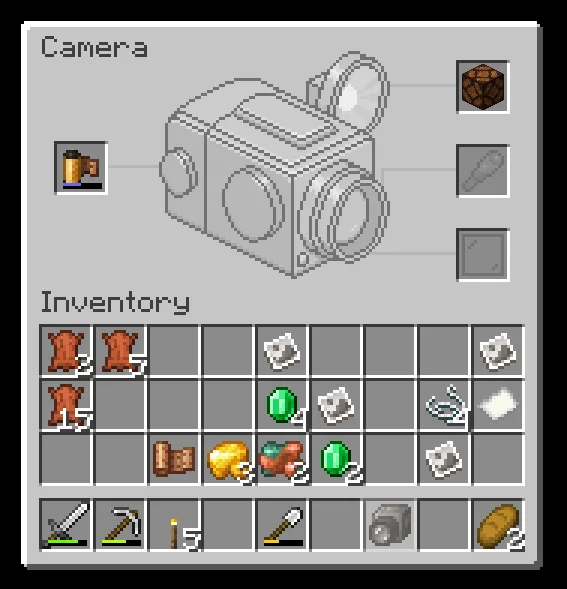
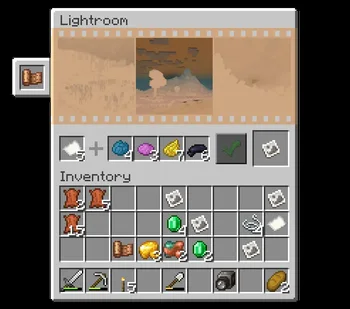
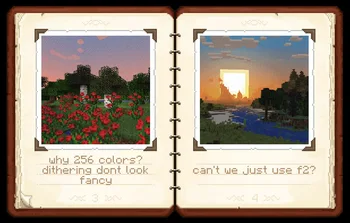
Camera mod with focus on process and aesthetics
Exposure is a resource made by mortuusars. It supports Minecraft 1.19 – 1.21. It has been downloaded 14,888,526 times on Modrinth. The last update came out on Nov 9, 2026.
Exposure has had 162 releases on Modrinth since Nov 21, 2023. 33 of them came out in the past year. The newest is 1.9.22, released on Sep 23, 2026. It is made for Minecraft 1.20.1. It runs on Fabric. The download is 1.9 MB.
| Version | Released | Minecraft | Type |
|---|---|---|---|
1.9.22 | Sep 23, 2026 | 1.20.1 | Beta |
1.9.22 | Sep 23, 2026 | 1.20.1 | Beta |
1.9.19 | Sep 23, 2026 | 1.21.1 | Release |
1.9.19 | Sep 23, 2026 | 1.21.1 | Release |
1.9.18 | Jun 9, 2026 | 1.21.1 | Release |
Exposure is open source. Its newest release on GitHub is Exposure - 1.19.2 - beta-test 2, published on Nov 10, 2023.
Before that: Exposure - 1.19.2 - beta-test (Nov 9, 2023).
[](modrinth.com/mod/exposure-polaroid)
[](modrinth.com/mod/exposure-catalog)
Description in text form
compose your shot and release the shutter.
settings: Focal Length, Shutter Speed, Flash mode, Composition Guides.
where you'd be able to:
and harder to make and process, color film.
best exposure.
Color print will require Cyan, Magenta and Yellow dyes on top of that.
And finally, you have your Photograph - a captured moment in time!
Now it's time to admire the result, hang it on the wall, share with
friends, sell it to the National Geographic. The possibilities are endless.
_Known incompatibilities:_
[](patreon.com/mortuusars/membership)[](https://ww…)
[](patreon.com/mortuusars/posts/rewards-129739244)
Written by mortuusars. Read it with pictures on Modrinth.
This mod is needed on both the server and every player who joins.
Install Fabric, Quilt, Forge and NeoForge for Minecraft 1.19 – 1.21.
Add the mods it needs: Fabric API and Forge Config API Port.
Download the .jar file from Modrinth and put it in the mods folder of your .minecraft directory.
Start Minecraft with the Fabric profile.
With the CraftRank Launcher you can skip these steps: open Mods, search for Exposure and click Install.
| Resource | Downloads | Versions | Last update | Price |
|---|---|---|---|---|
| Exposurethe one you looked at | 14.9M | 1.19 – 1.21 | 1 day ago | Free |
| Meadowsatisfyu | 8M | 1.19 – 1.21 | 22 days ago | Free |
 Ender Dragon Fight RemasteredMrGenie151 | 3.1M | 1.19 – 26.x | Jul 16, 2026 | Free |
 Shoulder Surfing ReloadedExopandora | 12.8M | 1.8 – 26.x | 9 days ago | Free |
Not yet. The newest version it supports is Minecraft 1.21.
Yes. Exposure is free to download from Modrinth.
Both. The server and every player need Exposure installed.
Yes: Just Enough Items (JEI), Fabric API, Forge Config API Port. Install it before Exposure.
Yes. The last update came out in the past day.
The closest ones are Meadow, Ender Dragon Fight Remastered and Shoulder Surfing Reloaded. Compare all alternatives
MeadowMods · 1.19 – 1.21A Mod offering a slight overhaul for the meadow biome by adding two new sub biomes and introducing the process of crafting cheese.
Ender Dragon Fight RemasteredMods · 1.19 – 26.xA difficulty increase of Minecraft's final boss, with a focus on a somewhat Vanilla feel.
Shoulder Surfing ReloadedMods · 1.8 – 26.xHighly configurable third person camera mod
 Camera UtilsMods · 1.19 – 26.x
Helpful camera utilities
 Nature's CompassMods · 1.12 – 26.x
Allows you to locate biomes anywhere in the world.
 Advancement PlaquesMods · 1.12 – 26.x
Replace those boring advancement popups with something flashier.
Log in to leave a review.