
 Eclipse Lite CinematicShader · 1.20 – 26.x
Cinematic version of a low-end shader for Minecraft "EclipseLite"
Kostenlos8,212 Downloads
A Revamped Version of EclipseLite, In Cooperation with Gamer Ben
Opens Modrinth · 472,712 downloads there


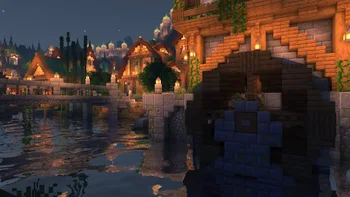
A Revamped Version of EclipseLite, In Cooperation with Gamer Ben
Eclipse (Shaderpack) stammt von gamerbenyt. Unterstützt wird Minecraft 1.19 – 1.21. Auf Modrinth gibt es 472,712 Downloads. Das letzte Update erschien am 14.08.2025.
Die neueste ist 1.0, erschienen am 14.08.2025. Sie ist für Minecraft 1.19 – 1.21.8 gemacht. Sie läuft auf Iris. Der Download ist 150 KB groß.
| Version | Veröffentlicht | Minecraft | Typ |
|---|---|---|---|
1.0 | 14.08.2025 | 1.19 – 1.21.8 | Beta |
Eclipse is a Revamped Version of EclipseLite, in Cooperation with Gamer Ben.
Eclipse is a Shader Pack that gives a Solar Eclipse feel to the skies during the day! It is based on EclipseLite, but has many distinct features that set it apart.
Eclipse aims to give a dark and moody feel to your world, but still keeping it vanilla.
Our shader may looks similar to vanilla, but thats the whole point! We want to keep Eclipse close to standard gameplay, yet with a new vibe.
Eclipse is a project founded and developed by GamesOfDev, but Owned and tweaked by Gamer Ben.
Geschrieben von gamerbenyt. Mit Bildern auf Modrinth lesen.
Installiere Iris (mit Sodium) oder OptiFine für deine Minecraft-Version: Shader brauchen eins davon.
Lade die .zip-Datei von Modrinth herunter. Entpacke sie nicht.
Öffne in Minecraft Optionen, dann Grafikeinstellungen, dann Shaderpacks und klicke auf Shaderpack-Ordner öffnen.
Lege die .zip-Datei in diesen Ordner, wähle Eclipse in der Liste und klicke auf Fertig.
Shader belasten die Grafikkarte. Wird das Spiel langsam, wähle in den Shader-Einstellungen ein niedrigeres Profil.
Noch nicht. Die neueste unterstützte Version ist Minecraft 1.21.
Ja. Eclipse kannst du kostenlos bei Modrinth herunterladen.
Ja. Das letzte Update kam innerhalb des letzten Tages.
Eclipse Lite CinematicShader · 1.20 – 26.xCinematic version of a low-end shader for Minecraft "EclipseLite"
Logg dich ein, um eine Bewertung zu schreiben.