
 Eclipse Lite CinematicShaders · 1.20 – 26.x
Cinematic version of a low-end shader for Minecraft "EclipseLite"
Free8,212 downloads

A Revamped Version of EclipseLite, In Cooperation with Gamer Ben
Opens Modrinth · 472,712 downloads there


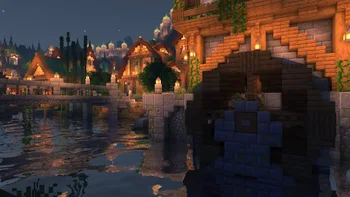
A Revamped Version of EclipseLite, In Cooperation with Gamer Ben
Eclipse is a shader pack made by gamerbenyt. It supports Minecraft 1.19 – 1.21. It has been downloaded 472,712 times on Modrinth. The last update came out on Aug 14, 2025.
The newest is 1.0, released on Aug 14, 2025. It is made for Minecraft 1.19 – 1.21.8. It runs on Iris. The download is 150 KB.
| Version | Released | Minecraft | Type |
|---|---|---|---|
1.0 | Aug 14, 2025 | 1.19 – 1.21.8 | Beta |
Eclipse is a Revamped Version of EclipseLite, in Cooperation with Gamer Ben.
Eclipse is a Shader Pack that gives a Solar Eclipse feel to the skies during the day! It is based on EclipseLite, but has many distinct features that set it apart.
Eclipse aims to give a dark and moody feel to your world, but still keeping it vanilla.
Our shader may looks similar to vanilla, but thats the whole point! We want to keep Eclipse close to standard gameplay, yet with a new vibe.
Eclipse is a project founded and developed by GamesOfDev, but Owned and tweaked by Gamer Ben.
Written by gamerbenyt. Read it with pictures on Modrinth.
Install Iris (with Sodium) or OptiFine for your Minecraft version: shaders need one of them.
Download the .zip file from Modrinth. Do not unzip it.
In Minecraft, open Options, then Video Settings, then Shader Packs, and click Open Shader Pack Folder.
Drop the .zip file into that folder, pick Eclipse in the list and click Done.
Shaders are heavy on the graphics card. If the game gets slow, pick a lower profile in the shader settings.
Not yet. The newest version it supports is Minecraft 1.21.
Yes. Eclipse is free to download from Modrinth.
Yes. The last update came out in the past day.
Eclipse Lite CinematicShaders · 1.20 – 26.xCinematic version of a low-end shader for Minecraft "EclipseLite"
Log in to leave a review.