
 Thunder's Motion BlurShader · 1.8 – 26.x
Lightweight and performant shader for motion blur. Looks good even at 4 samples. Great for PVP.
Kostenlos47,924 Downloads
A shader that visually assists in PVP!
Direkter Download von Modrinth · 59,505 Downloads
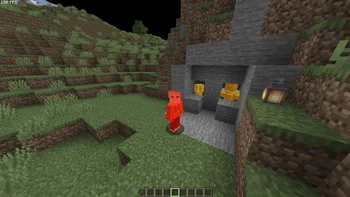
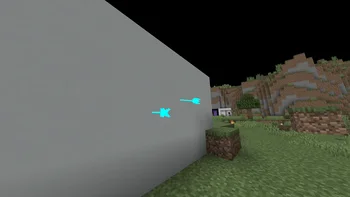
PVP ZeroX (Shaderpack) stammt von LoLip_p. A shader that visually assists in PVP!
Unterstützt wird Minecraft 1.8 – 26.x. Auf Modrinth gibt es 59,505 Downloads. Das letzte Update erschien am 23.08.2026.
PVP ZeroX hat seit 29.11.2025 2 Versionen auf Modrinth veröffentlicht. 2 davon erschienen im letzten Jahr. Die neueste ist 1.0.1, erschienen am 23.08.2026. Sie ist für Minecraft 1.10 – 1.20.3 gemacht. Sie läuft auf Iris und Optifine. Der Download ist 54 KB groß.
| Version | Veröffentlicht | Minecraft | Typ |
|---|---|---|---|
1.0.1 | 23.08.2026 | 1.10 – 1.20.3 | Release |
1.0.0 | 29.11.2025 | 1.10 – 1.20.3 | Release |
PVP ZeroX is a shader designed for PVP.
It adds:
Features that allow you to focus on PVP:
All settings can be adjusted, enabled, or disabled. There are also 3 presets to suit your taste. If you have any ideas for what else to add, please write to Discord.
Geschrieben von LoLip_p. Mit Bildern auf Modrinth lesen.
Installiere Iris (mit Sodium) oder OptiFine für deine Minecraft-Version: Shader brauchen eins davon.
Lade die .zip-Datei von Modrinth herunter. Entpacke sie nicht.
Öffne in Minecraft Optionen, dann Grafikeinstellungen, dann Shaderpacks und klicke auf Shaderpack-Ordner öffnen.
Lege die .zip-Datei in diesen Ordner, wähle PVP ZeroX in der Liste und klicke auf Fertig.
Shader belasten die Grafikkarte. Wird das Spiel langsam, wähle in den Shader-Einstellungen ein niedrigeres Profil.
| Ressource | Downloads | Versionen | Letztes Update | Preis |
|---|---|---|---|---|
| PVP ZeroXdie du angesehen hast | 60K | 1.8 – 26.x | 23. Aug. 2026 | Kostenlos |
| Thunder's Motion BlurThunderFound | 48K | 1.8 – 26.x | 30. Mai 2026 | Kostenlos |
 B3-PvPLalaggi | 8,535 | 1.17 – 26.x | 24. Juli 2026 | Kostenlos |
 AxolotlShadersGamesofDev | 4,732 | 1.20 – 1.21 | 20. Nov. 2025 | Kostenlos |
Ja. PVP ZeroX unterstützt Minecraft 26.x. Alle unterstützten Versionen: 26.x, 1.21, 1.20, 1.19, 1.18, 1.17, 1.16, 1.13, 1.12, 1.8.
Ja. PVP ZeroX kannst du kostenlos bei Modrinth herunterladen.
Ja. Das letzte Update kam innerhalb des letzten Tages.
Am ähnlichsten sind Thunder's Motion Blur, B3-PvP und AxolotlShaders. Alle Alternativen vergleichen
Thunder's Motion BlurShader · 1.8 – 26.xLightweight and performant shader for motion blur. Looks good even at 4 samples. Great for PVP.
B3-PvPShader · 1.17 – 26.xA Simple Shader for Minecraft PvP
AxolotlShadersShader · 1.20 – 1.21AxolotlShaders is a visually enhanced Minecraft shader project focused on delivering vibrant colors, smooth lighting, and a clean, natural look while staying…
 AberrationShader · 1.21 – 26.x
A PvP shader that focuses on PvP visuals (specifically crystal PvP) rather then cinematics.
Logg dich ein, um eine Bewertung zu schreiben.