
 Thunder's Motion BlurShaders · 1.8 – 26.x
Lightweight and performant shader for motion blur. Looks good even at 4 samples. Great for PVP.
Free47,924 downloads
A shader that visually assists in PVP!
Direct download from Modrinth · 59,505 downloads
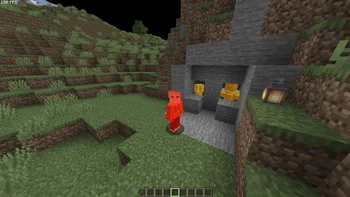
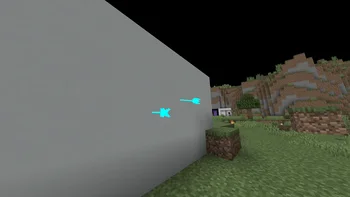
PVP ZeroX is a shader pack made by LoLip_p. A shader that visually assists in PVP!
It supports Minecraft 1.8 – 26.x. It has been downloaded 59,505 times on Modrinth. The last update came out on Aug 23, 2026.
PVP ZeroX has had 2 releases on Modrinth since Nov 29, 2025. 2 of them came out in the past year. The newest is 1.0.1, released on Aug 23, 2026. It is made for Minecraft 1.10 – 1.20.3. It runs on Iris and Optifine. The download is 54 KB.
| Version | Released | Minecraft | Type |
|---|---|---|---|
1.0.1 | Aug 23, 2026 | 1.10 – 1.20.3 | Release |
1.0.0 | Nov 29, 2025 | 1.10 – 1.20.3 | Release |
PVP ZeroX is a shader designed for PVP.
It adds:
Features that allow you to focus on PVP:
All settings can be adjusted, enabled, or disabled. There are also 3 presets to suit your taste. If you have any ideas for what else to add, please write to Discord.
Written by LoLip_p. Read it with pictures on Modrinth.
Install Iris (with Sodium) or OptiFine for your Minecraft version: shaders need one of them.
Download the .zip file from Modrinth. Do not unzip it.
In Minecraft, open Options, then Video Settings, then Shader Packs, and click Open Shader Pack Folder.
Drop the .zip file into that folder, pick PVP ZeroX in the list and click Done.
Shaders are heavy on the graphics card. If the game gets slow, pick a lower profile in the shader settings.
Full guide: How to install Minecraft shaders
| Resource | Downloads | Versions | Last update | Price |
|---|---|---|---|---|
| PVP ZeroXthe one you looked at | 60K | 1.8 – 26.x | Aug 23, 2026 | Free |
| Thunder's Motion BlurThunderFound | 48K | 1.8 – 26.x | May 30, 2026 | Free |
 B3-PvPLalaggi | 8,510 | 1.17 – 26.x | Jul 24, 2026 | Free |
 AxolotlShadersGamesofDev | 4,732 | 1.20 – 1.21 | Nov 20, 2025 | Free |
Yes. PVP ZeroX supports Minecraft 26.x. All supported versions: 26.x, 1.21, 1.20, 1.19, 1.18, 1.17, 1.16, 1.13, 1.12, 1.8.
Yes. PVP ZeroX is free to download from Modrinth.
Yes. The last update came out in the past day.
The closest ones are Thunder's Motion Blur, B3-PvP and AxolotlShaders. Compare all alternatives
Thunder's Motion BlurShaders · 1.8 – 26.xLightweight and performant shader for motion blur. Looks good even at 4 samples. Great for PVP.
B3-PvPShaders · 1.17 – 26.xA Simple Shader for Minecraft PvP
AxolotlShadersShaders · 1.20 – 1.21AxolotlShaders is a visually enhanced Minecraft shader project focused on delivering vibrant colors, smooth lighting, and a clean, natural look while staying…
 AberrationShaders · 1.21 – 26.x
A PvP shader that focuses on PvP visuals (specifically crystal PvP) rather then cinematics.
Log in to leave a review.