
 Make Your Own ShadersShaders · 1.19 – 26.x
This is a Tutorial Series to learn how to make Shaders! There are videos for each file on YouTube that will walk you through and help you learn in a way that…
Free16,175 downloads
Creepy, tense shaders that will tickle your nerves.
Direct download from Modrinth · 713,327 downloads
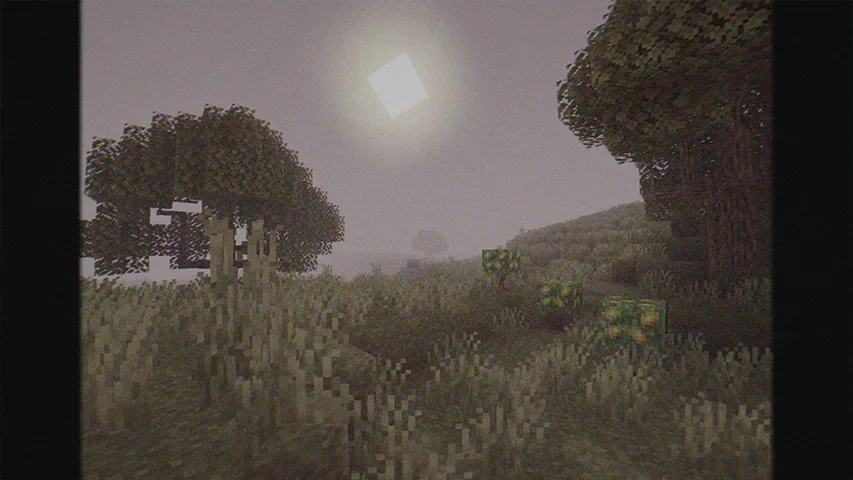
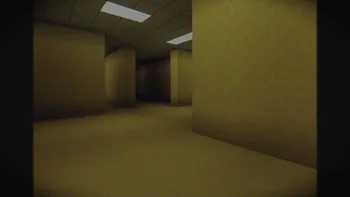
Cursed Fog is a shader pack made by LoLip_p. Creepy, tense shaders that will tickle your nerves.
It supports Minecraft 1.8 – 26.x. It has been downloaded 713,327 times on Modrinth. The last update came out on Sep 20, 2026.
Cursed Fog has had 11 releases on Modrinth since Nov 11, 2024. 2 of them came out in the past year. The newest is 1.0.10, released on Sep 20, 2026. It is made for Minecraft 1.10 – 1.20.3. It runs on Iris and Optifine. The download is 73 KB.
| Version | Released | Minecraft | Type |
|---|---|---|---|
1.0.10 | Sep 20, 2026 | 1.10 – 1.20.3 | Release |
1.0.9 | Aug 24, 2026 | 1.10 – 1.20.3 | Release |
1.0.8 | Oct 18, 2025 | 1.10 – 1.20.3 | Release |
1.0.7 | Jul 7, 2025 | 1.10 – 1.20.3 | Release |
1.0.6 | May 9, 2025 | 1.10 – 1.20.3 | Release |
[
EN 🌐
Hi, I'm LoLip_p! I developed this shader to create a tense and eerie atmosphere, perfect for horror modpacks. I would be delighted if it were included in your projects. It features a CRT mask, various video artifacts, noise effects, and more. If any effects don't match your preferences, all parameters are fully customizable, allowing you to easily toggle settings on or off. Support the author on Patreon.
RU 🐻
Привет, я LoLip_p! Я разработал этот шейдер, чтобы создать напряженную и жуткую атмосферу, идеально подходящую для модпаков в жанре хоррор. Я был бы рад, если бы он был включен в ваши проекты. Он включает в себя маску CRT, различные видеоартефакты, шумовые эффекты и многое другое. Если какие-либо эффекты не соответствуют вашим предпочтениям, все параметры полностью настраиваемы, что позволяет легко включать или отключать настройки. Поддержите автора на Patreon.
CH 🐉
你好,我是LoLip_p!我开发了这款着色器,旨在营造紧张诡异的氛围,特别适合恐怖模组合集。若能将其纳入您的项目,我将深感荣幸。它包含CRT滤镜、多种视频伪影、噪点效果等特色功能。若某些效果不符合您的偏好,所有参数均可自由调整,您可轻松启用或禁用各项设置。支持作者请访问 Patreon.
DE 🍺
Hallo, ich bin LoLip_p! Ich habe diesen Shader entwickelt, um eine spannende und unheimliche Atmosphäre zu schaffen, die perfekt für Horror-Modpacks geeignet ist. Ich würde mich sehr freuen, wenn er in Ihren Projekten verwendet würde. Er verfügt über eine CRT-Maske, verschiedene Videoartefakte, Rauscheffekte und vieles mehr. Wenn Ihnen bestimmte Effekte nicht gefallen, können Sie alle Parameter vollständig anpassen und die Einstellungen ganz einfach ein- oder ausschalten. Unterstützen Sie den Autor auf Patreon.
Written by LoLip_p. Read it with pictures on Modrinth.
Install Iris (with Sodium) or OptiFine for your Minecraft version: shaders need one of them.
Download the .zip file from Modrinth. Do not unzip it.
In Minecraft, open Options, then Video Settings, then Shader Packs, and click Open Shader Pack Folder.
Drop the .zip file into that folder, pick Cursed Fog in the list and click Done.
Shaders are heavy on the graphics card. If the game gets slow, pick a lower profile in the shader settings.
Full guide: How to install Minecraft shaders
| Resource | Downloads | Versions | Last update | Price |
|---|---|---|---|---|
| Cursed Fogthe one you looked at | 713K | 1.8 – 26.x | Sep 20, 2026 | Free |
| Make Your Own Shaderstimetravelbeard | 16K | 1.19 – 26.x | Aug 16, 2026 | Free |
 Visual ShadersTw1l | 7,613 | 1.21 | Aug 3, 2026 | Free |
Yes. Cursed Fog supports Minecraft 26.x. All supported versions: 26.x, 1.21, 1.20, 1.19, 1.18, 1.17, 1.16, 1.13, 1.12, 1.8.
Yes. Cursed Fog is free to download from Modrinth.
Yes. The last update came out in the past day.
Make Your Own ShadersShaders · 1.19 – 26.xThis is a Tutorial Series to learn how to make Shaders! There are videos for each file on YouTube that will walk you through and help you learn in a way that…
Visual ShadersShaders · 1.21Cinematic lighting shader with stunning sunsets, volumetric fog, realistic water, and atmospheric effects for beautiful Minecraft visuals.
Log in to leave a review.