
 Entity Model FeaturesMods · 1.18 – 26.x
EMF is an, OptiFine format, Custom Entity Model replacement mod available for Fabric and Forge.
Kostenlos105,183,524 Downloads
Reacharound Placement / Bedrock Bridging for Fabric, Forge & Quilt with a few extra tweaks
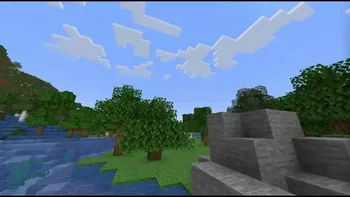
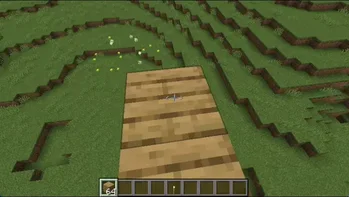

Reacharound Placement / Bedrock Bridging for Fabric, Forge & Quilt with a few extra tweaks
Bridging Mod (Ressource) stammt von CG360. Unterstützt wird Minecraft 1.17 – 26.x. Auf Modrinth gibt es 6,908,874 Downloads. Das letzte Update erschien am 21.09.2026.
Bridging Mod hat seit 31.01.2023 113 Versionen auf Modrinth veröffentlicht. 12 davon erschienen im letzten Jahr. Die neueste ist 2.7.0+26.3.neoforge, erschienen am 21.09.2026. Sie ist für Minecraft 26.3 gemacht. Sie läuft auf NeoForge. Der Download ist 5.7 MB groß.
| Version | Veröffentlicht | Minecraft | Typ |
|---|---|---|---|
2.7.0+26.3.neoforge | 21.09.2026 | 26.3 | Release |
2.7.0+26.3.fabric | 21.09.2026 | 26.3 | Release |
2.7.0+26.2.neoforge | 16.06.2026 | 26.2 | Release |
2.7.0+26.2.fabric | 16.06.2026 | 26.2 | Release |
2.6.6+26.1.neoforge | 12.04.2026 | 26.1, 26.1.1, 26.1.2 | Release |
This mod adds a bridging assist feature often referred to as "Reach-Around Placement" for Forge, Fabric, & Quilt! It's very similar to features found in both Minecraft: Bedrock Edition & the Quark mod, taking the best parts from both.
Bridging allows for placing blocks in gaps in front, above, or below blocks, even if the surface isn't visible! When it's available, a crosshair is shown to indicate where that block will be placed. When the F3 menu is visible, there's an extra outline showing the exact position it's placing in (but you can turn it on all the time in the config)
_Scroll down to see it all in detail, screenshots and all!_
This mod's official project pages can be found below:
This mod should only be used in singleplayer, or on small servers where all the players involved are okay with it! SMPs, homemade skyblock with friends - that kinda stuff.
It should NOT be used on big networks or on servers where these kinds of modifications are disallowed! You can (and probably will) get banned for using it! It doesn't work on Hypixel anyway, and I _won't_ be fixing that.
Versions of the Bridging Mod older than v2.0.0 were a Fabric port of Quark's "Reach-Around Placement". You can find Quark's source here: https://github.com/VazkiiMods/Quark
Versions since have rewritten it from scratch.
Translations:
Translations are always welcome & very appreciated! Please submit them Here!
Out of the box, the mod just works. It bridges with a crosshair, works on every axis, and tries to keep out of the way when you don't need it. It lets you place blocks in air gaps on both up/down and horizontally. This is useful for
Slabs just work naturally, blocks align to the blocks you're building off properly, and torches no longer get in your way.
This mod is a bit more similar to Bedrock's reacharound than it is to Quark's. It's much more lenient, but it has that added verticality.
It blends in with your regular crosshair and even has support for DynamicCrosshair (Thank you Crendgrim!)
It's only visible when you're about to place a block using bridging mode, and hints to where the block will be bridged off of (up/down/horizontally)
Almost every part of the mod is configurable! The config is split into 4 main tabs:
And if Bridging is being awkward and you don't want to go into the config to turn it off, _there's a handy keybind!_
Anyways, here's the config:
Geschrieben von CG360. Mit Bildern auf Modrinth lesen.
Diese Mod läuft nur in deinem eigenen Spiel. Server brauchen sie nicht, du kannst sie also auf jedem Server nutzen.
Installiere Fabric, Quilt, Forge und NeoForge für Minecraft 1.17 – 26.x.
Füge die benötigten Mods hinzu: YetAnotherConfigLib (YACL).
Lade die .jar-Datei von Modrinth herunter und lege sie in den mods-Ordner deines .minecraft-Verzeichnisses.
Starte Minecraft mit dem Fabric-Profil.
Mit dem CraftRank Launcher sparst du dir diese Schritte: Öffne Mods, suche nach Bridging Mod und klicke auf Installieren.
| Ressource | Downloads | Versionen | Letztes Update | Preis |
|---|---|---|---|---|
| Bridging Moddie du angesehen hast | 6.9M | 1.17 – 26.x | 21. Sept. 2026 | Kostenlos |
| Entity Model FeaturesTraben | 105.2M | 1.18 – 26.x | vor 26 Tagen | Kostenlos |
 BedrockIfyjuancarloscp52 | 5.2M | 1.16 – 26.x | 18. Juli 2026 | Kostenlos |
 IJM's TweaksItsJustMiaouss | 2.9M | 1.20 – 26.x | 3. Okt. 2026 | Kostenlos |
Ja. Bridging Mod unterstützt Minecraft 26.x. Alle unterstützten Versionen: 26.x, 1.21, 1.20, 1.19, 1.18, 1.17.
Ja. Bridging Mod kannst du kostenlos bei Modrinth herunterladen.
Clientseitig. Bridging Mod kommt in deinen eigenen mods-Ordner und funktioniert auf jedem Server, auch auf Servern ohne Mods.
Ja: YetAnotherConfigLib (YACL). Installiere es vor Bridging Mod.
Ja. Das letzte Update kam innerhalb des letzten Tages.
Am ähnlichsten sind Entity Model Features, BedrockIfy und IJM's Tweaks. Alle Alternativen vergleichen
Entity Model FeaturesMods · 1.18 – 26.xEMF is an, OptiFine format, Custom Entity Model replacement mod available for Fabric and Forge.
BedrockIfyMods · 1.16 – 26.xBedrockIfy is a fabric Minecraft Mod that implements some useful Minecraft Bedrock Edition features into Minecraft Java Edition.
IJM's TweaksMods · 1.20 – 26.x⚙️ A Fabric mod that tweaks the client side of Minecraft.
 Subtle EffectsMods · 1.20 – 26.x
Adding many new subtle details through particles and a few sounds
 ImmersiveThunderMods · 1.19 – 1.21
A fabric mod that adds realistic and dynamic thunder sounds to Minecraft based on the player’s distance from the lightning strike.
 Nether Depths UpgradeMods · 1.16 – 1.21
Nether Depths Upgrade is a small mod that adds some extra flora and fauna to the lava seas of the nether. A total of nine fish have been added, a new enchant…
Logg dich ein, um eine Bewertung zu schreiben.