
 Visual Effects+Texturenpakete · 1.21 – 26.x
Biome based dynamic and colored fog with custom particles and weather!
Kostenlos1,934,465 Downloads

Transforms sky, fog, and water colors across every biome for a richer, more atmospheric Minecraft experience.
Direkter Download von Modrinth · 261,800 Downloads

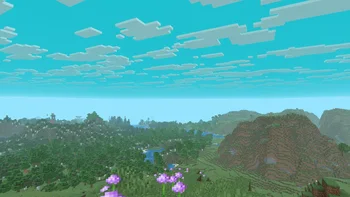

BiomeBloom (Texturenpaket) stammt von nicxd. Transforms sky, fog, and water colors across every biome for a richer, more atmospheric Minecraft experience.
Unterstützt wird Minecraft 1.16 – 1.21. Auf Modrinth gibt es 261,800 Downloads. Das letzte Update erschien am 03.01.2026.
BiomeBloom hat seit 26.10.2025 4 Versionen auf Modrinth veröffentlicht. 2 davon erschienen im letzten Jahr. Die neueste ist 1.3, erschienen am 03.01.2026. Sie ist für Minecraft 1.16 – 1.21.11 gemacht. Sie läuft auf Minecraft. Der Download ist 26 KB groß.
| Version | Veröffentlicht | Minecraft | Typ |
|---|---|---|---|
1.3 | 03.01.2026 | 1.16 – 1.21.11 | Release |
1.2 | 09.12.2025 | 1.16 – 1.21.10 | Release |
1.1 | 04.11.2025 | 1.16 – 1.21.10 | Release |
1.0 | 26.10.2025 | 1.16 – 1.21.10 | Release |
[
BiomeBloom transforms your Minecraft world through dynamic sky, fog, and water color variations based on each biome.
Every region gains its own mood — from bright tropical waters to misty forests and crisp, icy tundras with pale horizons.
Every sky tells a new story.
[
Geschrieben von nicxd. Mit Bildern auf Modrinth lesen.
Lade die .zip-Datei von Modrinth herunter. Entpacke sie nicht.
Öffne in Minecraft Optionen, dann Ressourcenpakete, dann Paketordner öffnen.
Lege die .zip-Datei in diesen Ordner und gehe zurück ins Spiel.
Schiebe BiomeBloom in die rechte Liste und klicke auf Fertig.
Es ist für Minecraft 1.16 – 1.21 gemacht. Auf anderen Versionen markiert Minecraft es als inkompatibel, oft funktioniert es aber trotzdem.
| Ressource | Downloads | Versionen | Letztes Update | Preis |
|---|---|---|---|---|
| BiomeBloomdie du angesehen hast | 262K | 1.16 – 1.21 | 3. Jan. 2026 | Kostenlos |
| Visual Effects+dosya | 1.9M | 1.21 – 26.x | vor 11 Tagen | Kostenlos |
 Fresh AnimationsFreshLX | 51.9M | 1.13 – 26.x | vor 10 Tagen | Kostenlos |
 Cubic Sun & MoonJoeFly | 4.8M | 1.8 – 1.21 | 26. Dez. 2025 | Kostenlos |
Noch nicht. Die neueste unterstützte Version ist Minecraft 1.21.
Ja. BiomeBloom kannst du kostenlos bei Modrinth herunterladen.
Ja: Polytone. Installiere es vor BiomeBloom.
Ja. Das letzte Update kam innerhalb des letzten Tages.
Am ähnlichsten sind Visual Effects+, Fresh Animations und Cubic Sun & Moon. Alle Alternativen vergleichen
Visual Effects+Texturenpakete · 1.21 – 26.xBiome based dynamic and colored fog with custom particles and weather!
Fresh AnimationsTexturenpakete · 1.13 – 26.xMake your game like the trailers! Dynamic animated entities to freshen your Minecraft experience.
Cubic Sun & MoonTexturenpakete · 1.8 – 1.21Recreates the Sun and the Moon in 3D and is compatible with mods that add sky features.
 Hyper Realistic SkyTexturenpakete · 1.16 – 26.x
The biggest, most versatile and feature rich sky pack you will ever find out there.
 Reanimated BlueTexturenpakete · 1.19 – 26.x
Realistic physics-like animations that let you feel the impact of every interaction with mobs | Reanimated from the ground up.
 Sun and Moon CircularTexturenpakete · 1.12 – 1.21
Add a special touch to your Minecraft sky with the Sun and Moon Circular texture pack, which transforms the sun and moon phases into rounded, smoother shapes…
Logg dich ein, um eine Bewertung zu schreiben.