
 Visual Effects+Texture packs · 1.21 – 26.x
Biome based dynamic and colored fog with custom particles and weather!
Free1,934,465 downloads

Transforms sky, fog, and water colors across every biome for a richer, more atmospheric Minecraft experience.
Direct download from Modrinth · 261,681 downloads

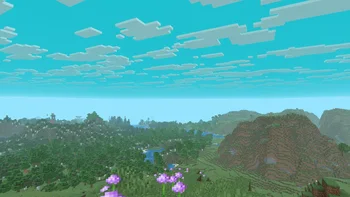

BiomeBloom is a texture pack made by nicxd. Transforms sky, fog, and water colors across every biome for a richer, more atmospheric Minecraft experience.
It supports Minecraft 1.16 – 1.21. It has been downloaded 261,681 times on Modrinth. The last update came out on Jan 3, 2026.
BiomeBloom has had 4 releases on Modrinth since Oct 26, 2025. 2 of them came out in the past year. The newest is 1.3, released on Jan 3, 2026. It is made for Minecraft 1.16 – 1.21.11. It runs on Minecraft. The download is 26 KB.
| Version | Released | Minecraft | Type |
|---|---|---|---|
1.3 | Jan 3, 2026 | 1.16 – 1.21.11 | Release |
1.2 | Dec 9, 2025 | 1.16 – 1.21.10 | Release |
1.1 | Nov 4, 2025 | 1.16 – 1.21.10 | Release |
1.0 | Oct 26, 2025 | 1.16 – 1.21.10 | Release |
[
BiomeBloom transforms your Minecraft world through dynamic sky, fog, and water color variations based on each biome.
Every region gains its own mood — from bright tropical waters to misty forests and crisp, icy tundras with pale horizons.
Every sky tells a new story.
[
Written by nicxd. Read it with pictures on Modrinth.
Download the .zip file from Modrinth. Do not unzip it.
In Minecraft, open Options, then Resource Packs, then Open Pack Folder.
Drop the .zip file into that folder and go back to the game.
Move BiomeBloom to the right-hand list and click Done.
It is made for Minecraft 1.16 – 1.21. On other versions Minecraft marks it as incompatible, but it often still works.
Full guide: How to install Minecraft resource packs
| Resource | Downloads | Versions | Last update | Price |
|---|---|---|---|---|
| BiomeBloomthe one you looked at | 262K | 1.16 – 1.21 | Jan 3, 2026 | Free |
| Visual Effects+dosya | 1.9M | 1.21 – 26.x | 10 days ago | Free |
 Fresh AnimationsFreshLX | 51.9M | 1.13 – 26.x | 9 days ago | Free |
 Cubic Sun & MoonJoeFly | 4.8M | 1.8 – 1.21 | Dec 26, 2025 | Free |
Not yet. The newest version it supports is Minecraft 1.21.
Yes. BiomeBloom is free to download from Modrinth.
Yes: Polytone. Install it before BiomeBloom.
Yes. The last update came out in the past day.
The closest ones are Visual Effects+, Fresh Animations and Cubic Sun & Moon. Compare all alternatives
Visual Effects+Texture packs · 1.21 – 26.xBiome based dynamic and colored fog with custom particles and weather!
Fresh AnimationsTexture packs · 1.13 – 26.xMake your game like the trailers! Dynamic animated entities to freshen your Minecraft experience.
Cubic Sun & MoonTexture packs · 1.8 – 1.21Recreates the Sun and the Moon in 3D and is compatible with mods that add sky features.
 Hyper Realistic SkyTexture packs · 1.16 – 26.x
The biggest, most versatile and feature rich sky pack you will ever find out there.
 Reanimated BlueTexture packs · 1.19 – 26.x
Realistic physics-like animations that let you feel the impact of every interaction with mobs | Reanimated from the ground up.
 Sun and Moon CircularTexture packs · 1.12 – 1.21
Add a special touch to your Minecraft sky with the Sun and Moon Circular texture pack, which transforms the sun and moon phases into rounded, smoother shapes…
Log in to leave a review.