
 Vanilla-PlusRessourcenpakete · 1.16 – 26.x
smooth rework of vanilla textures, with focus on tools, “standard survival” items, particles and more
Kostenlos624,864 Downloads
Polishes and redesigns a few items in Minecraft!
Direkter Download von Modrinth · 246,544 Downloads
Detail Brush (Ressourcenpaket) stammt von vectorwing. Polishes and redesigns a few items in Minecraft!
Unterstützt wird Minecraft 1.19 – 1.21. Auf Modrinth gibt es 246,544 Downloads. Das letzte Update erschien am 10.07.2025.
Detail Brush hat seit 02.08.2023 6 Versionen auf Modrinth veröffentlicht. Keine davon erschien im letzten Jahr. Die neueste ist 1.8-1.20.2+, erschienen am 10.07.2025. Sie ist für Minecraft 1.20.2 – 1.21.7 gemacht. Sie läuft auf Minecraft. Der Download ist 97 KB groß.
| Version | Veröffentlicht | Minecraft | Typ |
|---|---|---|---|
1.8-1.20.2+ | 10.07.2025 | 1.20.2 – 1.21.7 | Release |
1.7-1.21+ | 05.07.2025 | 1.21, 1.21.1 | Release |
1.20-1.6 | 02.08.2023 | 1.20, 1.20.1 | Release |
1.19.4-1.6 | 02.08.2023 | 1.19.4 | Release |
1.19.3-1.6 | 02.08.2023 | 1.19.3 | Release |
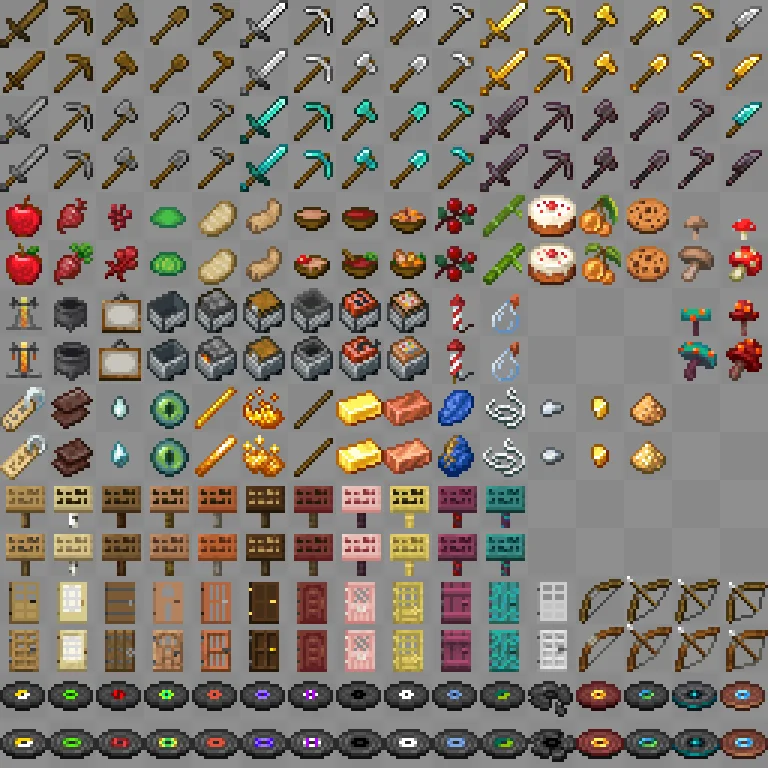
Detail Brush is a resource pack which brushes some detail into Minecraft items which might look poorly drawn or outdated, with the goal of bringing cohesion to the game's overall art style.
In short, this pack will do the following:
A full list of changes can be found in changelog.md, inside the .zip file, and a picture with all modified textures can be found at the Gallery.
Geschrieben von vectorwing. Mit Bildern auf Modrinth lesen.
Lade die .zip-Datei von Modrinth herunter. Entpacke sie nicht.
Öffne in Minecraft Optionen, dann Ressourcenpakete, dann Paketordner öffnen.
Lege die .zip-Datei in diesen Ordner und gehe zurück ins Spiel.
Schiebe Detail Brush in die rechte Liste und klicke auf Fertig.
Es ist für Minecraft 1.19 – 1.21 gemacht. Auf anderen Versionen markiert Minecraft es als inkompatibel, oft funktioniert es aber trotzdem.
| Ressource | Downloads | Versionen | Letztes Update | Preis |
|---|---|---|---|---|
| Detail Brushdie du angesehen hast | 247K | 1.19 – 1.21 | 10. Juli 2025 | Kostenlos |
| Vanilla-PlusxSpinHDx | 625K | 1.16 – 26.x | 16. Aug. 2026 | Kostenlos |
 Visual EnchantmentsSiscu | 687K | 1.16 – 26.x | vor 16 Tagen | Kostenlos |
 No Enchant Glint5E8A | 604K | 1.8 – 26.x | 16. Sept. 2026 | Kostenlos |
Noch nicht. Die neueste unterstützte Version ist Minecraft 1.21.
Ja. Detail Brush kannst du kostenlos bei Modrinth herunterladen.
Ja. Das letzte Update kam innerhalb des letzten Tages.
Am ähnlichsten sind Vanilla-Plus, Visual Enchantments und No Enchant Glint. Alle Alternativen vergleichen
Vanilla-PlusRessourcenpakete · 1.16 – 26.xsmooth rework of vanilla textures, with focus on tools, “standard survival” items, particles and more
Visual EnchantmentsRessourcenpakete · 1.16 – 26.xA resourcepack that adds visual indicators to enchanted items
No Enchant GlintRessourcenpakete · 1.8 – 26.xRemoves Enchant Glint on all items
 Glowing 3D ItemsRessourcenpakete · 1.21
Adds unique 3D models to many items in the game.
 Hypixel PlusRessourcenpakete · 1.8 – 26.x
A Resource Pack built for the Hypixel server that textures all of SkyBlock, Bedwars, and so much more!
 Stellarity Resource PackRessourcenpakete · 1.20 – 26.x
Resource pack for Stellarity. Contains textures for all of its items, plus some other improvements for added immersion.
Logg dich ein, um eine Bewertung zu schreiben.