
 Vanilla-PlusResource packs · 1.16 – 26.x
smooth rework of vanilla textures, with focus on tools, “standard survival” items, particles and more
Free624,864 downloads
Polishes and redesigns a few items in Minecraft!
Direct download from Modrinth · 246,224 downloads
Detail Brush is a resource pack made by vectorwing. Polishes and redesigns a few items in Minecraft!
It supports Minecraft 1.19 – 1.21. It has been downloaded 246,224 times on Modrinth. The last update came out on Jul 10, 2025.
Detail Brush has had 6 releases on Modrinth since Aug 2, 2023. None of them came out in the past year. The newest is 1.8-1.20.2+, released on Jul 10, 2025. It is made for Minecraft 1.20.2 – 1.21.7. It runs on Minecraft. The download is 97 KB.
| Version | Released | Minecraft | Type |
|---|---|---|---|
1.8-1.20.2+ | Jul 10, 2025 | 1.20.2 – 1.21.7 | Release |
1.7-1.21+ | Jul 5, 2025 | 1.21, 1.21.1 | Release |
1.20-1.6 | Aug 2, 2023 | 1.20, 1.20.1 | Release |
1.19.4-1.6 | Aug 2, 2023 | 1.19.4 | Release |
1.19.3-1.6 | Aug 2, 2023 | 1.19.3 | Release |
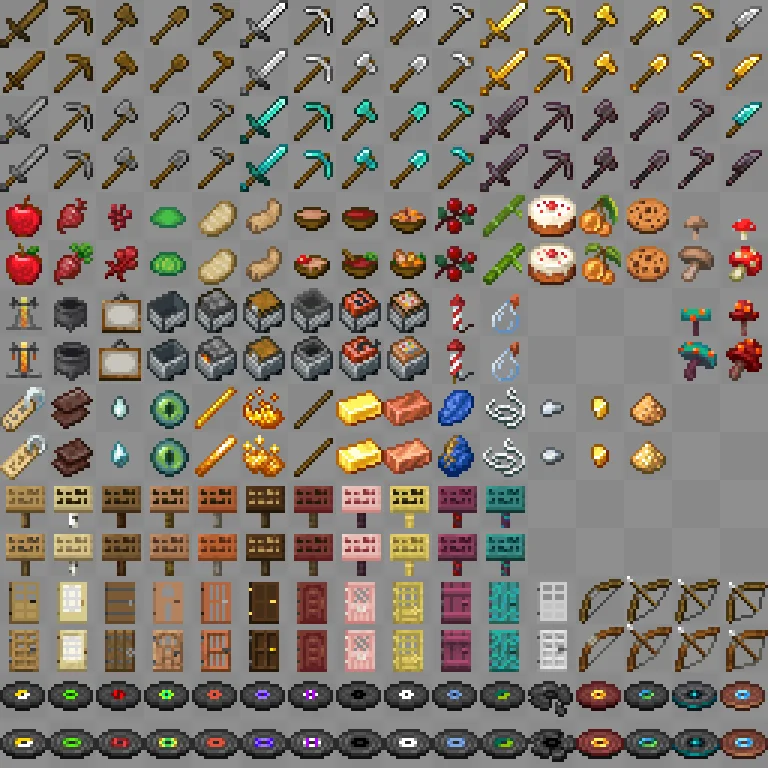
Detail Brush is a resource pack which brushes some detail into Minecraft items which might look poorly drawn or outdated, with the goal of bringing cohesion to the game's overall art style.
In short, this pack will do the following:
A full list of changes can be found in changelog.md, inside the .zip file, and a picture with all modified textures can be found at the Gallery.
Written by vectorwing. Read it with pictures on Modrinth.
Download the .zip file from Modrinth. Do not unzip it.
In Minecraft, open Options, then Resource Packs, then Open Pack Folder.
Drop the .zip file into that folder and go back to the game.
Move Detail Brush to the right-hand list and click Done.
It is made for Minecraft 1.19 – 1.21. On other versions Minecraft marks it as incompatible, but it often still works.
Full guide: How to install Minecraft resource packs
| Resource | Downloads | Versions | Last update | Price |
|---|---|---|---|---|
| Detail Brushthe one you looked at | 246K | 1.19 – 1.21 | Jul 10, 2025 | Free |
| Vanilla-PlusxSpinHDx | 625K | 1.16 – 26.x | Aug 16, 2026 | Free |
 Visual EnchantmentsSiscu | 687K | 1.16 – 26.x | 15 days ago | Free |
 No Enchant Glint5E8A | 604K | 1.8 – 26.x | Sep 16, 2026 | Free |
Not yet. The newest version it supports is Minecraft 1.21.
Yes. Detail Brush is free to download from Modrinth.
Yes. The last update came out in the past day.
The closest ones are Vanilla-Plus, Visual Enchantments and No Enchant Glint. Compare all alternatives
Vanilla-PlusResource packs · 1.16 – 26.xsmooth rework of vanilla textures, with focus on tools, “standard survival” items, particles and more
Visual EnchantmentsResource packs · 1.16 – 26.xA resourcepack that adds visual indicators to enchanted items
No Enchant GlintResource packs · 1.8 – 26.xRemoves Enchant Glint on all items
 Glowing 3D ItemsResource packs · 1.21
Adds unique 3D models to many items in the game.
 Hypixel PlusResource packs · 1.8 – 26.x
A Resource Pack built for the Hypixel server that textures all of SkyBlock, Bedwars, and so much more!
 Stellarity Resource PackResource packs · 1.20 – 26.x
Resource pack for Stellarity. Contains textures for all of its items, plus some other improvements for added immersion.
Log in to leave a review.